







Question: 3. Parenthesis are also used for square root. Excel enters square root as sqrt(n). For example, to find the square root of 49 you enter
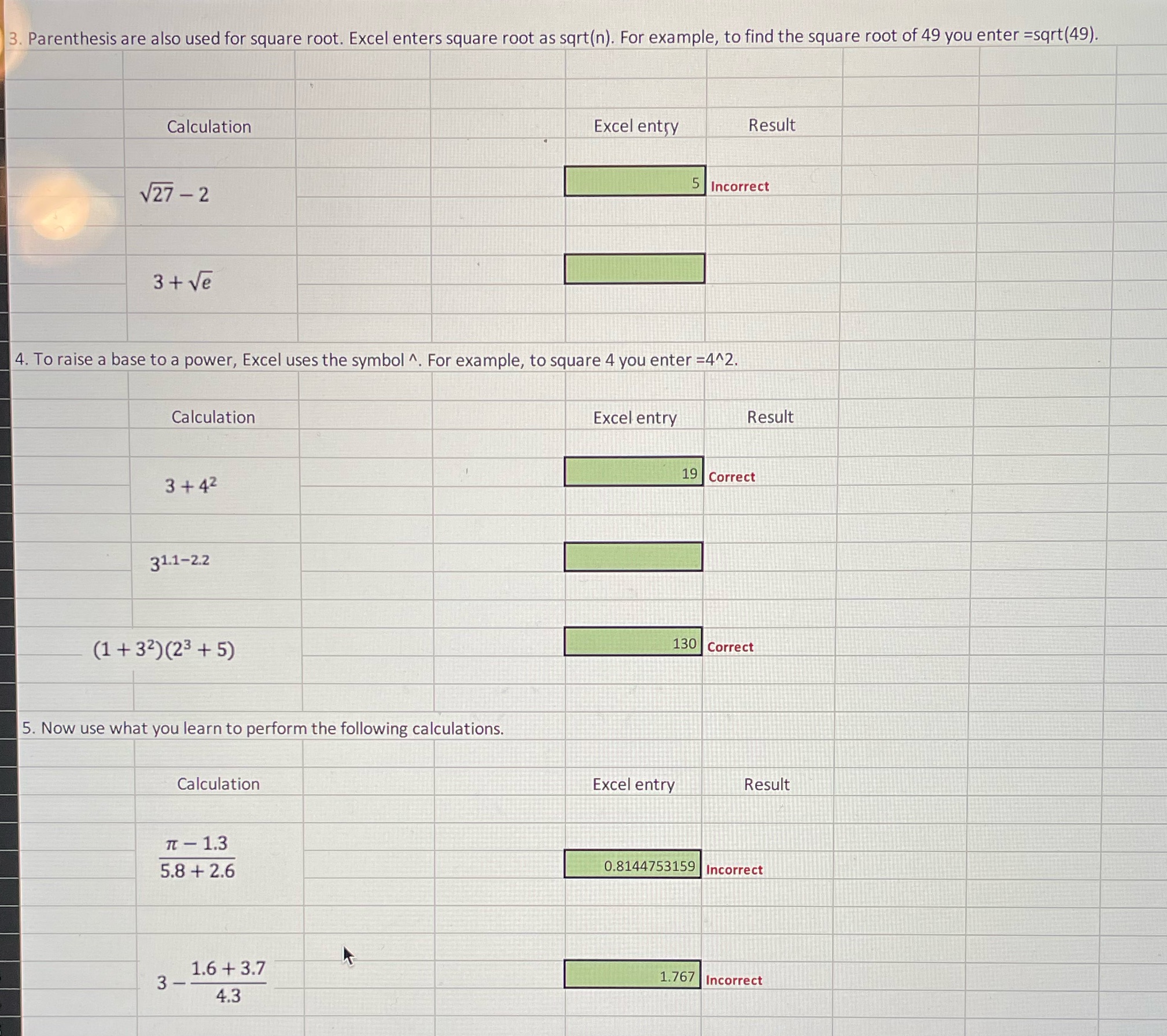
3. Parenthesis are also used for square root. Excel enters square root as sqrt(n). For example, to find the square root of 49 you enter =sqrt(49). Calculation Excel entry Result V27 - 2 5 Incorrect 3+ Ve 4. To raise a base to a power, Excel uses the symbol ^. For example, to square 4 you enter =4^2. Calculation Excel entry Result 3 + 42 19 Correct 31.1-2.2 (1+ 32)(23 + 5) 130 Correct 5. Now use what you learn to perform the following calculations. Calculation Excel entry Result Tt - 1.3 5.8 + 2.6 0.8144753159 Incorrect 1.6 + 3.7 3 1.767 Incorrect 4.3
Step by Step Solution
There are 3 Steps involved in it
1 Expert Approved Answer
Step: 1 Unlock

Question Has Been Solved by an Expert!
Get step-by-step solutions from verified subject matter experts
Step: 2 Unlock
Step: 3 Unlock
 Study Help