







Question: 3. Write the corresponding subroutine according to the functions provided below. (Just write the function name, for example LCD_DrawPoint (40,50);) (15 points) (1) Draw a
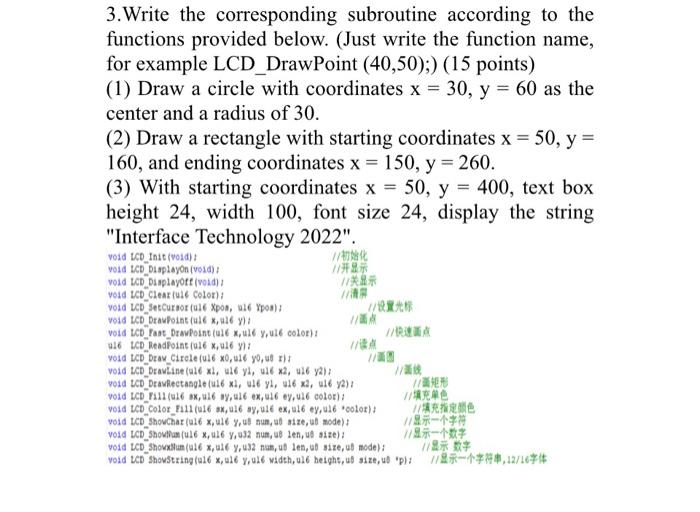
3. Write the corresponding subroutine according to the functions provided below. (Just write the function name, for example LCD_DrawPoint (40,50);) (15 points) (1) Draw a circle with coordinates x=30,y=60 as the center and a radius of 30 . (2) Draw a rectangle with starting coordinates x=50,y= 160, and ending coordinates x=150,y=260. (3) With starting coordinates x=50,y=400, text box height 24 , width 100 , font size 24 , display the string "Interface Technology 2022". void LCD_Indt (vold) t vold LCD Displayon (vold) : yold LCD Displayote (voidi yoid LCD Clear (uale Color): vold LCD FALI (a16 ox, ul6 oy,ullox,al6oy,ual color)i vold tCD Color Fil1 (u16 ax, u16 ay,u16 ex, u16 ey,u16 'oolor): void ICD ShowChar (ul6 x, ul6 y, ul nun, at alze, at mode)? vold LCD Shouxluan(al6 x, al6 y,u32 nan, ub len, ub size,ut mode); 3. Write the corresponding subroutine according to the functions provided below. (Just write the function name, for example LCD_DrawPoint (40,50);) (15 points) (1) Draw a circle with coordinates x=30,y=60 as the center and a radius of 30 . (2) Draw a rectangle with starting coordinates x=50,y= 160, and ending coordinates x=150,y=260. (3) With starting coordinates x=50,y=400, text box height 24 , width 100 , font size 24 , display the string "Interface Technology 2022". void LCD_Indt (vold) t vold LCD Displayon (vold) : yold LCD Displayote (voidi yoid LCD Clear (uale Color): vold LCD FALI (a16 ox, ul6 oy,ullox,al6oy,ual color)i vold tCD Color Fil1 (u16 ax, u16 ay,u16 ex, u16 ey,u16 'oolor): void ICD ShowChar (ul6 x, ul6 y, ul nun, at alze, at mode)? vold LCD Shouxluan(al6 x, al6 y,u32 nan, ub len, ub size,ut mode)
Step by Step Solution
There are 3 Steps involved in it

Get step-by-step solutions from verified subject matter experts
 Study Help