







Question: 3.11 (Modifying Class GradeBook ) Modify class GradeBook ( Figs. 3.11 3.12 ) as follows: a) Include a second string data member that represents the
3.11 (Modifying Class GradeBook) Modify class GradeBook (Figs. 3.113.12) as follows:
a) Include a second string data member that represents the course instructors name.
b) Provide a set function to change the instructors name and a get function to retrieve it.
c) Modify the constructor to specify course name and instructor name parameters.
d) Modify function displayMessage to output the welcome message and course name, then the string This course is presented by: followed by the instructors name
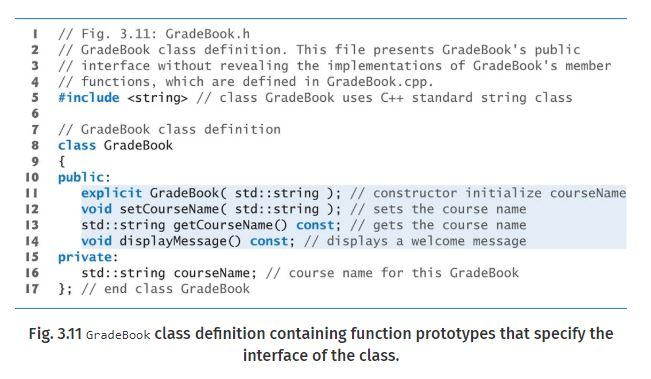
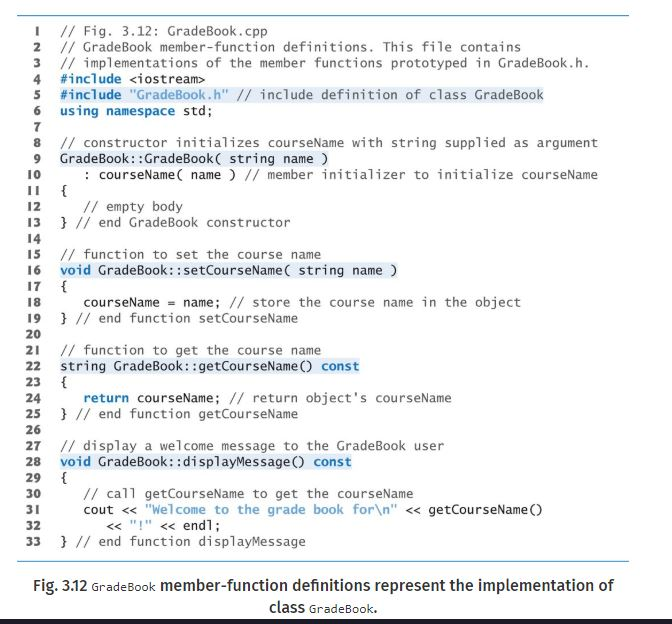
I believe I wrote the code correctly already to include the above modifications. But I'm not sure how to compile this I thought that the Gradebook.h file 3.11 will be saved, and then I would create another file for just the srouce code which is fig 3.12. I thought when I pressed run on the source code it would find the Gradebook.h file. Is this not correct thinking?
Here's my saved code from Gradebook.h
// Fig. 3.11: GradeBook.h // GradeBook class definition. This file presents GradeBook's public // interface without revealing the implementations of GradeBook's memeber // functions, which are defined in GradeBook.cpp.
#include
//GradeBook class definition
class GradeBook
{
public: GradeBook(std::string CourseName, std::string InstructorName); //constructor initialize courseName void setCourseName (std::string); //sets the course name std::string getCourseName(); //gets the course name void setInstructorName(std::string); //sets the instructor name std::string getInstructorName(); //gets the instructor name void displayMessage(); //display a welcome message
private: std::string CourseName; //course name for this GradeBook std::string InstructorName; //Instructor Name for this GradeBook }; //end class GradeBook
Here's my saved source code for the cpp file.
// Fig. 3.12: GradeBook.cpp //GradeBook member-function definitions. This file contains //implementations of the member functions prototyped in GradeBook.h.
#include
// constructor initializes CourseName with string supplied as argument GradeBook::GradeBook(string CourseName, string InstructorName) { setCourseName(CourseName); setInstructorName(InstructorName); } // function to set the course name void GradeBook::setCourseName(string CourseName) { CourseName = CourseName; //store the course name in the object } //end function setCourseName //function to get the course name string GradeBook::getCourseName() const { return CourseName; //return object's CourseName } //end function getCourseName //Set InstructorName void GradeBook::setInstructorName(string InstructorName) { InstructorName = InstructorName; } //Get InstructorName string GradeBook::getInstructorName() const { return InstructorName; } //display a welcome message to the GradeBook user void GradeBook::displayMessage() const { // call getCourseName to get teh CourseName cout
When I push run with the srouce code open it gives me this error:
main.cpp:6:64: fatal error: GradeBook.h: No such file or directory compilation terminated.
I // Fig. 3.11: GradeBook.h 2 // GradeBook class definition. This file presents GradeBook's public 3 // interface without revealing the implementations of GradeBook's member 4 / functions, which are defined in GradeBook.cpp. #include
Step by Step Solution
There are 3 Steps involved in it

Get step-by-step solutions from verified subject matter experts
 Study Help