







Question: 3.8 LAB - Select lesson schedule with multiple joins The database has three tables for tracking horse-riding lessons: Horse with columns: ID - primary key
3.8 LAB - Select lesson schedule with multiple joins
The database has three tables for tracking horse-riding lessons:
Horse with columns:
ID - primary key
RegisteredName
Breed
Height
BirthDate
Student with columns:
ID - primary key
FirstName
LastName
Street
City
State
Zip
Phone
EmailAddress
LessonSchedule with columns:
HorseID - partial primary key, foreign key references Horse(ID)
StudentID - foreign key references Student(ID)
LessonDateTime - partial primary key
Write a SELECT statement to create a lesson schedule for Feb 1, 2020 with the lesson date/time, student's first and last names, and the horse's registered name. Order the results in ascending order by lesson date/time, then by the horse's registered name. Make sure unassigned lesson times (student ID is NULL) appear in the results.
Hint: Perform a join on the LessonSchedule, Student, and Horse tables, matching the student IDs and horse IDs.
SELECT LessonSchedule.LessonDateTime, LessonSchedule.HorseID, Student.FirstName, Student.LastName FROM LessonSchedule INNER JOIN Student ON LessonSchedule.StudentID = Student.ID WHERE LessonSchedule.StudentID IS NOT NULL ORDER BY LessonSchedule.LessonDateTime ASC, LessonSchedule.HorseID ASC;
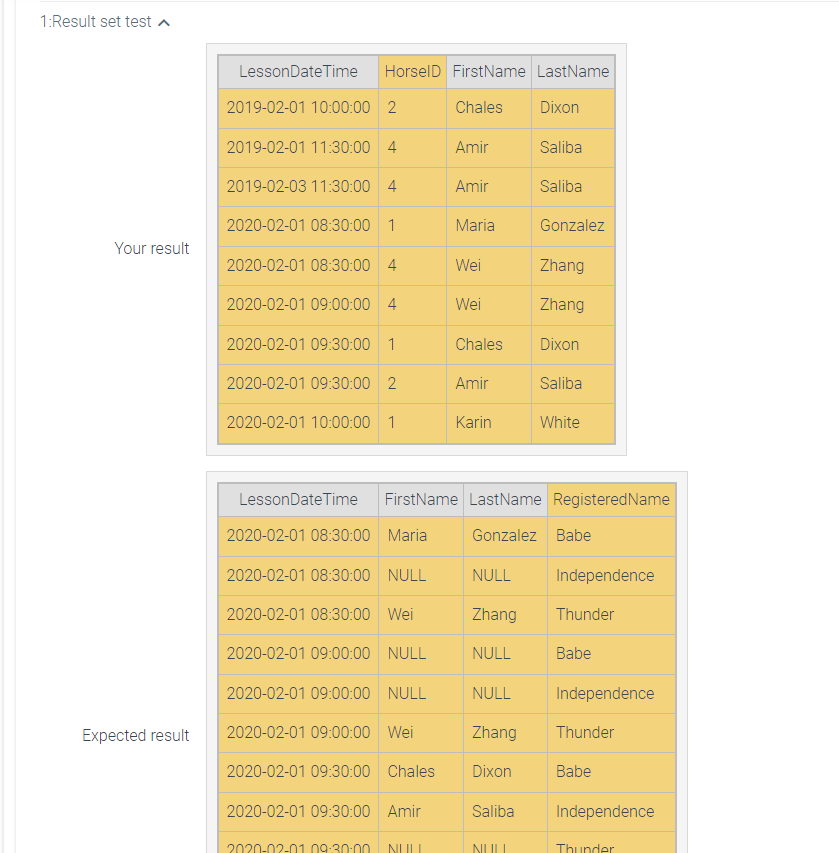
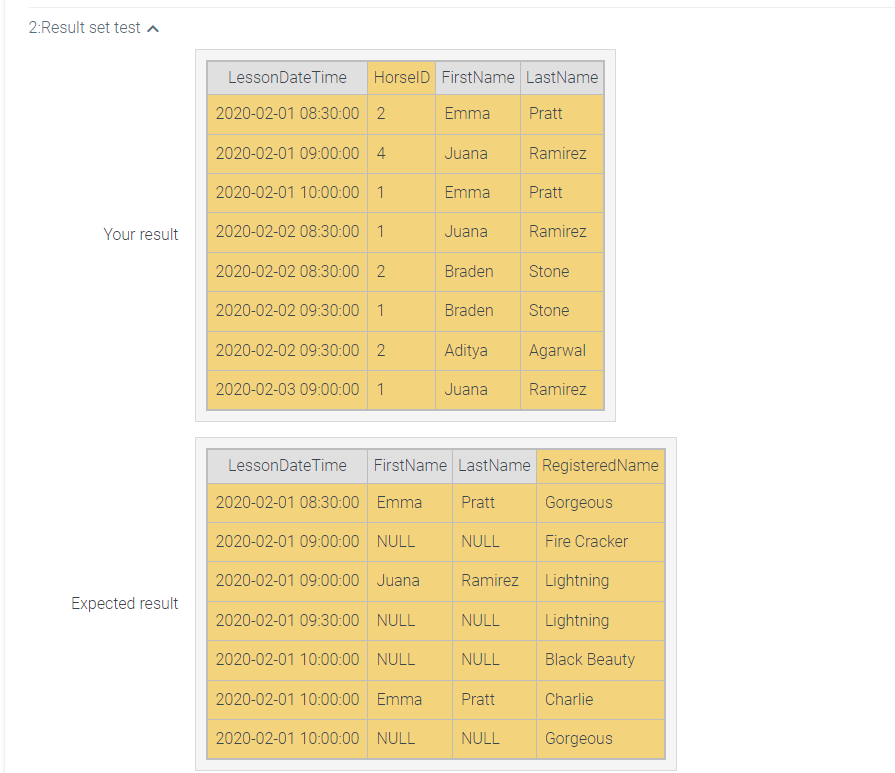
1:Result set test \begin{tabular}{|c|l|l|l|} \hline LessonDateTime & HorselD & FirstName & LastName \\ \hline 2019020110:00:00 & 2 & Chales & Dixon \\ \hline 2019020111:30:00 & 4 & Amir & Saliba \\ \hline 2019020311:30:00 & 4 & Amir & Saliba \\ \hline 2020020108:30:00 & 1 & Maria & Gonzalez \\ \hline 2020020108:30:00 & 4 & Wei & Zhang \\ \hline 2020020109:00:00 & 4 & Wei & Zhang \\ \hline 2020020109:30:00 & 1 & Chales & Dixon \\ \hline 2020020109:30:00 & 2 & Amir & Saliba \\ \hline 2020020110:00:00 & 1 & Karin & White \\ \hline \end{tabular} Your result \begin{tabular}{|c|l|l|l|} \hline LessonDateTime & FirstName & LastName & RegisteredName \\ \hline 2020020108:30:00 & Maria & Gonzalez & Babe \\ \hline 2020020108:30:00 & NULL & NULL & Independence \\ \hline 2020020108:30:00 & Wei & Zhang & Thunder \\ \hline 2020020109:00:00 & NULL & NULL & Babe \\ \hline 2020020109:00:00 & NULL & NULL & Independence \\ \hline 2020020109:00:00 & Wei & Zhang & Thunder \\ \hline 2020020109:30:00 & Chales & Dixon & Babe \\ \hline 2020020109:30:00 & Amir & Saliba & Independence \\ \hline 202002010930n & NIII & NUII & Thunder \\ \hline \end{tabular} 2:Result set test
Step by Step Solution
There are 3 Steps involved in it

Get step-by-step solutions from verified subject matter experts
 Study Help