







Question: 3.)Client sheet - In column Jdetermine for each row if the Client has paid more than 10k and has a Current Due of 0. If
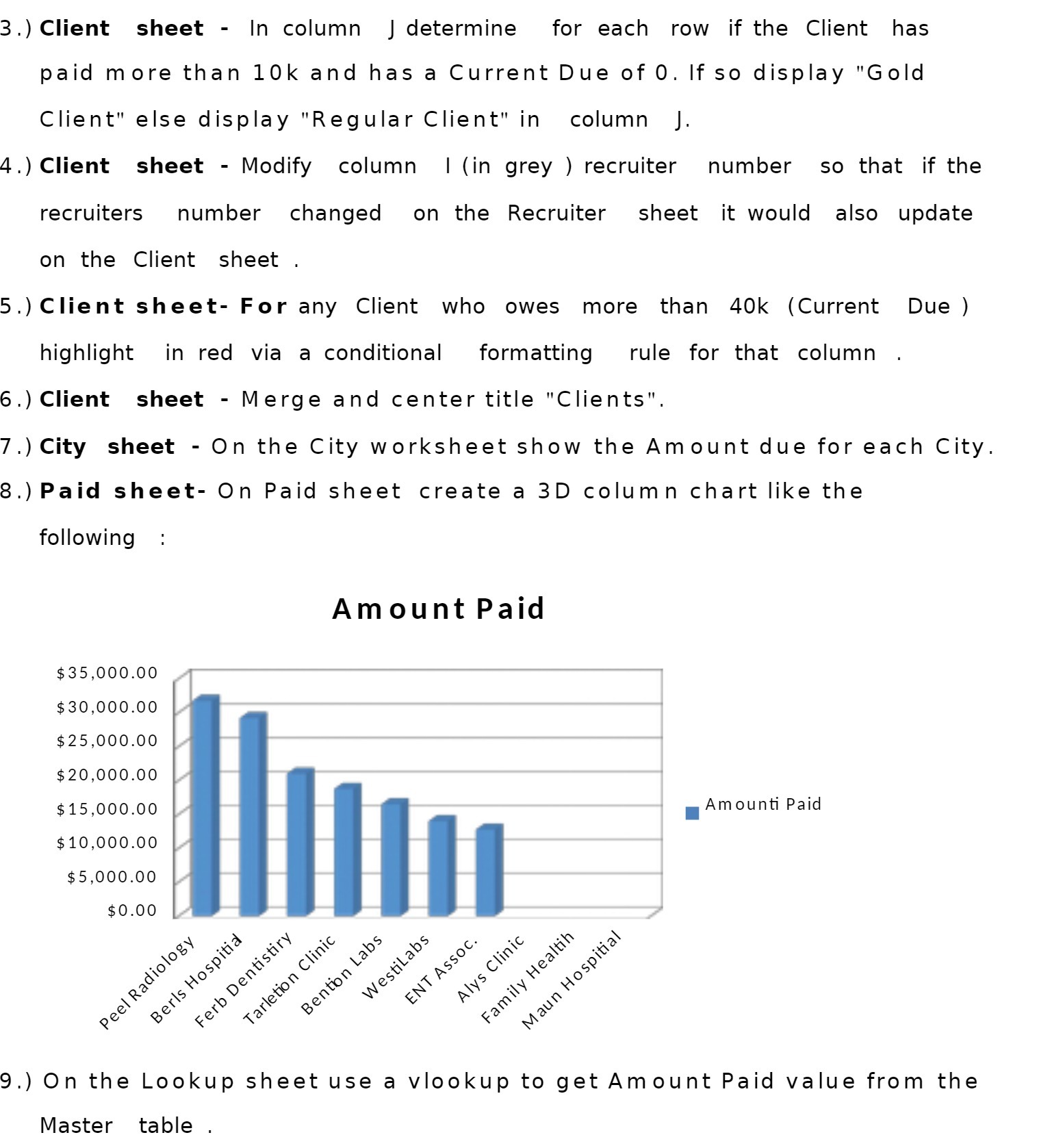
3.)Client sheet - In column Jdetermine for each row if the Client has paid more than 10k and has a Current Due of 0. If so display "Gold Client" else display "Regular Client" in column J. 4.)Client sheet - Modify column | (in grey ) recruiter number so that if the recruiters number changed on the Recruiter sheet it would also update on the Client sheet . 5.)Client sheet- For any Client who owes more than 40k (Current Due) highlight in red via a conditional formatting rule for that column 6.)Client sheet - Merge and center title "Clients". 7.)City sheet - On the City worksheet show the Amount due for each City. 8.)Paid sheet- On Paid sheet create a 3D column chart like the following Amount Paid $35,000.00 $30,000.00 $25,000.00 $20,000.00 Amounti Paid $15,000.00 I $10,000.00 $5,000.00 $0.00 9.) On the Lookup sheet use a vlookup to get Amount Paid value from the Master table
Step by Step Solution
There are 3 Steps involved in it

Get step-by-step solutions from verified subject matter experts
 Study Help