







Question: 4: 5 points. Power Query - Instructions - Download the P3top100.txt file from Blackboard. Import and transform the data to produce a table of data
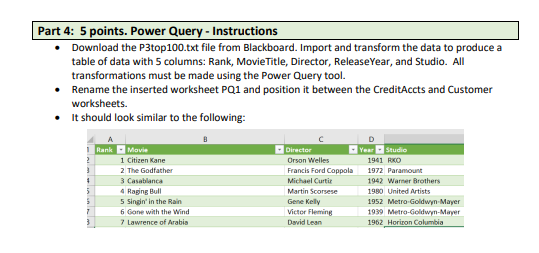
4: 5 points. Power Query - Instructions - Download the P3top100.txt file from Blackboard. Import and transform the data to produce a table of data with 5 columns: Rank, MovieTitle, Director, ReleaseYear, and Studio. All transformations must be made using the Power Query tool. - Rename the inserted worksheet PQ1 and position it between the CreditAccts and Customer worksheets. - It should look similar to the following
Step by Step Solution
There are 3 Steps involved in it
1 Expert Approved Answer
Step: 1 Unlock

Question Has Been Solved by an Expert!
Get step-by-step solutions from verified subject matter experts
Step: 2 Unlock
Step: 3 Unlock
 Study Help