







Question: 4. 6 ptsl Write an ARM assembly program which will accomplish the following instruction. As suggested in the tutorial, you likely want to use the
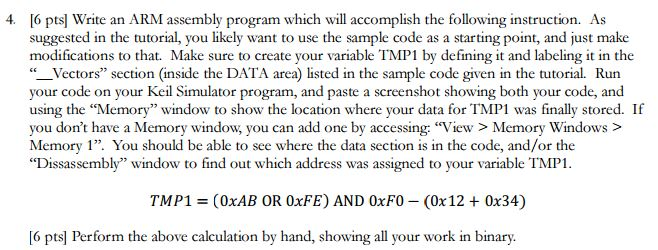
4. 6 ptsl Write an ARM assembly program which will accomplish the following instruction. As suggested in the tutorial, you likely want to use the sample code as a starting point, and just make modifications to that. Make sure to create your variable TMP1 by defining it and labeling it in the -Vectors" section (inside the DATA area) listed in the sample code given in the tutorial. Run your code on your Keil Simulator program, and paste a screenshot showing both your code, and using the Memory" window to show the location where your data for TMP 1 was finally stored. If you don't have a Memory window, you can add one by accessing: "View> Memory Windows> Memory 1". You should be able to see where the data section is in the code, and/or the variable TMP1 TMP1 = 0xAB OR 0xFE) AND 0xF0--(0x12 + 0x34) [6 pts Perform the above calculation by hand, showing all your work in binary. 4. 6 ptsl Write an ARM assembly program which will accomplish the following instruction. As suggested in the tutorial, you likely want to use the sample code as a starting point, and just make modifications to that. Make sure to create your variable TMP1 by defining it and labeling it in the -Vectors" section (inside the DATA area) listed in the sample code given in the tutorial. Run your code on your Keil Simulator program, and paste a screenshot showing both your code, and using the Memory" window to show the location where your data for TMP 1 was finally stored. If you don't have a Memory window, you can add one by accessing: "View> Memory Windows> Memory 1". You should be able to see where the data section is in the code, and/or the variable TMP1 TMP1 = 0xAB OR 0xFE) AND 0xF0--(0x12 + 0x34) [6 pts Perform the above calculation by hand, showing all your work in binary
Step by Step Solution
There are 3 Steps involved in it

Get step-by-step solutions from verified subject matter experts
 Study Help