







Question: 4. Set your new DB to become the default database as shown below: MySQL Workbench Local instance MySQL56 x File Edit View Query Database Server
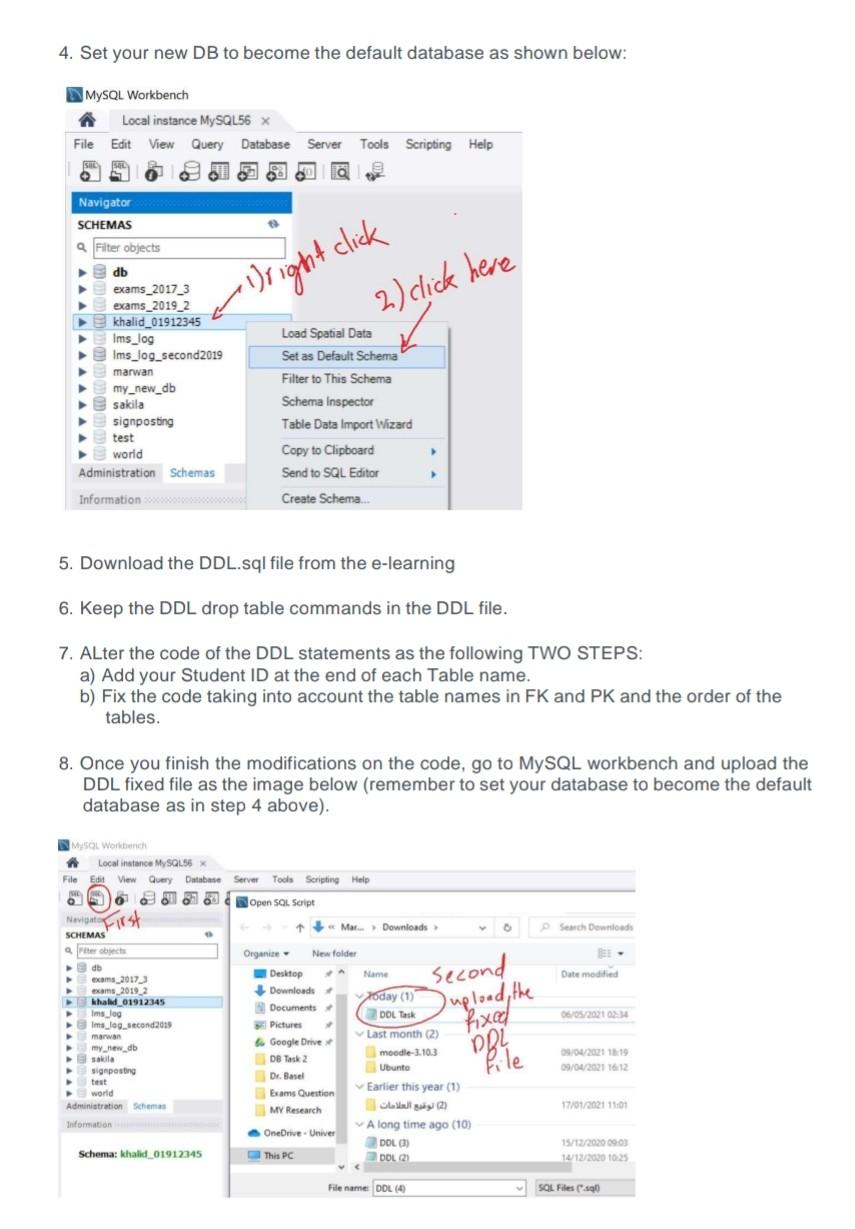
4. Set your new DB to become the default database as shown below: MySQL Workbench Local instance MySQL56 x File Edit View Query Database Server Tools Scripting Help Q right click Navigator SCHEMAS Filter objects db exams_2017_3 exams_2019_2 khalid_01912345 Ims_log Ims_log_second2019 marwan my_new_db sakila signposting test world Administration Schemas 2) 2) click here Load Spatial Data Set as Default Schema Filter to This Schema Schema Inspector Table Data Import Wizard Copy to Clipboard Send to SQL Editor Information Create Schema 5. Download the DDL.sql file from the e-learning 6. Keep the DDL drop table commands in the DDL file. 7. ALter the code of the DDL statements as the following TWO STEPS: a) Add your Student ID at the end of each Table name. b) Fix the code taking into account the table names in FK and PK and the order of the tables. 8. Once you finish the modifications on the code, go to MySQL workbench and upload the DDL fixed file as the image below (remember to set your database to become the default database as in step 4 above). MySQL Workbench Local instance MySQL56 x File Edit View Query Database 16 Server Tools Scripting Help Open SOL Script Marc Downloads Search Download Date modified second upload the 06/05/2010 SCHEMAS arbets db exams_2017 exams 2019.2 khalid 01912345 Imslog Ima_og_second2029 marwan my new db skila signposting world Administration Schemes Information Organic New folder Desktop Name Downloads Today (1) Documents 2 DDL Task Pictures Last month (2) Google Drive moodle-3.103 DB Task 2 Ubunto Dr. Basel Exams Question Earlier this year (1) MY Research A long time ago (10) OneDrive. Univer DOLC) This PC DOL29 fixed DRI Pile 09/04/2021 13:19 09/04/2021 16:12 17/01/2021 11:01 Schema: khalid 01912345 15/12/202009-03 10/12/2020 10.25 File name DOL (4 SOL Files (
Step by Step Solution
There are 3 Steps involved in it

Get step-by-step solutions from verified subject matter experts
 Study Help