







Question: 4. Write the JQuery code to add behavior to the following HTML web page. The page is similar to the number guessing game. The following
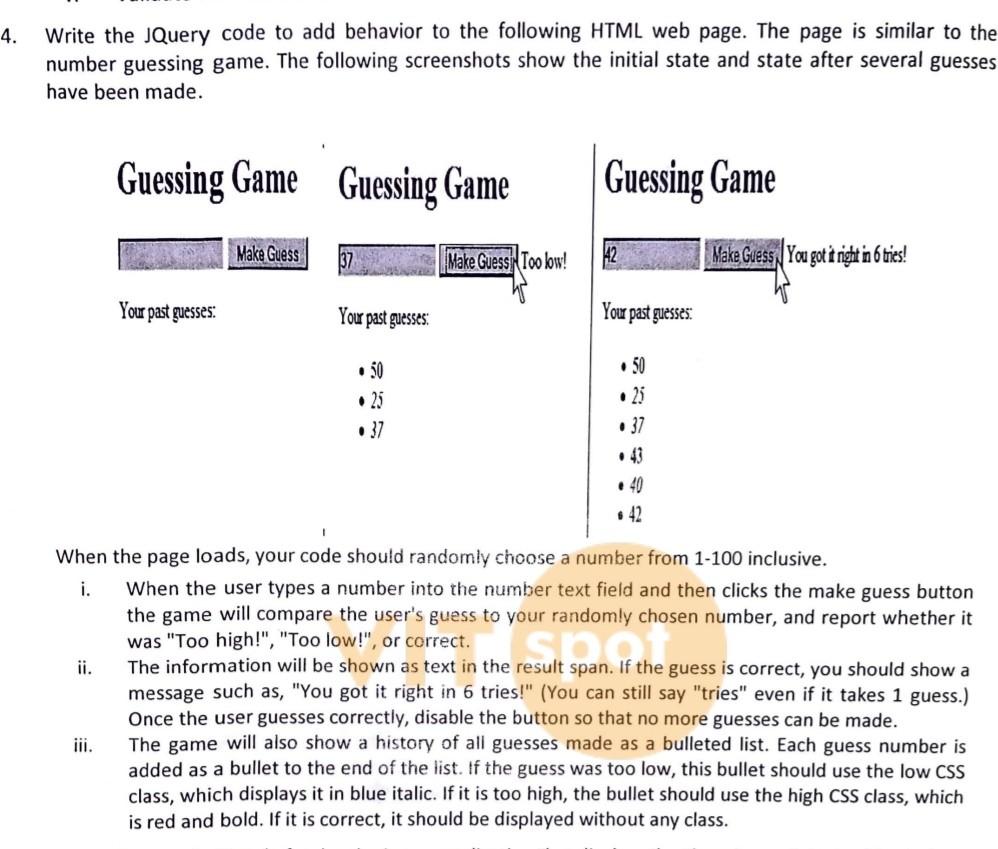
4. Write the JQuery code to add behavior to the following HTML web page. The page is similar to the number guessing game. The following screenshots show the initial state and state after several guesses have been made. Guessing Game Guessing Game Guessing Game Make Guess Make Guess Too low! Make Guess You got it right in 6 tries! Your past guesses: You past guesses: You past guesses: 25 37 50 .25 .37 When the page loads, your code should randomly choose a number from 1-100 inclusive. i. When the user types a number into the number text field and then clicks the make guess button the game will compare the user's guess to your randomly chosen number, and report whether it was "Too high!", "Too low!", or correct. ii. The information will be shown as text in the result span. If the guess is correct, you should show a message such as, "You got it right in 6 tries!" (You can still say "tries" even if it takes 1 guess.) Once the user guesses correctly, disable the button so that no more guesses can be made. The game will also show a history of all guesses made as a bulleted list. Each guess number is added as a bullet to the end of the list. If the guess was too low, this bullet should use the low CSS class, which displays it in blue italic. If it is too high, the bullet should use the high CSS class, which is red and bold. If it is correct, it should be displayed without any class
Step by Step Solution
There are 3 Steps involved in it

Get step-by-step solutions from verified subject matter experts
 Study Help