







Question: ( 5 0 points ) Practice GCC / GDB In this problem, we will use a test C program to demonstrate how to compile, execute
points Practice GCCGDB
In this problem, we will use a test program to demonstrate how to compile, execute and debug a program using GCC compiler and GDB debugger.
Before answering the following questions, please:
Download the "test.c file from WebCourses.
Make sure you can run GCC and GDB somewhere. For example, you can use:
a Any UCF servers.
b A Linuxbased machine that has GCC and GDB installed.
c A virtualization software that runs a Linux distribution on it
d Any other services that you can run GCC and GDB on
Familiarize yourself with running programs in the Terminal.
Once everything is setup, answer the following questions:
Start the Terminal, and run gdb version" and gcc version" commands. Paste the output of these two commands.
Use gcc ggdbo test test.c to compile the test.c file. Paste the output of the command.
Run the "test" program with input Paste the output of program.
Use GDB to debug the "test" program you may refer to a GDB cheat sheet eg run gdb test Then, set breakpoints at main, and line of the program. Start the program with input and until the breakpoint on line is hit. Copy and paste the GDB output for the above commands.
Use a GDB command to show the assembly of the "test" program. Locate the line of assembly that calls "printf", and paste the five assembly lines before and after the "printf" call. The test program has two printf calls, and you can choose either one.
Save all the output of the terminal and upload it to WebCourses.
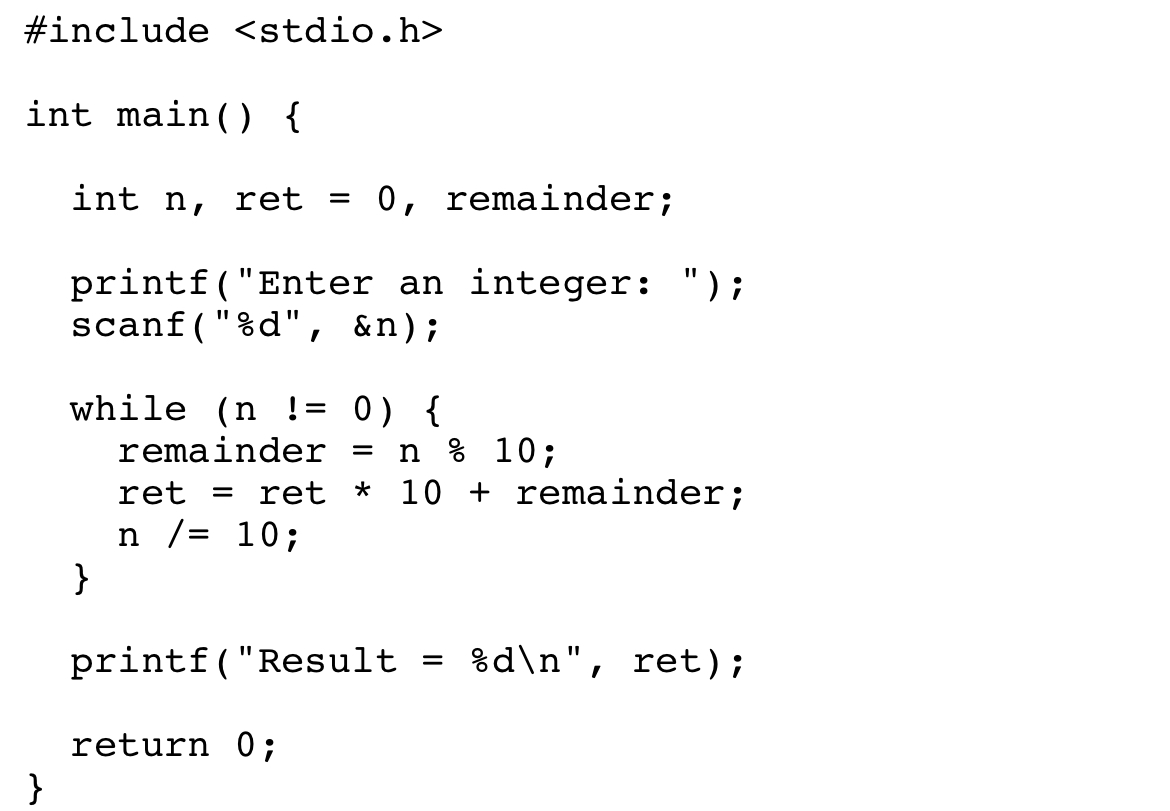
Test.c code :
Step by Step Solution
There are 3 Steps involved in it
1 Expert Approved Answer
Step: 1 Unlock

Question Has Been Solved by an Expert!
Get step-by-step solutions from verified subject matter experts
Step: 2 Unlock
Step: 3 Unlock
 Study Help