







Question: 5. A B C D E Name Score Grade 2 John 80 3 Mary 92 4 Tom 50 un Letter Grade CO LO We assign
5.
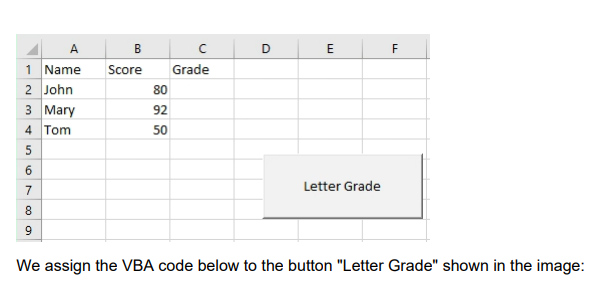
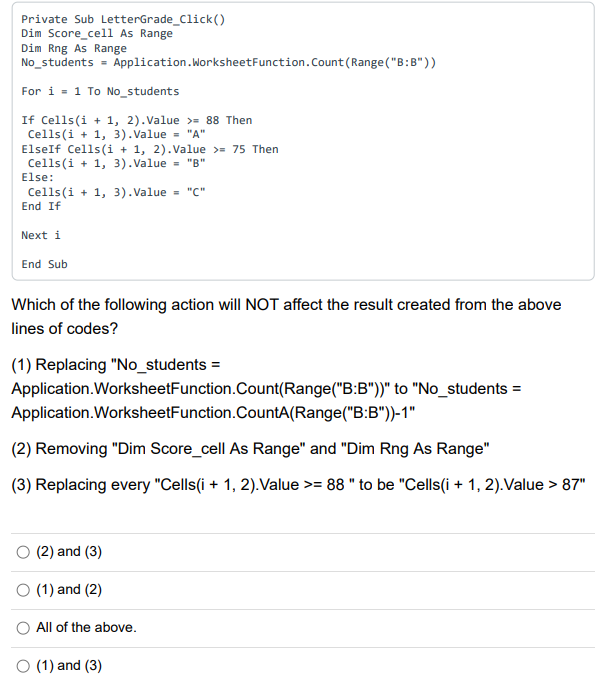
A B C D E Name Score Grade 2 John 80 3 Mary 92 4 Tom 50 un Letter Grade CO LO We assign the VBA code below to the button "Letter Grade" shown in the image:Private Sub LetterGrade_Click() Dim Score_cell As Range Dim Rng As Range No_students = Application. WorksheetFunction. Count (Range("B:B") ) For i = 1 To No_students If Cells(i + 1, 2). Value >= 88 Then Cells(i + 1, 3) . Value = "A" Elself Cells(i + 1, 2). Value >= 75 Then Cells(i + 1, 3). Value = "B" Else: Cells(i + 1, 3). Value = "(" End If Next i End Sub Which of the following action will NOT affect the result created from the above lines of codes? (1) Replacing "No_students = Application.WorksheetFunction.Count(Range("B:B"))" to "No_students = Application. WorksheetFunction.CountA(Range("B:B"))-1" (2) Removing "Dim Score_cell As Range" and "Dim Rng As Range" (3) Replacing every "Cells(i + 1, 2). Value >= 88 " to be "Cells(i + 1, 2). Value > 87" O (2) and (3) O (1) and (2) O All of the above. O (1) and (3)
Step by Step Solution
There are 3 Steps involved in it

Get step-by-step solutions from verified subject matter experts
 Study Help