







Question: 5. Write the following PowerShell command as a foreach loop. Hint: You will need to populate a variable before the foreach loop, and you will
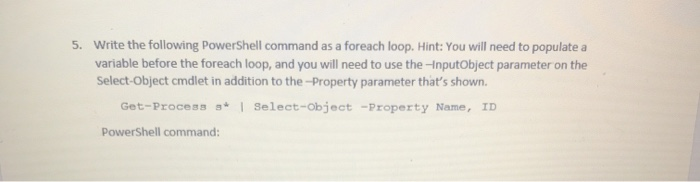
5. Write the following PowerShell command as a foreach loop. Hint: You will need to populate a variable before the foreach loop, and you will need to use the -InputObject parameter on the Select-Object cmdlet in addition to the - Property parameter that's shown. Get-Process 3* | Select-Object -Property Name, ID PowerShell command: 5. Write the following PowerShell command as a foreach loop. Hint: You will need to populate a variable before the foreach loop, and you will need to use the -InputObject parameter on the Select-Object cmdlet in addition to the - Property parameter that's shown. Get-Process 3* | Select-Object -Property Name, ID PowerShell command
Step by Step Solution
There are 3 Steps involved in it

Get step-by-step solutions from verified subject matter experts
 Study Help