







Question: 5)Determine the Default-gateway IP address for each PC device. * 172.16.128.2 172.16.129.129 172.16.129.202 172.16.129.126 172.16.128.3 PC-A PC-B PC-C PC-D PC-A PC-B PC-C PC-D 6)Determine the
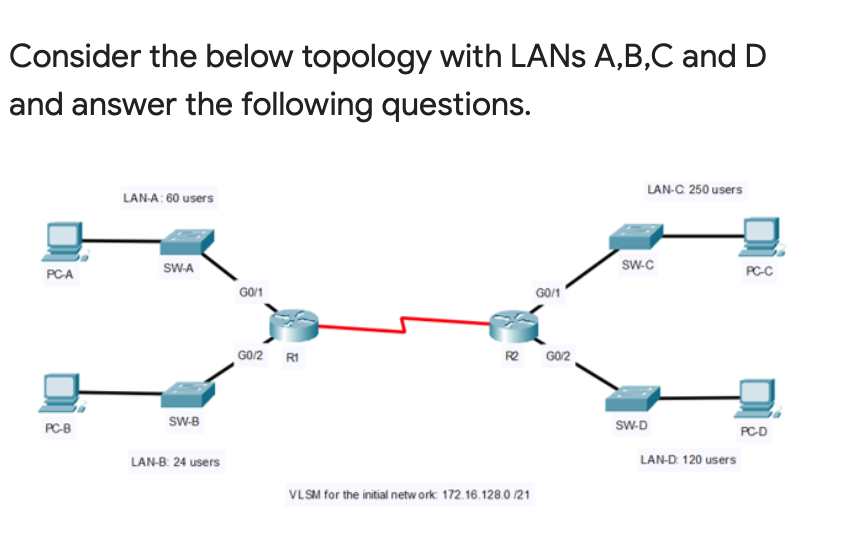
5)Determine the Default-gateway IP address for each PC device. *
172.16.128.2
172.16.129.129
172.16.129.202
172.16.129.126
172.16.128.3
PC-A
PC-B
PC-C
PC-D
PC-A
PC-B
PC-C
PC-D 6)Determine the PCs IP addresses as follows *
172.16.128.10
172.16.129.190
172.16.129.1
172.16.129.193
172.16.1.1
172.16.129.191
PC-A (last valid ip)
PC-B (2nd valid ip)
PC-C (10th valid ip)
PC-D (1st valid ip)
PC-A (last valid ip)
PC-B (2nd valid ip)
PC-C (10th valid ip)
PC-D (1st valid ip)
Consider the below topology with LANs A,B,C and D and answer the following questions. LAN-C 250 users LAN-A: 60 users PCA SWA SW-C PCC G0/1 G0/1 G0/2 R1 RC G012 PCB SW-B SW-D PCD LAN-D. 120 users LAN-B: 24 users VLSM for the initial network 172.16.128.0 121
Step by Step Solution
There are 3 Steps involved in it

Get step-by-step solutions from verified subject matter experts
 Study Help