Question: 6 7 N 8 9 1 Management thinks an average of 85 guests a day would be a realistic average. Use Goal Seek to find
6 7 N 8 9 1 Management thinks an average of 856 7 N 8 9 1 Management thinks an average of 856 7 N 8 9 1 Management thinks an average of 856 7 N 8 9 1 Management thinks an average of 856 7 N 8 9 1 Management thinks an average of 85

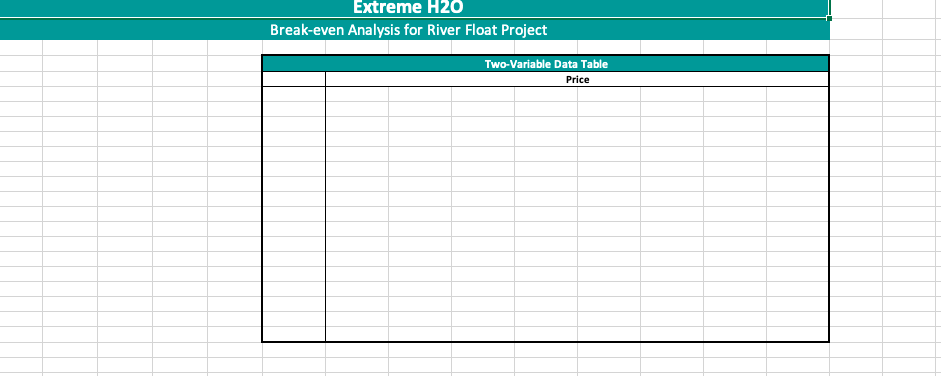
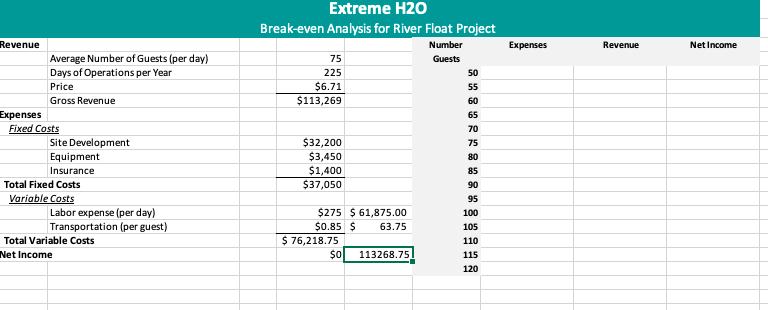
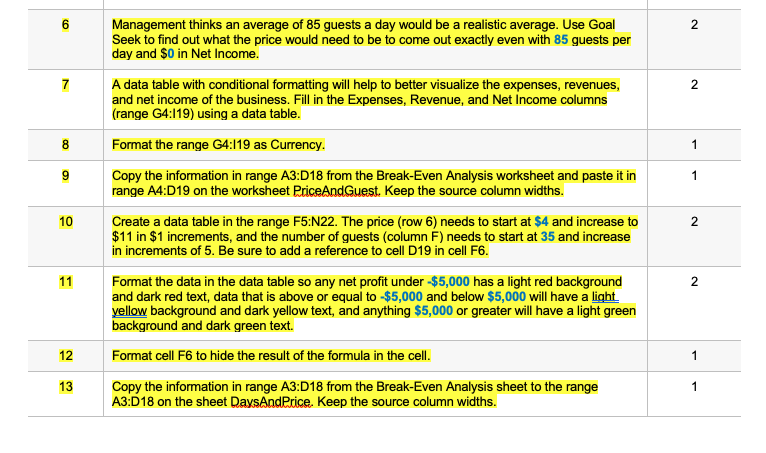
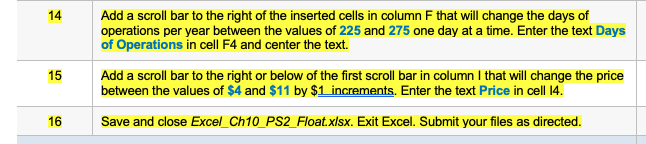
6 7 N 8 9 1 Management thinks an average of 85 guests a day would be a realistic average. Use Goal Seek to find out what the price would need to be to come out exactly even with 85 guests per day and $0 in Net Income. A data table with conditional formatting will help to better visualize the expenses, revenues, and net income of the business. Fill in the Expenses, Revenue, and Net Income columns (range G4:119) using a data table. Format the range G4:19 as Currency. Copy the information in range A3:D18 from the Break-Even Analysis worksheet and paste it in range A4:D19 on the worksheet PriceAndGuest. Keep the source column widths. Create a data table in the range F5:N22. The price (row 6) needs to start at $4 and increase to $11 in $1 increments, and the number of guests (column F) needs to start at 35 and increase in increments of 5. Be sure to add a reference to cell D19 in cell F6. Format the data in the data table so any net profit under $5,000 has a light red background and dark red text, data that is above or equal to $5,000 and below $5,000 will have a light. yellow background and dark yellow text, and anything $5,000 or greater will have a light green background and dark green text. Format cell F6 to hide the result of the formula in the cell. Copy the information in range A3:018 from the Break-Even Analysis sheet to the range A3:D18 on the sheet DaysAndPrice. Keep the source column widths. 10 2 11 2 1 | 14 Add a scroll bar to the right of the inserted cells in column F that will change the days of operations per year between the values of 225 and 275 one day at a time. Enter the text Days of Operations in cell F4 and center the text. 15 Add a scroll bar to the right or below of the first scroll bar in column 1 that will change the price between the values of $4 and $11 by $1 increments. Enter the text Price in cell 14. Save and close Excel Ch10 PS2 Float xlsx. Exit Excel. Submit your files as directed. 16 Extreme H2O Break-even Analysis for River Float Project Extreme H20 Break-even Analysis for River Float Project Two-Variable Data Table Price Extreme H2O Break-even Analysis for River Float Project Number Expenses Revenue Net Income Guests 75 225 $6.71 $113,269 Revenue Average Number of Guests (per day) Days of Operations per Year Price Gross Revenue Expenses Fixed Costs Site Development Equipment Insurance Total Fixed Costs Variable Costs Labor expense (per day) Transportation (per guest) Total Variable Costs Net Income 50 55 60 65 70 75 80 $32,200 $3,450 $1,400 $37,050 85 $275 $ 61,875.00 $0.85 $ 63.75 $ 76,218.75 $0 113268.75 90 95 100 105 110 115 120
Step by Step Solution

There are 3 Steps involved in it

1 Expert Approved Answer
Step: 1 Unlock blur-text-image

Question Has Been Solved by an Expert!

Get step-by-step solutions from verified subject matter experts

Step: 2 Unlock
Step: 3 Unlock

Students Have Also Explored These Related General Management Questions!