







Question: 6 CLASS UNIVERSITYLIST This class has many things in common with StudentList. It stores multiple universities instead of multiple students in a list that can
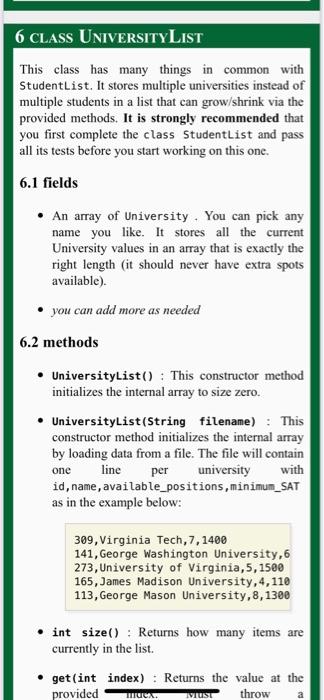
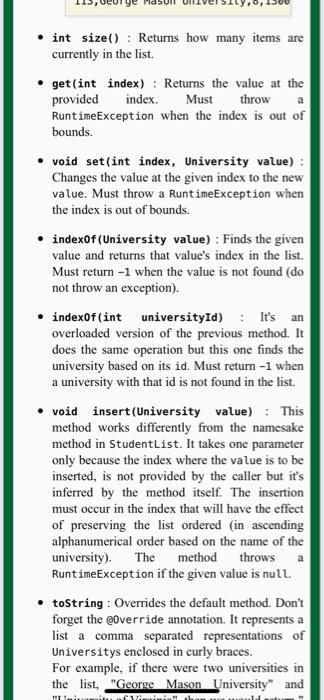
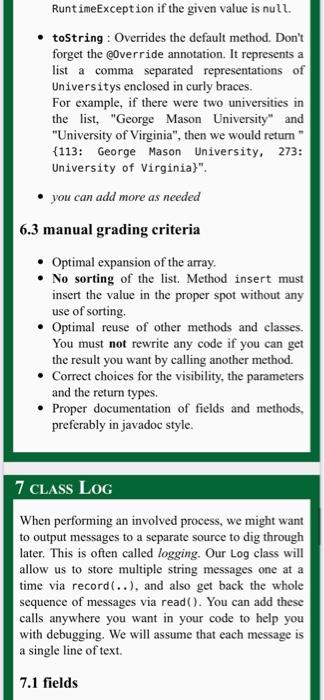
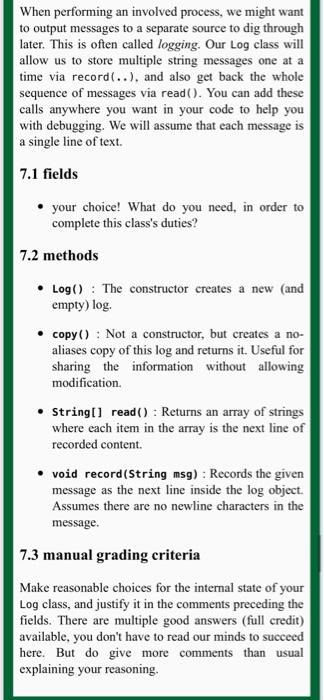
6 CLASS UNIVERSITYLIST This class has many things in common with StudentList. It stores multiple universities instead of multiple students in a list that can grow/shrink via the provided methods. It is strongly recommended that you first complete the class Studentlist and pass all its tests before you start working on this one. 6.1 fields An array of University. You can pick any name you like. It stores all the current University values in an array that is exactly the right length (it should never have extra spots available). you can add more as needed 6.2 methods UniversityList(): This constructor method initializes the internal array to size zero. UniversityList(String filename) : This constructor method initializes the internal array by loading data from a file. The file will contain one line university id, name, available_positions, minimum_SAT as in the example below: per with 309, Virginia Tech, 7, 1400 141, George Washington University, 6 273, University of Virginia,5, 1500 165, James Madison University, 4,110 113, George Mason University, 8,1300 int size(): Returns how many items are currently in the list. get(int index) : Returns the value at the provided throw We. WUST a int size(): Returns how many items are currently in the list. a .get(int index) : Returns the value at the provided index. Must throw RuntimeException when the index is out of bounds. void set (int index, University value): Changes the value at the given index to the new value. Must throw a RuntimeException when the index is out of bounds. indexOf(University value) : Finds the given value and returns that value's index in the list. Must return-1 when the value is not found (do not throw an exception). .indexOf(int universityId): It's an overloaded version of the previous method. It does the same operation but this one finds the university based on its id. Must return -1 when a university with that id is not found in the list. void insert(University value) : This method works differently from the namesake method in StudentList. It takes one parameter only because the index where the value is to be inserted, is not provided by the caller but it's inferred by the method itself. The insertion must occur in the index that will have the effect of preserving the list ordered (in ascending alphanumerical order based on the name of the university). The method throws RuntimeException if the given value is null .toString : Overrides the default method. Don't forget the @Override annotation. It represents a list a comma separated representations of Universitys enclosed in curly braces. For example, if there were two universities in the list. "George Mason University" and a HOR RuntimeException if the given value is null. .toString: Overrides the default method. Don't forget the @Override annotation. It represents a list a comma separated representations of Universitys enclosed in curly braces. For example, if there were two universities in the list, "George Mason University" and "University of Virginia", then we would retur {113: George Mason University, 273: University of Virginia)". you can add more as needed 6.3 manual grading criteria Optimal expansion of the array. No sorting of the list. Method insert must insert the value in the proper spot without any use of sorting. Optimal reuse of other methods and classes. You must not rewrite any code if you can get the result you want by calling another method. Correct choices for the visibility, the parameters and the return types. Proper documentation of fields and methods. preferably in javadoc style. 7 CLASS Log When performing an involved process, we might want to output messages to a separate source to dig through later. This is often called logging. Our Log class will allow us to store multiple string messages one at a time via record(..), and also get back the whole sequence of messages via read(). You can add these calls anywhere you want in your code to help you with debugging. We will assume that each message is a single line of text. 7.1 fields When performing an involved process, we might want to output messages to a separate source to dig through later. This is often called logging. Our Log class will allow us to store multiple string messages one at a time via record(..). and also get back the whole sequence of messages via read(). You can add these calls anywhere you want in your code to help you with debugging. We will assume that each message is a single line of text. 7.1 fields your choice! What do you need, in order to complete this class's duties? 7.2 methods Log(): The constructor creates a new (and empty) log copy(): Not a constructor, but creates a no- aliases copy of this log and returns it. Useful for sharing the information without allowing modification String[] read(): Returns an array of strings where each item in the array is the next line of recorded content void record(String msg): Records the given message as the next line inside the log object. Assumes there are no newline characters in the message. 7.3 manual grading criteria Make reasonable choices for the internal state of your Log class, and justify it in the comments preceding the fields. There are multiple good answers (full credit) available, you don't have to read our minds to succeed here. But do give more comments than usual explaining your reasoning 6 CLASS UNIVERSITYLIST This class has many things in common with StudentList. It stores multiple universities instead of multiple students in a list that can grow/shrink via the provided methods. It is strongly recommended that you first complete the class Studentlist and pass all its tests before you start working on this one. 6.1 fields An array of University. You can pick any name you like. It stores all the current University values in an array that is exactly the right length (it should never have extra spots available). you can add more as needed 6.2 methods UniversityList(): This constructor method initializes the internal array to size zero. UniversityList(String filename) : This constructor method initializes the internal array by loading data from a file. The file will contain one line university id, name, available_positions, minimum_SAT as in the example below: per with 309, Virginia Tech, 7, 1400 141, George Washington University, 6 273, University of Virginia,5, 1500 165, James Madison University, 4,110 113, George Mason University, 8,1300 int size(): Returns how many items are currently in the list. get(int index) : Returns the value at the provided throw We. WUST a int size(): Returns how many items are currently in the list. a .get(int index) : Returns the value at the provided index. Must throw RuntimeException when the index is out of bounds. void set (int index, University value): Changes the value at the given index to the new value. Must throw a RuntimeException when the index is out of bounds. indexOf(University value) : Finds the given value and returns that value's index in the list. Must return-1 when the value is not found (do not throw an exception). .indexOf(int universityId): It's an overloaded version of the previous method. It does the same operation but this one finds the university based on its id. Must return -1 when a university with that id is not found in the list. void insert(University value) : This method works differently from the namesake method in StudentList. It takes one parameter only because the index where the value is to be inserted, is not provided by the caller but it's inferred by the method itself. The insertion must occur in the index that will have the effect of preserving the list ordered (in ascending alphanumerical order based on the name of the university). The method throws RuntimeException if the given value is null .toString : Overrides the default method. Don't forget the @Override annotation. It represents a list a comma separated representations of Universitys enclosed in curly braces. For example, if there were two universities in the list. "George Mason University" and a HOR RuntimeException if the given value is null. .toString: Overrides the default method. Don't forget the @Override annotation. It represents a list a comma separated representations of Universitys enclosed in curly braces. For example, if there were two universities in the list, "George Mason University" and "University of Virginia", then we would retur {113: George Mason University, 273: University of Virginia)". you can add more as needed 6.3 manual grading criteria Optimal expansion of the array. No sorting of the list. Method insert must insert the value in the proper spot without any use of sorting. Optimal reuse of other methods and classes. You must not rewrite any code if you can get the result you want by calling another method. Correct choices for the visibility, the parameters and the return types. Proper documentation of fields and methods. preferably in javadoc style. 7 CLASS Log When performing an involved process, we might want to output messages to a separate source to dig through later. This is often called logging. Our Log class will allow us to store multiple string messages one at a time via record(..), and also get back the whole sequence of messages via read(). You can add these calls anywhere you want in your code to help you with debugging. We will assume that each message is a single line of text. 7.1 fields When performing an involved process, we might want to output messages to a separate source to dig through later. This is often called logging. Our Log class will allow us to store multiple string messages one at a time via record(..). and also get back the whole sequence of messages via read(). You can add these calls anywhere you want in your code to help you with debugging. We will assume that each message is a single line of text. 7.1 fields your choice! What do you need, in order to complete this class's duties? 7.2 methods Log(): The constructor creates a new (and empty) log copy(): Not a constructor, but creates a no- aliases copy of this log and returns it. Useful for sharing the information without allowing modification String[] read(): Returns an array of strings where each item in the array is the next line of recorded content void record(String msg): Records the given message as the next line inside the log object. Assumes there are no newline characters in the message. 7.3 manual grading criteria Make reasonable choices for the internal state of your Log class, and justify it in the comments preceding the fields. There are multiple good answers (full credit) available, you don't have to read our minds to succeed here. But do give more comments than usual explaining your reasoning
Step by Step Solution
There are 3 Steps involved in it

Get step-by-step solutions from verified subject matter experts
 Study Help