







Question: Two Classes In Java. Thank you so much for all of your help. I really really appreciate it. The only things you can import are
Two Classes In Java. Thank you so much for all of your help. I really really appreciate it.
The only things you can import are the Scanner and the File. Any extra functionality besides the default (i.e. java.lang) is disallowed.
You may not use any built-in functionality for copying an array, like System.arrayCopy(), Arrays.copyOf(), Object.clone(), Arrays.stream, etc. If you want to copy an array, you should do it manually (i.e. create a new array and transfer the data).
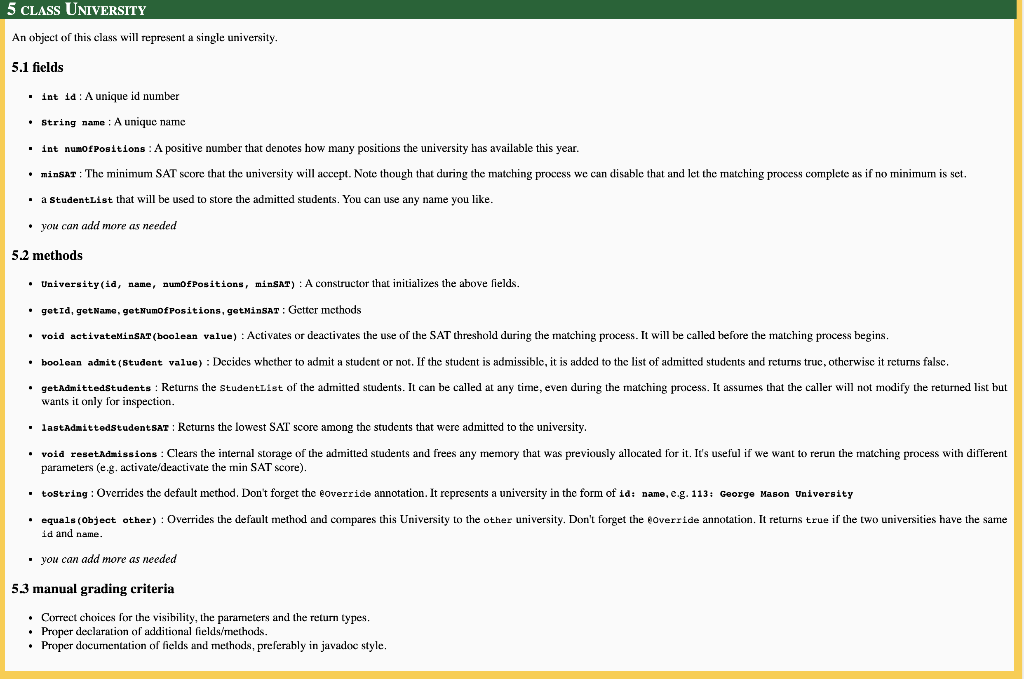
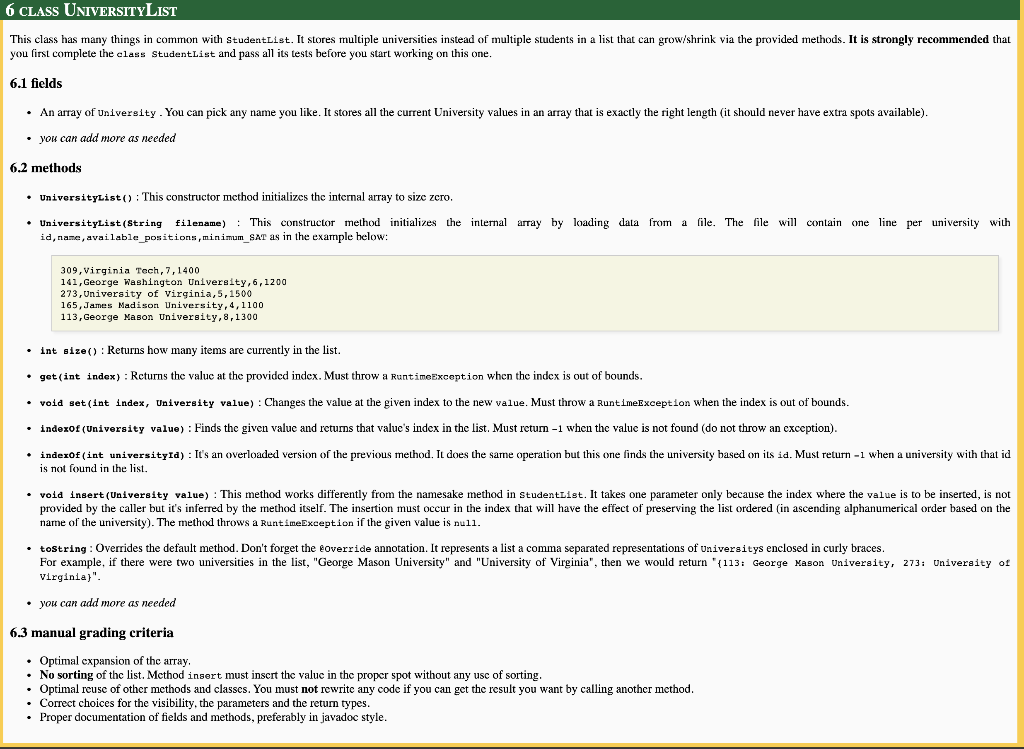
5 CLASS UNIVERSITY An object of this class will represent a single university. 5.1 fields int 10: A unique id number String name: A unique name int numofPositions : A positive number that denotes how many positions the university has available this year. minsar: The minimum SAT score that the university will accept. Note though that during the matching process we can disable that and let the matching process complete as if no minimum is sct. a StudentList that will be used to store the admitted students. You can use any name you like. you can add more as needed 5.2 methods University(id, name, Dumof Positions, minSAT): A constructor that initializes the above fields. getid, getName, getNumofPositions, getMinsar: Getter methods void activateMinSAT (boolean value) : Activates or deactivates the use of the SAT threshold during the matching process. It will be called before the matching process begins. boolean admit (Student value): Decides whcther to admit a student or not. If the student is admissible, it is added to the list of admitted students and returns truc, otherwise it retums falsc, .getAdmittedStudents : Returns the StudentList of the admitted students. It can be called at any time, even during the matching process. It assumes that the caller will not modify the returned list but wants it only for inspection. lastAdmittedStudent SAT : Returns the lowest SAT score among the students that were admitted to the university, void resetAdmissions : Clears the internal storage of the admitted students and frees any memory that was previously allocated for it. It's useful if we want to rerun the matching process with different parameters (e.g. activate/deactivate the min SAT score). tostring: Overrides the default method. Don't forget the override annotation. It represents a university in the form of 10: name, e.g. 113: George Mason University .equals(Object other): Overrides the default method and compares this University to the other university. Don't forget the override annotation. It returns true if the two universities have the same id and name you can add more as needed 5.3 manual grading criteria Correct choices for the visibility, the parameters and the return types. Proper declaration of additional fields/ methods. Proper documentation of fields and methods, preferably in javadoc style. 6 CLASS UNIVERSITYLIST This class has many things in common with StudentList. It stores multiple universities instead of multiple students in a list that can grow/shrink via the provided methods. It is strongly recommended that you first complete the class StudentList and pass all its tests before you start working on this one. 6.1 fields An array of University. You can pick any name you like. It stores all the current University values in an array that is exactly the right length (it should never have extra spots available). you can add more as needed 6.2 methods Universitylist(): This constructor method initializes the internal array to size zero. UniversityList(String filename) : This constructor method initializes the internal array hy loading data from a file. The file will contain one line per university with id, name, available_positions,minimum_SAT as in the example below: 309, Virginia Tech, 7, 1400 141, George Washington University,6,1200 273, University of Virginia,5,1500 165, James Madison University, 4, 1100 113, George Mason University, 8,1300 Int size(): Returns how many items are currently in the list. .get(int index): Returns the value at the provided index. Must throw a RuntimeException when the index is out of bounds. void set (int index, University value) : Changes the value at the given index to th new value. Must throw a RuntimeException when the index is out of bounds. indexof (University value) : Finds the given value and retums that value's index in the list. Must retum -1 when the value is not found (do not throw an exception). indexOf(int universityId) : It's an overloaded version of the previous method. It does the same operation but this one finds the university based on its id. Must return -1 when a university with that id is not found in the list. void insert (University value) : This method works differently from the namesake method in StudentList. It takes one parameter only because the index where the value is to be inserted, is not provided by the caller but it's inferred by the method itself. The insertion must occur in the index that will have the effect of preserving the list ordered (in ascending alphanumerical order based on the name of the university). The method throws a RuntimeException if the given value is null. tostring: Overrides the default method. Don't forget the coverride annotation. It represents a list a comma separated representations of Universitys enclosed in curly braces. For example, if there were two universities in the list, "George Mason University" and "University of Virginia", then we would return "(113: George Mason University, 273: University of Virginia)". you can add more as needed 6.3 manual grading criteria Optimal expansion of the array, No sorting of the list. Method insert must inscrt the value in the proper spot without any use of sorting. Optimal reuse of other methods and classes. You must not rewrite any code if you can get the result you want by calling another method. Correct choices for the visibility, the parameters and the retum types. Proper documentation of fields and methods, preferably in javadoc style
Step by Step Solution
There are 3 Steps involved in it

Get step-by-step solutions from verified subject matter experts
 Study Help