







Question: 6 . If the user clicks the Clear link, the app should reset the form to how it was when the app first started (
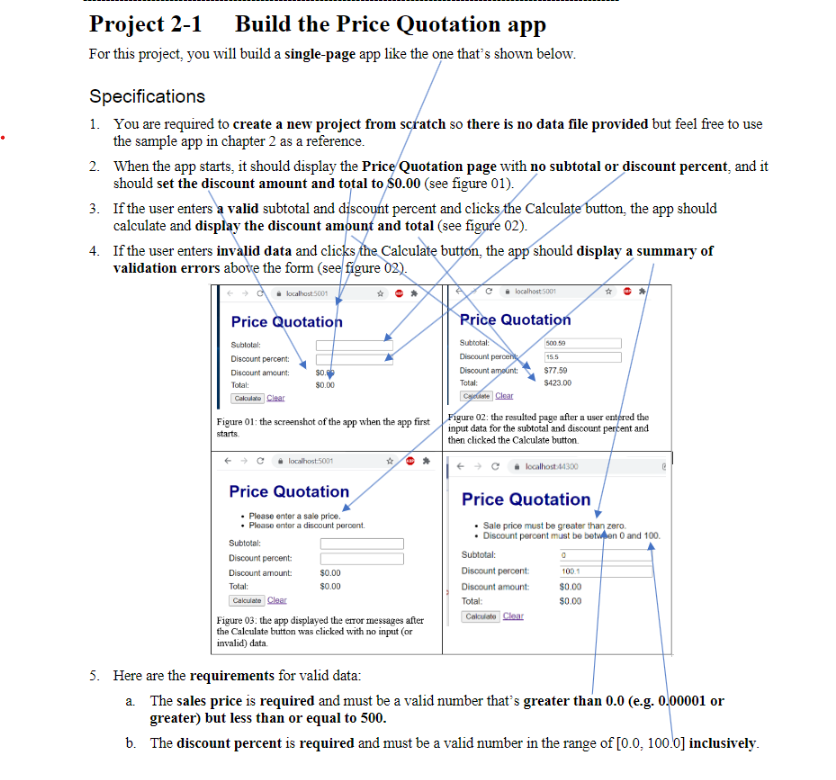
If the user clicks the Clear link, the app should reset the form to how it was when the app first started see
figure
Use the MVC pattern. To do that, create a model class you decide the model class name, data type eg
string, int, double, property name, method name, parametersifany, etc. that stores:
a the subtotal and discount percent and calculates the discount amount and total.
The class diagram below is just a reference. Please write your own class.
this UML model class diagram
Class: PriceQutoeModel
Properties:
dataType Subtotal
dateType DiscountPercent
pls add more code if needed
Methods:
datatype CalcuateDiscountAmountparameters
pls add more code if needed
b Make sure to bind that model to the Razor view that displays the Price Quotation page shown above
see figure
Use a Razor layout to store the common HTML elements such as: and
a You are required to use a Layout.cshtml file in your app
Use a custom CSS style sheet eg name it custom.css or a file name of your liking to style the HTML
elements so they appear as shown above see figure
a You are also required to use a site.css file in addition to your style sheet eg custom.css
b Use color navy for the text Price Quotation in your style sheet eg custom.css
Make sure that the appearance of your app resembles the one on the screenshot.
a Make sure there is no border around the values of the discount amount and total
This is all in Visual Basic, please add specific steps. Thanks
Step by Step Solution
There are 3 Steps involved in it
1 Expert Approved Answer
Step: 1 Unlock

Question Has Been Solved by an Expert!
Get step-by-step solutions from verified subject matter experts
Step: 2 Unlock
Step: 3 Unlock
 Study Help