







Question: 6. Without changing the given code organization (do not change index.html, no external CSS files, no external US libraries besides your own js files for
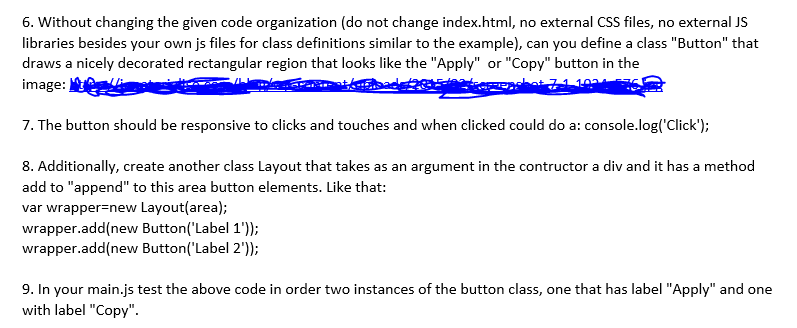
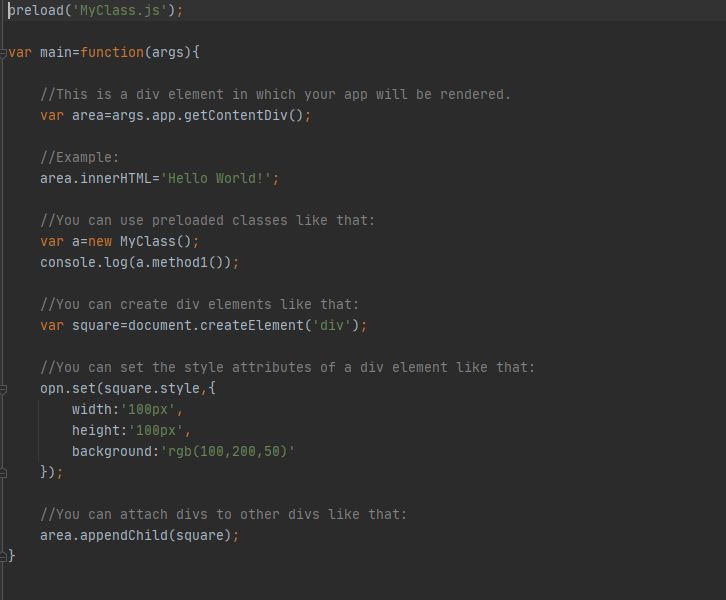
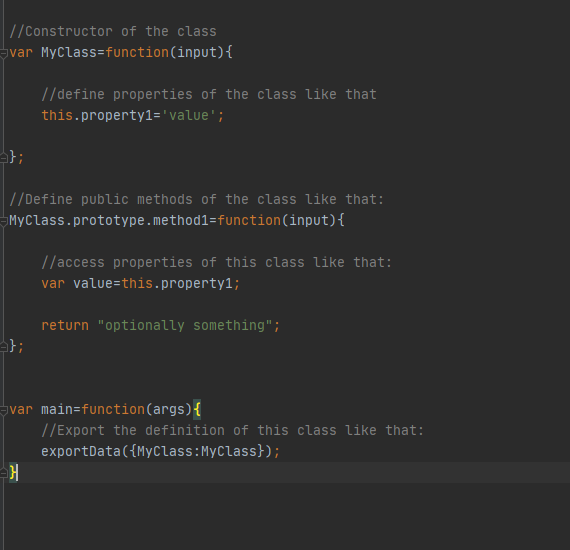
6. Without changing the given code organization (do not change index.html, no external CSS files, no external US libraries besides your own js files for class definitions similar to the example), can you define a class "Button" that draws a nicely decorated rectangular region that looks like the "Apply" or "Copy" button in the image: 14. 7. The button should be responsive to clicks and touches and when clicked could do a: console.log('Click'); 8. Additionally, create another class Layout that takes as an argument in the contructor a div and it has a method add to "append" to this area button elements. Like that: var wrapper=new Layout(area); wrapper.add(new Button('Label 1")); wrapper.add(new Button('Label 2')); 9. In your main.js test the above code in order two instances of the button class, one that has label "Apply" and one with label "Copy". reload('MyClass.js'); var main=function(args) { //This is a div element in which your app will be rendered. var area=args.app.getContentDiv(); //Example: area.innerHTML='Hello World!'; //You can use preloaded classes like that: var a=new MyClass(); console.log(a.method10); // You can create div elements like that: var square=document.createElement('div'); // You can set the style attributes of a div element like that: opn.set(square.style, { width:100px', height: '100px', background:'rgb(100, 200,50)' }); // You can attach divs to other divs like that: area.appendChild(square); } //Constructor of the class Evar MyClass=function(input){ //define properties of the class like that this.property1='value'; -}; //Define public methods of the class like that: MyClass.prototype.methodl=function(input){ //access properties of this class like that: var value=this.property1; return "optionally something"; }; var main=function(args) { 1/Export the definition of this class like that: exportData({MyClass:MyClass}); } 6. Without changing the given code organization (do not change index.html, no external CSS files, no external US libraries besides your own js files for class definitions similar to the example), can you define a class "Button" that draws a nicely decorated rectangular region that looks like the "Apply" or "Copy" button in the image: 14. 7. The button should be responsive to clicks and touches and when clicked could do a: console.log('Click'); 8. Additionally, create another class Layout that takes as an argument in the contructor a div and it has a method add to "append" to this area button elements. Like that: var wrapper=new Layout(area); wrapper.add(new Button('Label 1")); wrapper.add(new Button('Label 2')); 9. In your main.js test the above code in order two instances of the button class, one that has label "Apply" and one with label "Copy". reload('MyClass.js'); var main=function(args) { //This is a div element in which your app will be rendered. var area=args.app.getContentDiv(); //Example: area.innerHTML='Hello World!'; //You can use preloaded classes like that: var a=new MyClass(); console.log(a.method10); // You can create div elements like that: var square=document.createElement('div'); // You can set the style attributes of a div element like that: opn.set(square.style, { width:100px', height: '100px', background:'rgb(100, 200,50)' }); // You can attach divs to other divs like that: area.appendChild(square); } //Constructor of the class Evar MyClass=function(input){ //define properties of the class like that this.property1='value'; -}; //Define public methods of the class like that: MyClass.prototype.methodl=function(input){ //access properties of this class like that: var value=this.property1; return "optionally something"; }; var main=function(args) { 1/Export the definition of this class like that: exportData({MyClass:MyClass}); }
Step by Step Solution
There are 3 Steps involved in it

Get step-by-step solutions from verified subject matter experts
 Study Help