







Question: Using SQL Create a table called Dept_Employee with the following structure. Name Empno Type Number Null Not null key Primary Default Ename Varchar2(20) Not
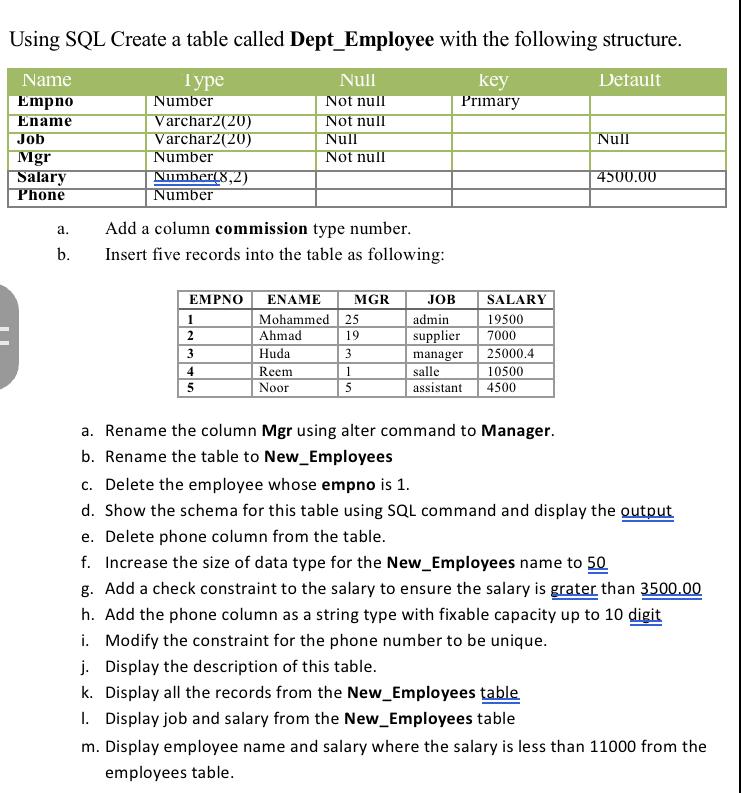
Using SQL Create a table called Dept_Employee with the following structure. Name Empno Type Number Null Not null key Primary Default Ename Varchar2(20) Not null Job Varchar2(20) Null Null Mgr Number Not null Salary Phone Number(8,2) 4500.00 a. b. Number Add a column commission type number. Insert five records into the table as following: EMPNO ENAME MGR JOB SALARY 1 Mohammed 25 admin 19500 2 Ahmad 19 supplier 7000 3 Huda 3 manager 25000.4 4 Reem 1 salle 10500 5 Noor 5 assistant 4500 a. Rename the column Mgr using alter command to Manager. b. Rename the table to New_Employees c. Delete the employee whose empno is 1. d. Show the schema for this table using SQL command and display the output e. Delete phone column from the table. f. Increase the size of data type for the New_Employees name to 50 g. Add a check constraint to the salary to ensure the salary is grater than 3500.00 h. Add the phone column as a string type with fixable capacity up to 10 digit i. Modify the constraint for the phone number to be unique. j. Display the description of this table. k. Display all the records from the New_Employees table 1. Display job and salary from the New_Employees table m. Display employee name and salary where the salary is less than 11000 from the employees table.
Step by Step Solution
There are 3 Steps involved in it
Here are the SQL commands to perform each task Create the table DeptEmployee sql Copy code CREATE TABLE DeptEmployee Empno NUMBER PRIMARY KEY NOT NULL ... View full answer

Get step-by-step solutions from verified subject matter experts
 Study Help