







Question: 6 . You are going to add some additional functionality to this program. To do this you will need to understand what each line of
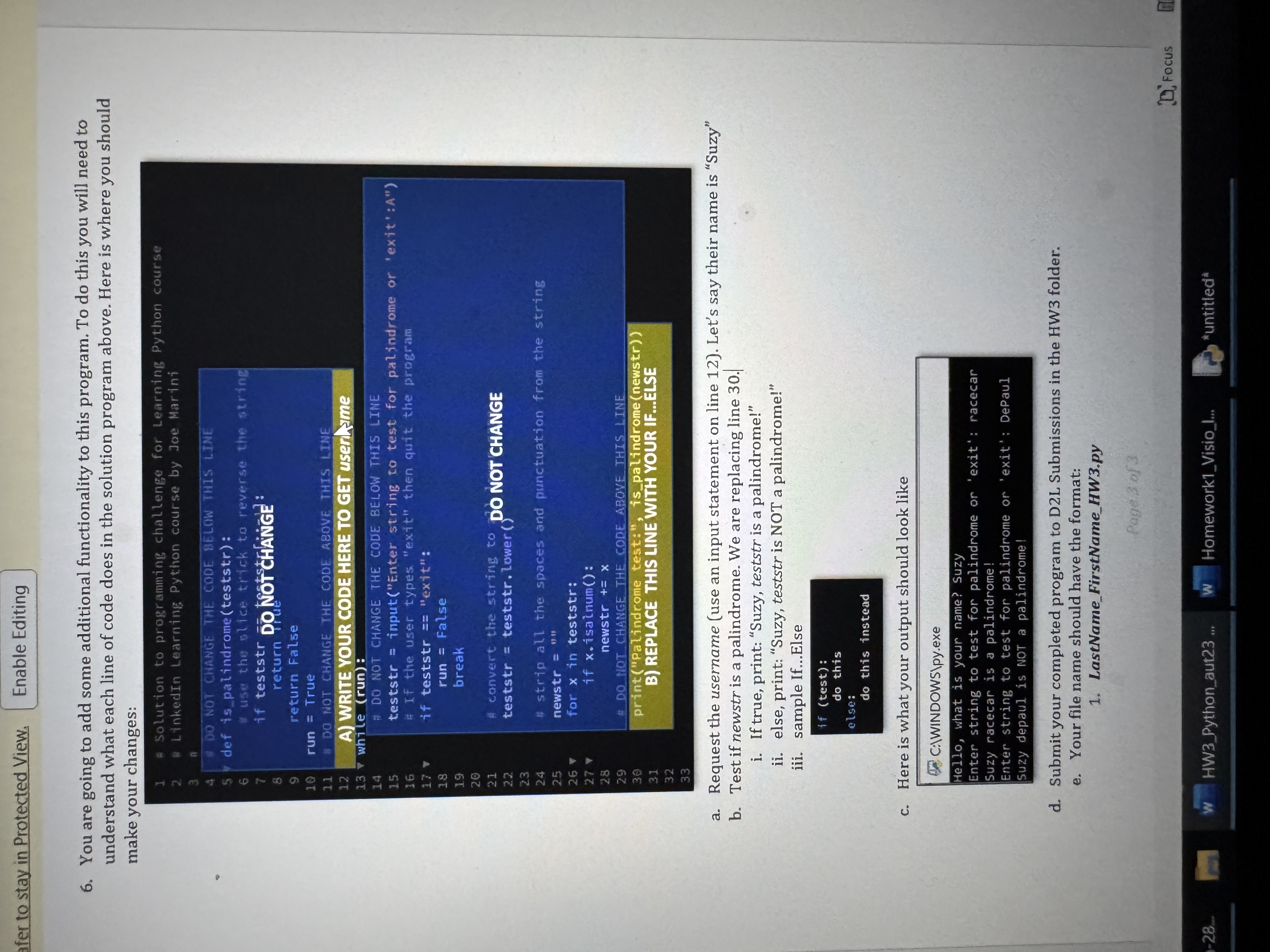
You are going to add some additional functionality to this program. To do this you will need to understand what each line of code does in the solution program above. Here is where you should make your changes:
Solution to programming challenge for Learning python course
LinkedIn Learninf: Pytion course by Joe Marlini
~
DO NOT CHANGE THE CODE OELOW THIS LTNE
def ispalindrometestistr:
use the plice titick to reverse the string
return of
return
run True
S DO HOT CMANGE THE CODE REOVE THIS LTNEE
A WRITE YOUR CODE HERE TO GET userLSme
while run:
: DO NOT CHANGE THE CODE BELOW THIS LIME
teststr imputEnterstring to test for palindrome or 'exit':A
A If the user types "extt" then quit the program
if teststr "exit":
run False
break
A convert the strirug to DO NOT CHANGE
teststr teststr.lower
strip all the spaces and punctuation from the string
newstr
for x in teststr:
if xisalnum:
newstr x
& DO HOT CHANGE THE CODE &BOVE THIS LINE
printpatindrome testt:", ispalindromenewstr
B REPLACE THIS LINEWMTH YOUR IFELSE
a Request the username use an input statement on line Let's say their name is "Suzy"
b Test if newstr is a palindrome. We are replacing line
i If true, print: "Suzy, teststr is a palindrome!"
ii else, print: "Suzy, teststr is NOT a palindrome!"
iii. sample IfElse
if test:
do this
else:
do this instead
c Here is what your output should look like
C:IWINDOWSIpy.exe
Hello, what is your nane? Suzy
Enter string to test for palindrome or 'exit': racecar
Suzy racecar is a palindrome!
Enter string to test for palindrome or 'exit': DePaul
suzy depaul is NOT a palindrome!
d Submit your completed program to DL Submissions in the HW folder.
e Your file name should have the format:
LastNameFirstNameHWpy
Step by Step Solution
There are 3 Steps involved in it
1 Expert Approved Answer
Step: 1 Unlock

Question Has Been Solved by an Expert!
Get step-by-step solutions from verified subject matter experts
Step: 2 Unlock
Step: 3 Unlock
 Study Help