







Question: 7. (Array) Worksheet Q7 contains 10,000 random numbers in column A. It is generated using Excel function RAND(). Then I froze them by copying values
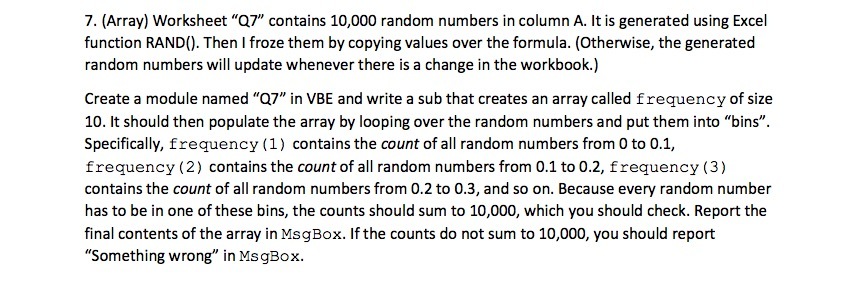
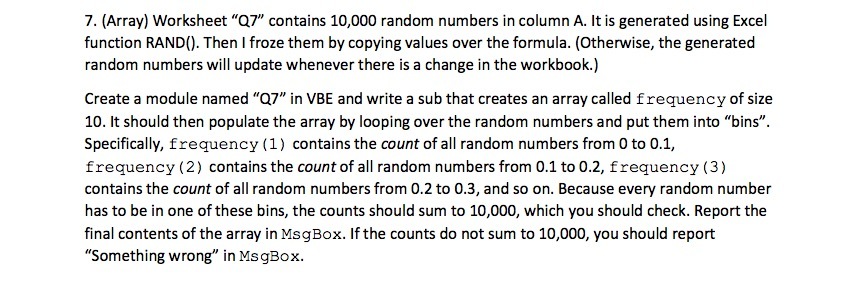
7. (Array) Worksheet "Q7" contains 10,000 random numbers in column A. It is generated using Excel function RAND(). Then I froze them by copying values over the formula. (Otherwise, the generated random numbers will update whenever there is a change in the workbook.) Create a module named "Q7" in VBE and write a sub that creates an array called frequency of size 10. It should then populate the array by looping over the random numbers and put them into "bins". Specifically, frequency (1) contains the count of all random numbers from 0 to 0.1, frequency (2) contains the count of all random numbers from 0.1 to 0.2, frequency (3) contains the count of all random numbers from 0.2 to 0.3, and so on. Because every random number has to be in one of these bins, the counts should sum to 10,000, which you should check. Report the final contents of the array in MsgBox. If the counts do not sum to 10,000, you should report "Something wrong" in MsgBox
Step by Step Solution
There are 3 Steps involved in it

Get step-by-step solutions from verified subject matter experts
 Study Help