







Question: 7-2 Add Data Validation to the Simple Calculator I need the answer in Visual Basic code. 1. Open the SimpleCalculator project in the Assignment ExercisesChapter
7-2 Add Data Validation to the Simple Calculator
I need the answer in Visual Basic code.
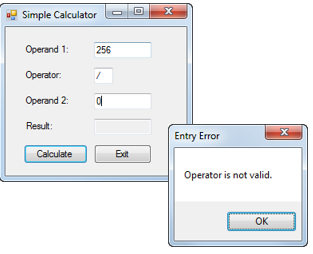
1. Open the SimpleCalculator project in the Assignment Exercises\Chapter 07\SimpleCalculator With Data Validation directory.
2. Code methods named IsPresent, IsDecimal, and IsWithinRange that work like the methods described in chapter 7 of the book.
3. Code a method named IsOperator that checks that the text box thats passed to it contains a value of +, -, *, or /.
4. Code a method named IsValidData that checks that the Operand 1 and Operand 2 text boxes contain a decimal value between 0 and 1,000,000 (non-inclusive) and that the Operator text box contains a valid operator.
5. Delete all of the catch blocks from the TryCatch statement in the btnCalculate_Click event handler except for the one that catches any exception. Then, add code to this event handler that performs the calculation and displays the result only if the values of the text boxes are valid.
6. Test the application to be sure that all the data is validated properly.
The code needing modification is provided below:
Public Class Form1
Private Sub btnCalculate_Click(sender As Object, e As EventArgs) Handles btnCalculate.Click Try Dim operand1 As Decimal = CDec(txtOperand1.Text) Dim operator1 As String = txtOperator.Text Dim operand2 As Decimal = CDec(txtOperand2.Text) Dim result As Decimal = CalculationResult(operand1, operator1, operand2)
result = Math.Round(result, 4) txtResult.Text = result.ToString Catch ex As InvalidCastException MessageBox.Show("Invalid numeric format. Please check all entries.", "Entry Error") Catch ex As OverflowException MessageBox.Show("Overflow error. Please enter smaller values.", "Entry Error") Catch ex As DivideByZeroException MessageBox.Show("Divide-by-zero error. Please enter a non-zero value for operand 2.", "Entry Error") Catch ex As Exception MessageBox.Show(ex.Message & vbCrLf & vbCrLf & ex.GetType.ToString & vbCrLf & vbCrLf & ex.StackTrace, "Exception") End Try End Sub
Private Function CalculationResult(operand1 As Decimal, operator1 As String, operand2 As Decimal) As Decimal If operator1 = "+" Then CalculationResult = operand1 + operand2 ElseIf operator1 = "-" Then CalculationResult = operand1 - operand2 ElseIf operator1 = "*" Then CalculationResult = operand1 * operand2 ElseIf operator1 = "/" Then CalculationResult = operand1 / operand2 End If Return CalculationResult End Function
Private Sub btnExit_Click(sender As Object, e As EventArgs) Handles btnExit.Click Me.Close() End Sub
Private Sub ClearResult(sender As Object, e As EventArgs) _ Handles txtOperand1.TextChanged, txtOperator.TextChanged, txtOperand2.TextChanged txtResult.Text = "" End Sub
End Class
* I have provided the code I currently have written below. The code I am needing claification on or is not working is Bolded.
Public Class Form1 Private Sub btnCalculate_Click(sender As Object, e As EventArgs) Handles btnCalculate.Click Try If IsValidData() Then Dim operand1 As Decimal = Convert.ToDecimal(txtOperand1.Text) Dim operator1 As String = Convert.ToString(txtOperator.Text) Dim operand2 As Decimal = Convert.ToDecimal(txtOperand2.Text) Dim result As Decimal = CalculationResult(operand1, operator1, operand2)
result = Math.Round(result, 4) txtResult.Text = result.ToString txtOperand1.Select() End If Catch ex As Exception MessageBox.Show(ex.Message, ex.GetType.ToString) (Does this line of code perform the calculation and display the result only if the values of the text boxes are valid?) End Try End Sub Private Function IsValidData() As Boolean Return _ IsPresent(txtOperand1, "Operand 1") AndAlso IsDecimal(txtOperand1, "Operand 1") AndAlso IsWithinRange(txtOperand1, "Operand 1", 0, 1000000) AndAlso IsPresent(txtOperator, "Operator 1") AndAlso IsOperator(txtOperator, "Operator 1") (I'm not sure how to implement this line of code where it will validate the following symbols: +, -, *, /) AndAlso IsPresent(txtOperand2, "Operand 2") AndAlso IsDecimal(txtOperand2, "Operand 2") AndAlso IsWithinRange(txtOperand2, "Operand 2", 0, 1000000) End Function Private Function IsPresent(textBox As TextBox, name As String) _ As Boolean If textBox.Text = "" Then MessageBox.Show(name & "is a required field.", "Entry Error") textBox.Select() Return False Else Return True End If End Function Private Function IsDecimal(textBox As TextBox, name As String) _ As Boolean Dim number As Decimal = 0 If Decimal.TryParse(textBox.Text, number) Then Return True Else MessageBox.Show(name & "must be a decimal value.", "Entry Error") textBox.Select() textBox.SelectAll() Return False End If End Function Private Function IsOperator(textBox As TextBox, name As String) _ As Boolean
(I'm not sure how to implement this line of code where it will validate the following symbols: +, -, *, /.)
End Function
Private Function IsWithinRange(textBox As TextBox, name As String, min As Decimal, max As Decimal) As Boolean Dim number As Decimal = CDec(textBox.Text) If number max Then MessageBox.Show(name & " must be between " & min & " and " & max & ".", "Entry Error") textBox.Select() textBox.SelectAll() Return False Else Return True End If End Function
Private Function CalculationResult(operand1 As Decimal, operator1 As String, operand2 As Decimal) As Decimal If operator1 = "+" Then CalculationResult = operand1 + operand2 ElseIf operator1 = "-" Then CalculationResult = operand1 - operand2 ElseIf operator1 = "*" Then CalculationResult = operand1 * operand2 ElseIf operator1 = "/" Then CalculationResult = operand1 / operand2 End If Return CalculationResult End Function
Private Sub btnExit_Click(sender As Object, e As EventArgs) Handles btnExit.Click Me.Close() End Sub
Private Sub ClearResult(sender As Object, e As EventArgs) _ Handles txtOperand1.TextChanged, txtOperator.TextChanged, txtOperand2.TextChanged txtResult.Text = "" End Sub
End Class
Simple Calculator Operand 1: Operator Operand 2: Resul 256 Entry Error Calculate Operator is not valid. OK Simple Calculator Operand 1: Operator Operand 2: Resul 256 Entry Error Calculate Operator is not valid. OK
Step by Step Solution
There are 3 Steps involved in it

Get step-by-step solutions from verified subject matter experts
 Study Help