







Question: 7-26 Write a documented program to implement the process illustrated using the Batch Simulator. The sequence of operation is to be as follows: Normally open
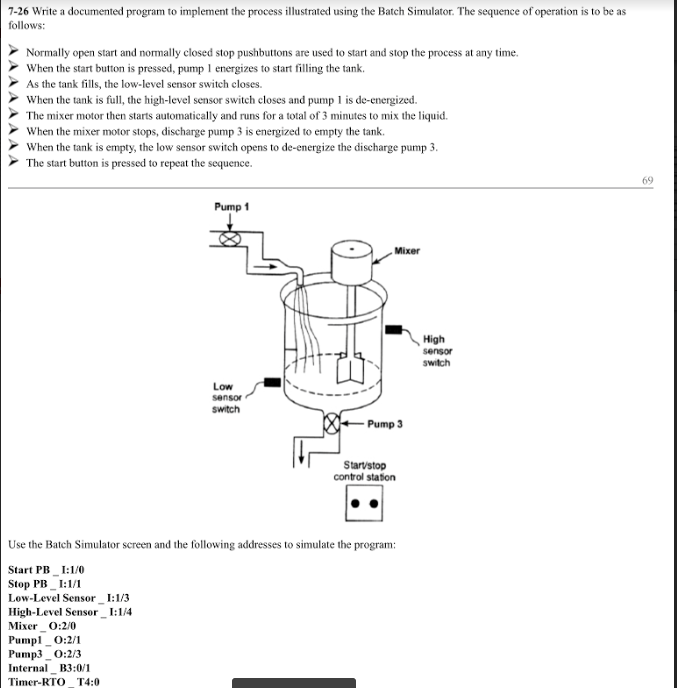
7-26 Write a documented program to implement the process illustrated using the Batch Simulator. The sequence of operation is to be as follows: Normally open start and normally closed stop pushbuttons are used to start and stop the process at any time. When the start button is pressed, pump 1 energizes to start filling the tank As the tank fills, the low-level sensor switch closes. When the tank is full, the high-level sensor switch closes and pump 1 is de-energized. The mixer motor then starts automatically and runs for a total of 3 minutes to mix the liquid. When the mixer motor stops, discharge pump 3 is energized to empty the tank. When the tank is empty, the low sensor switch opens to de-energize the discharge pump 3 The start button is pressed to repeat the sequence. 69 Pump 1 Mixer High switch Low senso switch Pump 3 Starvstop control staton Use the Batch Simulator screen and the following addresses to simulate the program: Start PB1:1/0 Stop PB1:1/1 Low-Level Sensor :1/3 High-Level Sensr_1:14 Mixer O:2/0 Pump 0:2/1 Pump3_O:2/3 Internal B3:01 Timer-RTO T4:0 - - 7-26 Write a documented program to implement the process illustrated using the Batch Simulator. The sequence of operation is to be as follows: Normally open start and normally closed stop pushbuttons are used to start and stop the process at any time. When the start button is pressed, pump 1 energizes to start filling the tank As the tank fills, the low-level sensor switch closes. When the tank is full, the high-level sensor switch closes and pump 1 is de-energized. The mixer motor then starts automatically and runs for a total of 3 minutes to mix the liquid. When the mixer motor stops, discharge pump 3 is energized to empty the tank. When the tank is empty, the low sensor switch opens to de-energize the discharge pump 3 The start button is pressed to repeat the sequence. 69 Pump 1 Mixer High switch Low senso switch Pump 3 Starvstop control staton Use the Batch Simulator screen and the following addresses to simulate the program: Start PB1:1/0 Stop PB1:1/1 Low-Level Sensor :1/3 High-Level Sensr_1:14 Mixer O:2/0 Pump 0:2/1 Pump3_O:2/3 Internal B3:01 Timer-RTO T4:0
Step by Step Solution
There are 3 Steps involved in it

Get step-by-step solutions from verified subject matter experts
 Study Help