



Question: 8. Create a named range called Final for the range M4 M12. In the Distribution of Grades section, use the named range and a function

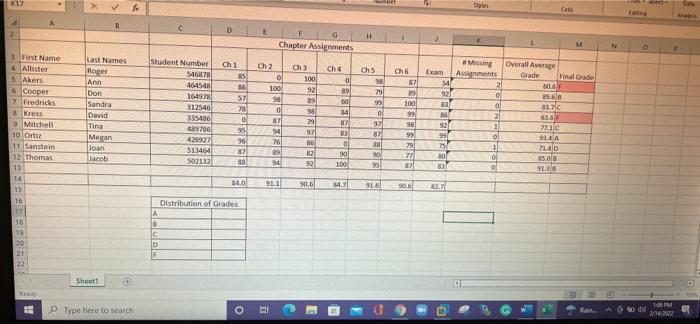
8. Create a named range called Final for the range M4 M12. In the Distribution of Grades section, use the named range and a function to calculate the number of students who have earned each grade 9. Add a custom number format to the student number to insert SN- before the number in the cell. 10. Add a header to the worksheet, it should include your name at the left and the sheet name at the right 11. Add additional formatting to the worksheet as necessary. Do not use a predefined table style to format the worksheet K17 Shini dan NE D H Chapter Assignments M N Ch 1 Chs 98 Cho 87 Overall Average Grade 60 Final Grade Student Number 546878 454548 164978 312546 335486 4736 99 Last Names Roger Ann Don Sandra David Tina Megan Joan Jacob 100 Ch 4 0 89 50 14 7 3 Wurst Name 4 Allister > Akers 6 Cooper 7 Fredricks Kress 9 Mitchell 10 Ortiz 11 Sanstein 12 Thomas 12 14 15 16 17 10 19 20 21 22 Ch 2 0 100 30 0 87 94 26 89 30 57 70 0 95 90 87 38 Ch 3 100 92 89 58 79 92 86 2 99 Miting Exam Assements 54 21 92 83 o BS 2 921 1 99 o 75 11 30/ ol 83 0 57 07 88 0 98 99 79 27 13.20 03.6 1C 914 714D 85 ole SLIE 513464 S02132 o 10 100 84.0 91.1 90,6 343 90,6 82.7 Distribution of Grades A c 0 Sheet1 + Type here to search o 2 w do o 10 111
Step by Step Solution
There are 3 Steps involved in it

Get step-by-step solutions from verified subject matter experts