



Question: 9. (Inventory) Create an ASCII file with the following data, or use the shipped.dat file available on this book's Web site. The headings aren't part
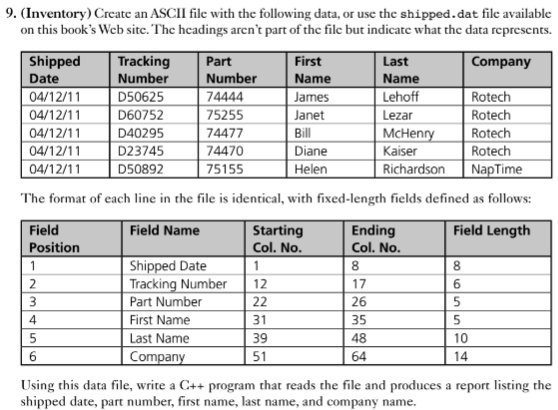
9. (Inventory) Create an ASCII file with the following data, or use the shipped.dat file available on this book's Web site. The headings aren't part of the file but indicate what the data represents. Tracking Number D50625 First Name James Janet Bill Diane Helen Last Name Lehoff Lezar McHenry Kaiser RichardsonNapTime Company Shipped Date 04/12/11 04/12/11D60752 Part Number 74444 75255 74477 74470 75155 Rotech Rotech Rotech Rotech 0/1211 D40295 04/12/11 04/12/11 D23745 D50892 The format of each li ntical, with fixed-length fields def Field Position Starting Col. No. Ending Col. No. Field Name Field Length Shipped Date Tracking Number 12 8 6 Part Number First Name Last Name Company 17 26 35 3948 4 5 10 14 31 51 64 Using this data file, write a C++ program that reads the file and produces a report listing the shipped date, part number, first name, last name, and company name 9. (Inventory) Create an ASCII file with the following data, or use the shipped.dat file available on this book's Web site. The headings aren't part of the file but indicate what the data represents. Tracking Number D50625 First Name James Janet Bill Diane Helen Last Name Lehoff Lezar McHenry Kaiser RichardsonNapTime Company Shipped Date 04/12/11 04/12/11D60752 Part Number 74444 75255 74477 74470 75155 Rotech Rotech Rotech Rotech 0/1211 D40295 04/12/11 04/12/11 D23745 D50892 The format of each li ntical, with fixed-length fields def Field Position Starting Col. No. Ending Col. No. Field Name Field Length Shipped Date Tracking Number 12 8 6 Part Number First Name Last Name Company 17 26 35 3948 4 5 10 14 31 51 64 Using this data file, write a C++ program that reads the file and produces a report listing the shipped date, part number, first name, last name, and company name
Step by Step Solution
There are 3 Steps involved in it

Get step-by-step solutions from verified subject matter experts