







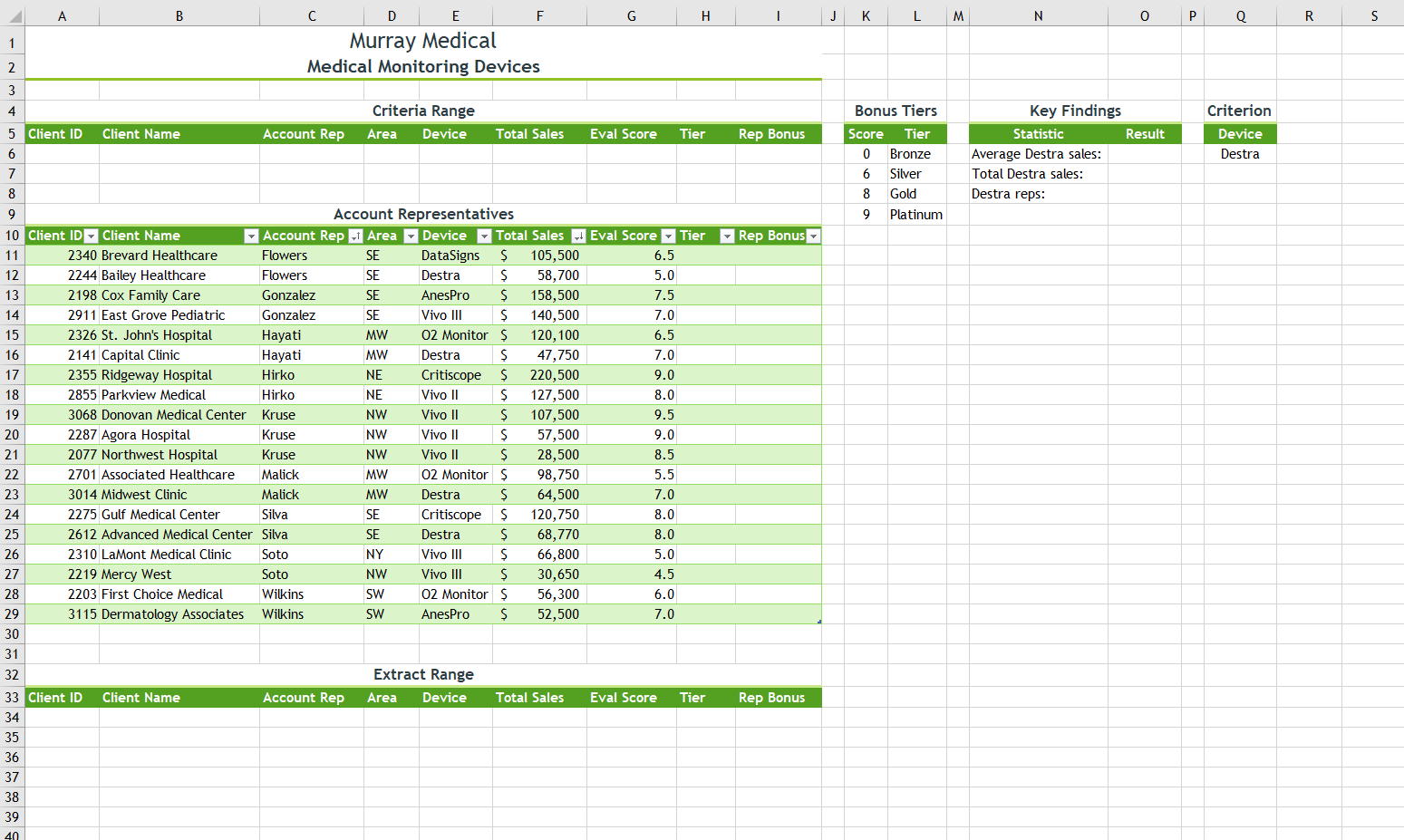
Question: 9.In cell O8, enter a formula using the COUNTIF function that counts the number of Destra devices, using a structured reference to the Device column
9.In cell O8, enter a formula using the COUNTIF function that counts the number of Destra devices, using a structured reference to the Device column (AccountReps[Device]) as the range and cell Q6 as the criteria.
10.Bao wants to identify clients in the southeast with total sales of $100,000 or more, and then list them in a separate part of the worksheet. In cell D6, enter a criterion to select clients in the SE Area. In cell F6, enter a criterion to select Total Sales greater than or equal to 100000. Create an advanced filter using the data in the AccountReps table (range A10:I29) as the List range. Use the range A5:I6 as the Criteria range. Copy the results to another location, starting in the range A34:I34.
11.As a contrast, Bao also wants to list the clients in other parts of the country. In the AccountReps table, display the filter arrows, and then filter the table to display all clients except those in the southeast. (Hint: Use the Filter command on the Sort & Filter menu to display the filter arrows.)
Step by Step Solution
There are 3 Steps involved in it

Get step-by-step solutions from verified subject matter experts
 Study Help