







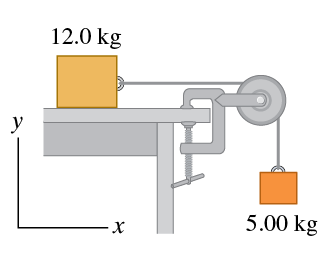
Question: A 1 2 . 0 kg box resting on a horizontal, frictionless surface is attached to a 5 . 0 0 kg weight by a
A kg
box resting on a horizontal, frictionless surface is attached to a kg
weight by a thin, light wire that passes over a frictionless pulley Figure The pulley has the shape of a uniform solid disk of mass kg
and diameter m
Part A
After the system is released, find the tension in the horizontal segment of the wire.
Express your answer with the appropriate units.
Activate to select the appropriates template from the following choices. Operate up and down arrow for selection and press enter to choose the input value typeActivate to select the appropriates symbol from the following choices. Operate up and down arrow for selection and press enter to choose the input value type
Th
nothing
nothing
Request Answer
Part B
After the system is released, find the tension in the vertical segment of the wire.
Express your answer with the appropriate units.
Activate to select the appropriates template from the following choices. Operate up and down arrow for selection and press enter to choose the input value typeActivate to select the appropriates symbol from the following choices. Operate up and down arrow for selection and press enter to choose the input value type
Tv
nothing
nothing
Request Answer
Part C
After the system is released, find the acceleration of the box.
Express your answer with the appropriate units.
Activate to select the appropriates template from the following choices. Operate up and down arrow for selection and press enter to choose the input value typeActivate to select the appropriates symbol from the following choices. Operate up and down arrow for selection and press enter to choose the input value type
ay
nothing
nothing
Request Answer
Part D
After the system is released, find the horizontal and vertical components of the force that the axle exerts on the pulley.
Express your answers in newtons separated by a comma.
Activate to select the appropriates template from the following choices. Operate up and down arrow for selection and press enter to choose the input value typeActivate to select the appropriates symbol from the following choices. Operate up and down arrow for selection and press enter to choose the input value type
Fx
Fy
Step by Step Solution
There are 3 Steps involved in it
1 Expert Approved Answer
Step: 1 Unlock

Question Has Been Solved by an Expert!
Get step-by-step solutions from verified subject matter experts
Step: 2 Unlock
Step: 3 Unlock
 Study Help