





Question: A 6 1. The table below shows the relevant data for a project scheduled to start on Monday, April 12th, 2021. Use Microsoft Project to
A 6 1. The table below shows the relevant data

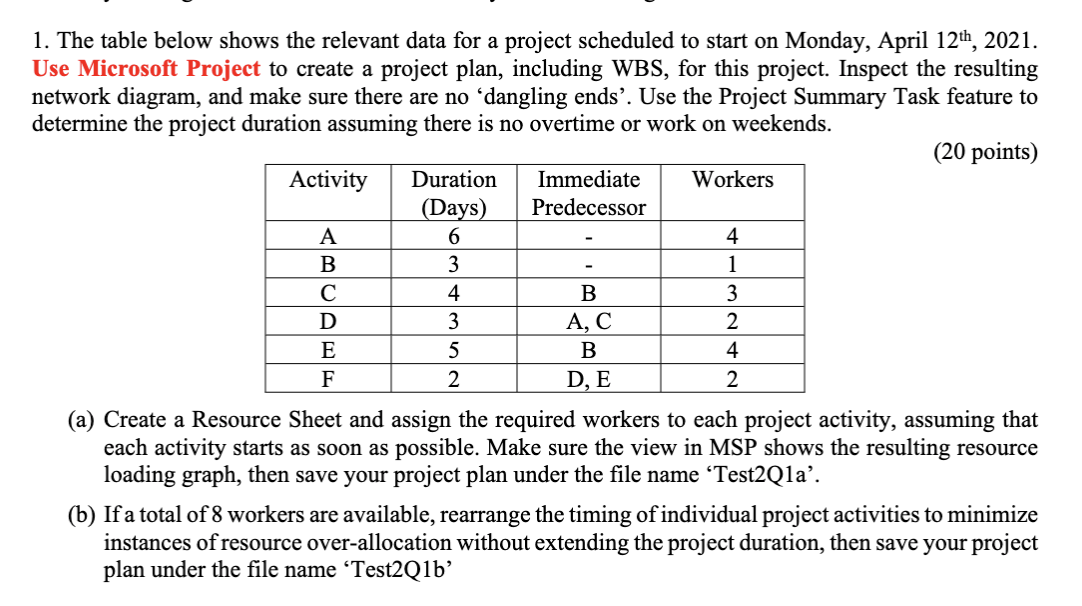
A 6 1. The table below shows the relevant data for a project scheduled to start on Monday, April 12th, 2021. Use Microsoft Project to create a project plan, including WBS, for this project. Inspect the resulting network diagram, and make sure there are no dangling ends'. Use the Project Summary Task feature to determine the project duration assuming there is no overtime or work on weekends. (20 points) Activity Duration Immediate Workers (Days) Predecessor 4 B 3 1 4 B 3 D 3 AC 2 E 5 B 4 F D, E 2 (a) Create a Resource Sheet and assign the required workers to each project activity, assuming that each activity starts as soon as possible. Make sure the view in MSP shows the resulting resource loading graph, then save your project plan under the file name Test2Qla. (b) If a total of 8 workers are available, rearrange the timing of individual project activities to minimize instances of resource over-allocation without extending the project duration, then save your project plan under the file name 'Test2Q1b' 2

Step by Step Solution

There are 3 Steps involved in it

1 Expert Approved Answer
Step: 1 Unlock blur-text-image

Question Has Been Solved by an Expert!

Get step-by-step solutions from verified subject matter experts

Step: 2 Unlock
Step: 3 Unlock

Students Have Also Explored These Related General Management Questions!