







Question: A B D 3 Prepare an income statement and a common-sized income statement from the 4 following information. Complete the steps below using cell references
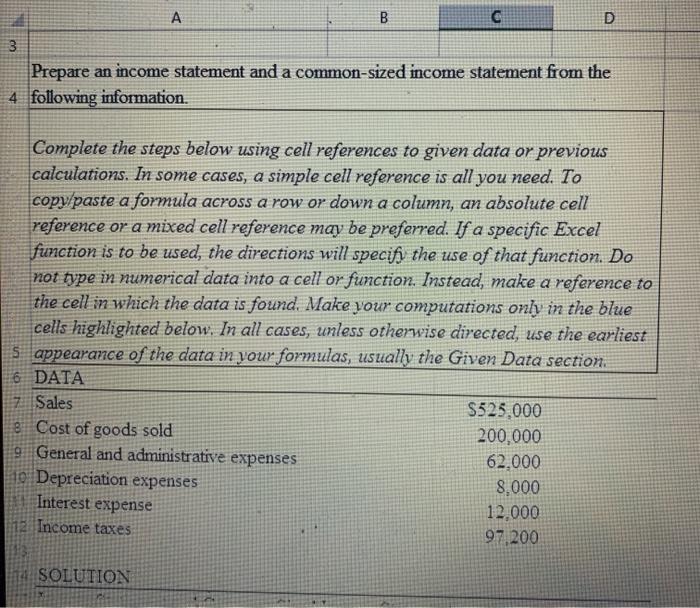
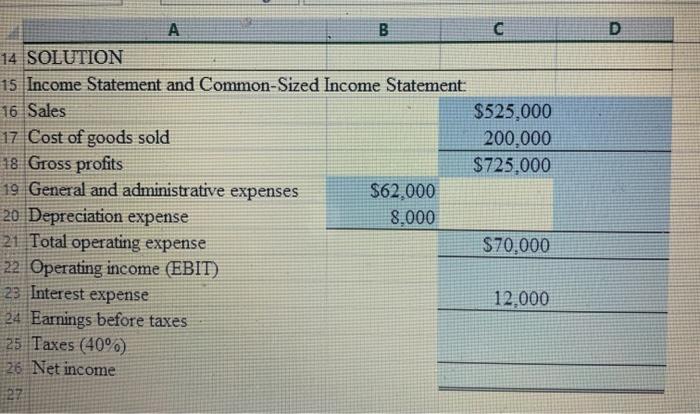
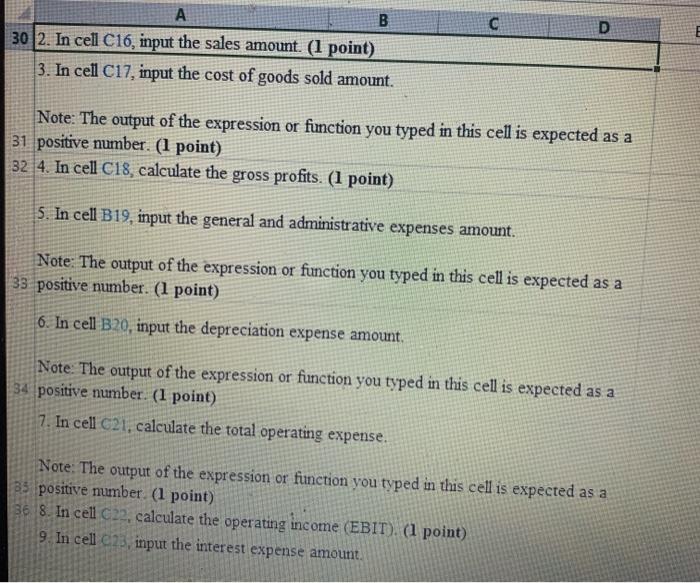
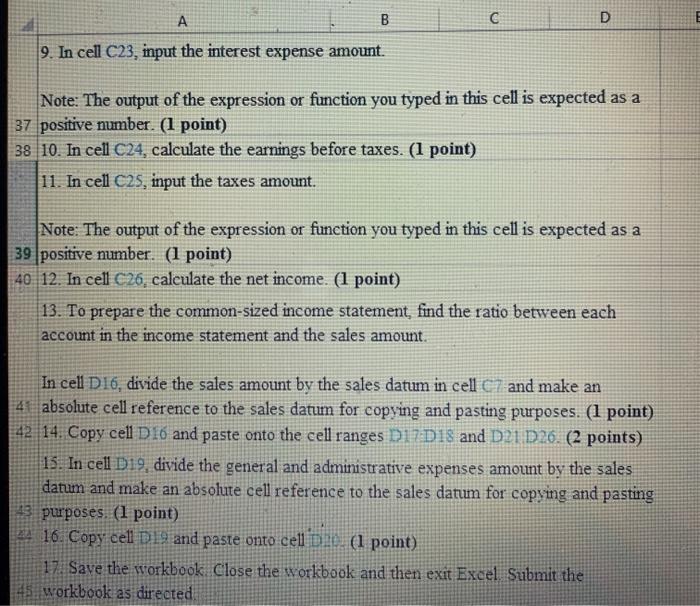
A B D 3 Prepare an income statement and a common-sized income statement from the 4 following information. Complete the steps below using cell references to given data or previous calculations. In some cases, a simple cell reference is all you need. To copy/paste a formula across a row or down a column, an absolute cell reference or a mixed cell reference may be preferred. If a specific Excel function is to be used, the directions will specifi the use of that function. Do not type in numerical data into a cell or function. Instead, make a reference to the cell in which the data is found. Make your computations only in the blue cells highlighted below. In all cases, unless otherwise directed, use the earliest s appearance of the data in your formulas, usually the Given Data section 6 DATA 7 Sales S525.000 8 Cost of goods sold 200,000 9 General and administrative expenses 62.000 10 Depreciation expenses 8,000 12.000 Income taxes 97,200 Interest expense SOLUTION D B C 14 SOLUTION 15 Income Statement and Common-Sized Income Statement: 16 Sales $525,000 17 Cost of goods sold 200.000 18 Gross profits $725.000 19 General and administrative expenses $62.000 20 Depreciation expense 8,000 21 Total operating expense $70,000 22 Operating income (EBIT) 23 Interest expense 12,000 24 Earnings before taxes 25 Taxes (40%) 26 Net income 27 D A B 30 2. In cell C16, input the sales amount. (1 point) 3. In cell C17, input the cost of goods sold amount. Note: The output of the expression or function you typed in this cell is expected as a 31 positive number. (1 point) 32 4. In cell C18, calculate the gross profits. (1 point) 5. In cell B19, input the general and administrative expenses amount. Note: The output of the expression or function you typed in this cell is expected as a 33 positive number. (1 point) 6. In cell B20, input the depreciation expense amount. Note: The output of the expression or function you typed in this cell is expected as a 34 positive number. (1 point) 7. In cell C21, calculate the total operating expense. Note: The output of the expression or function you typed in this cell is expected as a 35 positive number. (1 point) 36 8. In cell C22, calculate the operating income (EBIT). (1 point) 9. In cell C2, input the interest expense amount. A B D 9. In cell C23, input the interest expense amount. Note: The output of the expression or function you typed in this cell is expected as a 37 positive number. (1 point) 38 10. In cell C24, calculate the earnings before taxes. (1 point) 11. In cell C25, input the taxes amount. Note: The output of the expression or function you typed in this cell is expected as a 39 positive number. (1 point) 40 12. In cell C26, calculate the net income. (1 point) 13. To prepare the common-sized income statement, find the ratio between each account in the income statement and the sales amount. In cell D16, divide the sales amount by the sales datum in cell C and make an 41 absolute cell reference to the sales datum for copying and pasting purposes. (1 point) 42 14. Copy cell D 16 and paste onto the cell ranges D17D18 and D2 D26. (2 points) 15. In cell D19, divide the general and administrative expenses amount by the sales datum and make an absolute cell reference to the sales datum for copying and pasting 43 purposes. (1 point) 16. Copy cell D 19 and paste onto cell Die (1 point) 17. Save the workbook Close the workbook and then exit Excel Submit the 45. workbook as directed
Step by Step Solution
There are 3 Steps involved in it

Get step-by-step solutions from verified subject matter experts
 Study Help