



Question: Corporate Finance b. In cell range C42:G53, insert a Line chart to plot the NPV profile of the investment opportunity with the cost of capital
Corporate Finance
b. In cell range C42:G53, insert a Line chart to plot the NPV profile of the investment opportunity with the cost of capital (cell range D30:D40) on the horizontal axis and the NPV (cell range E30:E40) on the vertical axis. Use the following labels: title: NPV Profile, horizontal axis label: Cost of Capital and vertical axis label: NPV.
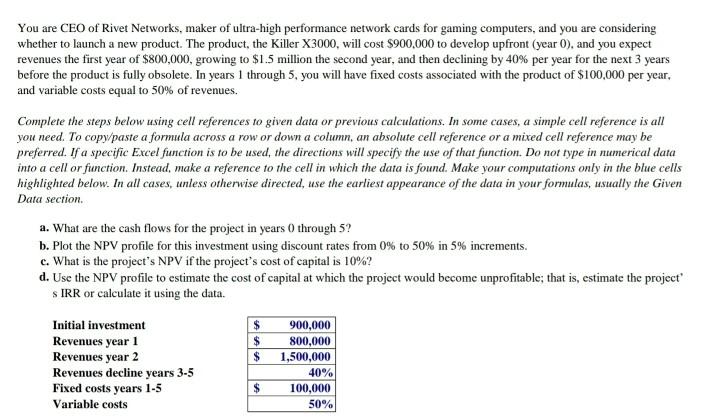
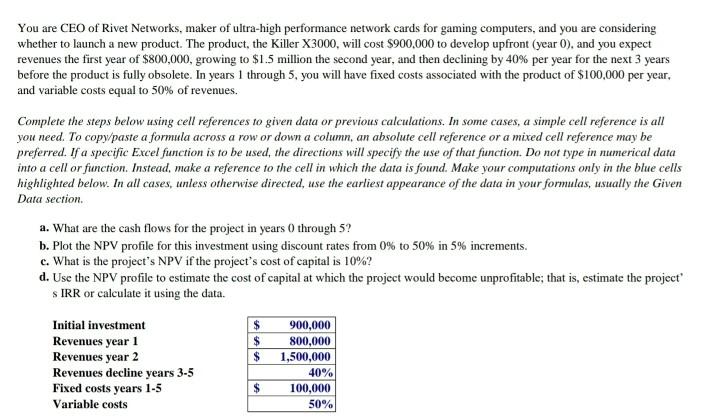
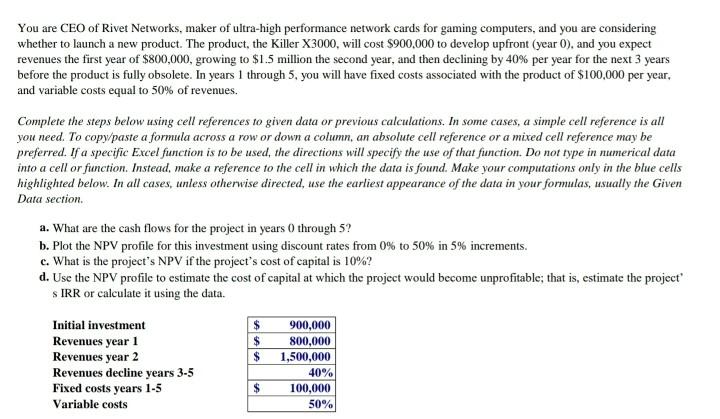
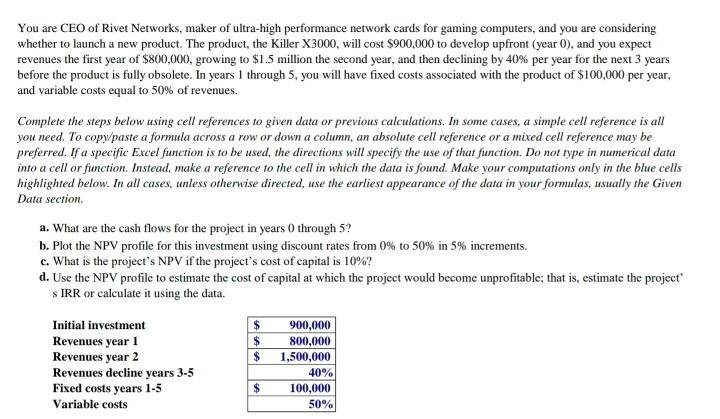
You are CEO of Rivet Networks, maker of ultra-high performance network cards for gaming computers, and you are considering whether to launch a new product. The product, the Killer X3000, will cost $900,000 to develop upfront (year 0), and you expect revenues the first year of $800,000, growing to $1.5 million the second year, and then declining by 40% per year for the next 3 years before the product is fully obsolete. In years 1 through 5, you will have fixed costs associated with the product of $100,000 per year, and variable costs equal to 50% of revenues. Complete the steps below using cell references to given data or previous calculations. In some cases, a simple cell reference is all you need. To copy/paste a formula across a row or down a column, an absolute cell reference or a mixed cell reference may be preferred. If a specific Excel function is to be used the directions will specify the use of that function. Do not type in numerical data into a cell or function. Instead, make a reference to the cell in which the data is found. Make your computations only in the blue cells highlighted below. In all cases, unless otherwise directed, use the earliest appearance of the data in your formulas, usually the Given Data section. a. What are the cash flows for the project in years through 5? b. Plot the NPV profile for this investment using discount rates from 0% to 50% in 5% increments. c. What is the project's NPV if the project's cost of capital is 10%? d. Use the NPV profile to estimate the cost of capital at which the project would become unprofitable; that is, estimate the project S IRR or calculate it using the data. Initial investment $ 900,000 Revenues year 1 $ 800,000 Revenues year 2 1,500,000 Revenues decline years 3-5 Fixed costs years 1-5 100,000 Variable costs 50% $ 40% $ You are CEO of Rivet Networks, maker of ultra-high performance network cards for gaming computers, and you are considering whether to launch a new product. The product, the Killer X3000, will cost $900,000 to develop upfront (year 0), and you expect revenues the first year of $800,000, growing to $1.5 million the second year, and then declining by 40% per year for the next 3 years before the product is fully obsolete. In years 1 through 5, you will have fixed costs associated with the product of $100,000 per year, and variable costs equal to 50% of revenues. Complete the steps below using cell references to given data or previous calculations. In some cases, a simple cell reference is all you need. To copy/paste a formula across a row or down a column, an absolute cell reference or a mixed cell reference may be preferred. If a specific Excel function is to be used the directions will specify the use of that function. Do not type in numerical data into a cell or function. Instead, make a reference to the cell in which the data is found. Make your computations only in the blue cells highlighted below. In all cases, unless otherwise directed, use the earliest appearance of the data in your formulas, usually the Given Data section. a. What are the cash flows for the project in years through 5? b. Plot the NPV profile for this investment using discount rates from 0% to 50% in 5% increments. c. What is the project's NPV if the project's cost of capital is 10%? d. Use the NPV profile to estimate the cost of capital at which the project would become unprofitable; that is, estimate the project S IRR or calculate it using the data. Initial investment $ 900,000 Revenues year 1 $ 800,000 Revenues year 2 1,500,000 Revenues decline years 3-5 Fixed costs years 1-5 100,000 Variable costs 50% $ 40% $ You are CEO of Rivet Networks, maker of ultra-high performance network cards for gaming computers, and you are considering whether to launch a new product. The product, the Killer X3000, will cost $900,000 to develop upfront (year 0), and you expect revenues the first year of $800,000, growing to $1.5 million the second year, and then declining by 40% per year for the next 3 years before the product is fully obsolete. In years 1 through 5, you will have fixed costs associated with the product of $100,000 per year, and variable costs equal to 50% of revenues. Complete the steps below using cell references to given data or previous calculations. In some cases, a simple cell reference is all you need. To copy/paste a formula across a row or down a column, an absolute cell reference or a mixed cell reference may be preferred. If a specific Excel function is to be used the directions will specify the use of that function. Do not type in numerical data into a cell or function. Instead, make a reference to the cell in which the data is found. Make your computations only in the blue cells highlighted below. In all cases, unless otherwise directed, use the earliest appearance of the data in your formulas, usually the Given Data section. a. What are the cash flows for the project in years through 5? b. Plot the NPV profile for this investment using discount rates from 0% to 50% in 5% increments. c. What is the project's NPV if the project's cost of capital is 10%? d. Use the NPV profile to estimate the cost of capital at which the project would become unprofitable; that is, estimate the project S IRR or calculate it using the data. Initial investment $ 900,000 Revenues year 1 $ 800,000 Revenues year 2 1,500,000 Revenues decline years 3-5 Fixed costs years 1-5 100,000 Variable costs 50% $ 40% $ You are CEO of Rivet Networks, maker of ultra-high performance network cards for gaming computers, and you are considering whether to launch a new product. The product, the Killer X3000, will cost $900,000 to develop upfront (year 0), and you expect revenues the first year of $800,000, growing to $1.5 million the second year, and then declining by 40% per year for the next 3 years before the product is fully obsolete. In years 1 through 5, you will have fixed costs associated with the product of $100,000 per year, and variable costs equal to 50% of revenues. Complete the steps below using cell references to given data or previous calculations. In some cases, a simple cell reference is all you need. To copy/paste a formula across a row or down a column, an absolute cell reference or a mixed cell reference may be preferred. If a specific Excel function is to be used the directions will specify the use of that function. Do not type in numerical data into a cell or function. Instead, make a reference to the cell in which the data is found. Make your computations only in the blue cells highlighted below. In all cases, unless otherwise directed, use the earliest appearance of the data in your formulas, usually the Given Data section. a. What are the cash flows for the project in years through 5? b. Plot the NPV profile for this investment using discount rates from 0% to 50% in 5% increments. c. What is the project's NPV if the project's cost of capital is 10%? d. Use the NPV profile to estimate the cost of capital at which the project would become unprofitable; that is, estimate the project S IRR or calculate it using the data. Initial investment $ 900,000 Revenues year 1 $ 800,000 Revenues year 2 1,500,000 Revenues decline years 3-5 Fixed costs years 1-5 100,000 Variable costs 50% $ 40% $
Step by Step Solution
There are 3 Steps involved in it

Get step-by-step solutions from verified subject matter experts