







Question: A. B. What is the difference between 1, 1, 11, and 1+0i? If we were to create an atomic vector using the command of1, 1,
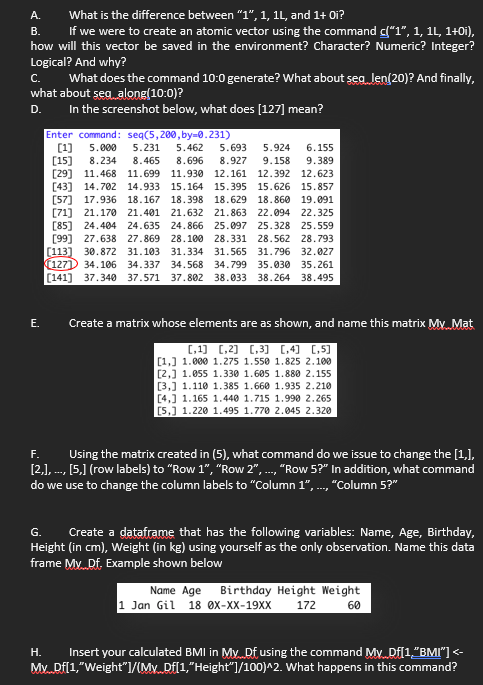
A. B. What is the difference between "1", 1, 11, and 1+0i? If we were to create an atomic vector using the command of"1", 1, 11, 1+0i), how will this vector be saved in the environment? Character? Numeric? Integer? Logical? And why? C. What does the command 10:0 generate? What about seg len(20)? And finally, what about seg along(10:0)? D. In the screenshot below, what does [127] mean? (1) Enter command: seq(5,280, by 0.231) 5.000 5.231 5.462 5.693 5.924 6.155 [15) 8.234 8.465 8.696 8.927 9.158 9.389 [29] 11.468 11.699 11.930 12.161 12.392 12.623 [43] 14.702 14.933 15.164 15.395 15.626 15.857 [57] 17.936 18.167 18.398 18.629 18.860 19.091 [71] 21.170 21.401 21.632 21.863 22.094 22.325 [85] 24.404 24.635 24.866 25.097 25.328 25.559 [99] 27.638 27.869 28.100 28.331 28.562 28.793 [113] 30.872 31.103 31.334 31.565 31.796 32.027 (127) 34.106 34.337 34.568 34.799 35.030 35.261 (141) 37.340 37.571 37.802 38.033 38.264 38.495 E. Create a matrix whose elements are as shown, and name this matrix My Mat (,1) 0,2] [3] [,4) 0,5) [1.] 1.000 1.275 1.550 1.825 2.100 [2.] 1.855 1.330 1.605 1.880 2.155 [3,] 1.110 1.385 1.660 1.935 2.210 [4.] 1.165 1.440 1.715 1.998 2.265 [5] 1.220 1.495 1.770 2.645 2.320 F. Using the matrix created in (5), what command do we issue to change the [1,). [2.), ---, (5,1 (row labels) to "Row 1", "Row 2", ..., "Row 5?" In addition, what command do we use to change the column labels to "Column 1", ., "Column 5?" G. Create a dataframe that has the following variables: Name, Age, Birthday, Height (in cm), Weight (in kg) using yourself as the only observation. Name this data frame My Df. Example shown below Name Age Birthday Height Weight 1 Jan Gil 18 ox-XX-19XX 172 60 H. Insert your calculated BMI in My Df using the command My Df[1,"BMI"]
Step by Step Solution
There are 3 Steps involved in it

Get step-by-step solutions from verified subject matter experts
 Study Help