







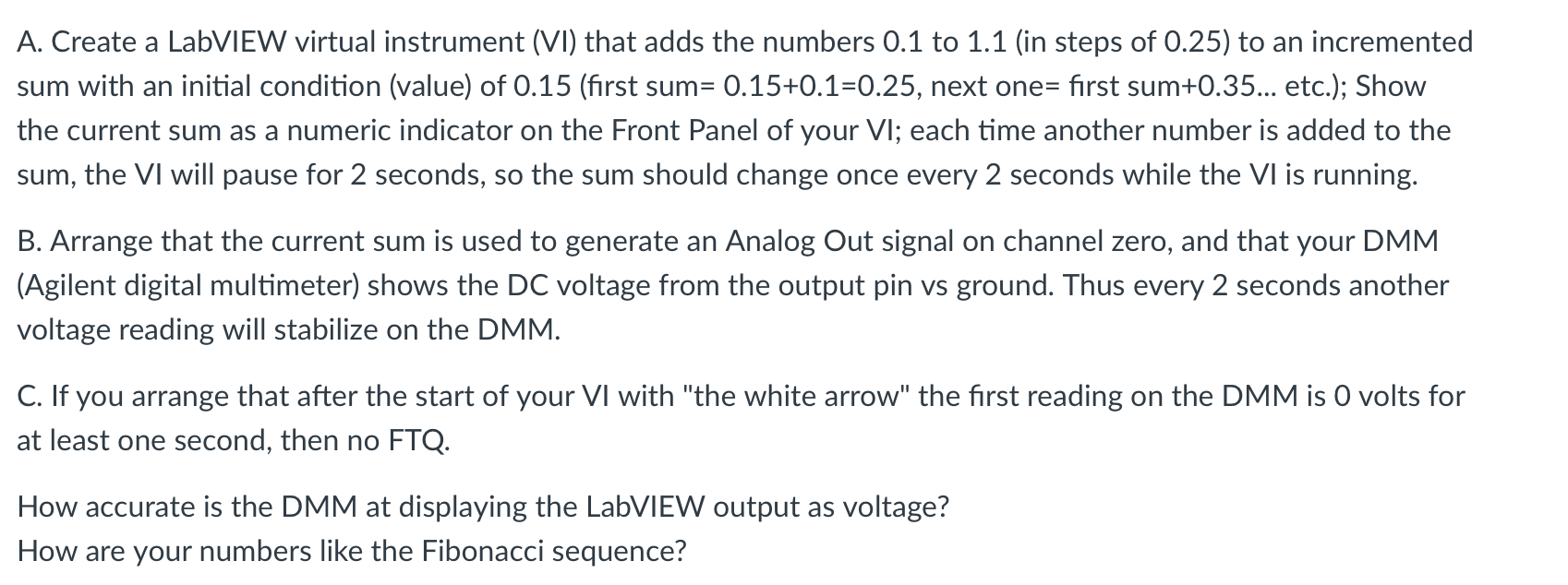
Question: A . Create a LabVIEW virtual instrument ( ( mathrm { VI } ) ) that adds the numbers 0 . 1
A Create a LabVIEW virtual instrument mathrmVI that adds the numbers to in steps of to an incremented sum with an initial condition value of first sum next one first sum etc.; Show the current sum as a numeric indicator on the Front Panel of your VI ; each time another number is added to the sum, the VI will pause for seconds, so the sum should change once every seconds while the VI is running.
B Arrange that the current sum is used to generate an Analog Out signal on channel zero, and that your DMM Agilent digital multimeter shows the DC voltage from the output pin vs ground. Thus every seconds another voltage reading will stabilize on the DMM
C If you arrange that after the start of your VI with "the white arrow" the first reading on the DMM is volts for at least one second, then no FTQ
How accurate is the DMM at displaying the LabVIEW output as voltage?
How are your numbers like the Fibonacci sequence?
Step by Step Solution
There are 3 Steps involved in it
1 Expert Approved Answer
Step: 1 Unlock

Question Has Been Solved by an Expert!
Get step-by-step solutions from verified subject matter experts
Step: 2 Unlock
Step: 3 Unlock
 Study Help