







Question: Use labview please. Construct a Virtual Instrument, VI, to compute roots of quadratic and display the above requirements given the test cases. Please help I
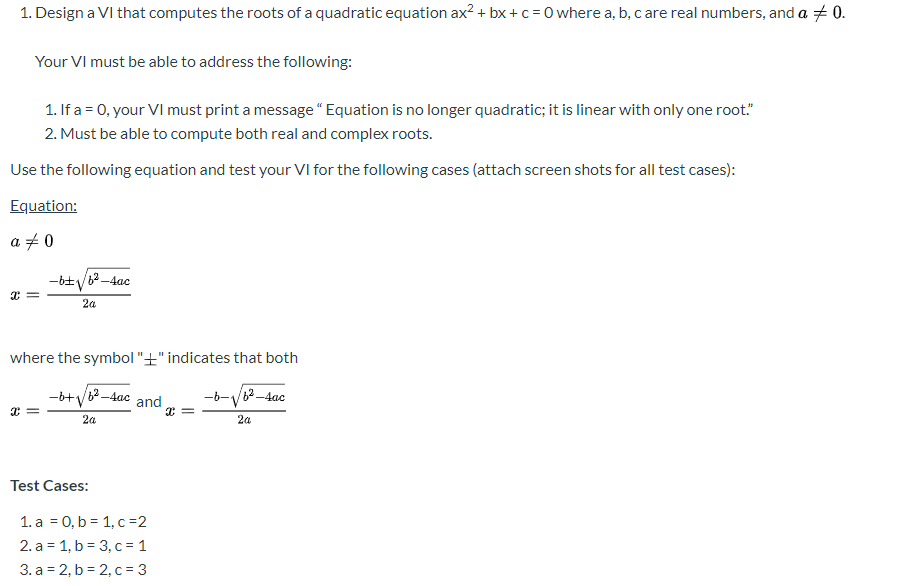
Use labview please. Construct a Virtual Instrument, VI, to compute roots of quadratic and display the above requirements given the test cases. Please help I am new to labview programming and learning how to select components and wire. Need to see Front panel and block diagram.
1. Design a VI that computes the roots of a quadratic equation ax2 + bx+c = 0 where a, b, care real numbers, and a +0. Your VI must be able to address the following: 1. If a = 0. your VI must print a message "Equation is no longer quadratic; it is linear with only one root." 2. Must be able to compute both real and complex roots. Use the following equation and test your VI for the following cases (attach screen shots for all test cases): Equation: a 70 -6+V62-4ac 2a where the symbol "+" indicates that both + = =+*%82-tee and op = +V0-dae 2a Test Cases: 1. a = 0,b= 1,c=2 2. a = 1, b = 3,c= 1 3. a = 2,b=2,c= 3 1. Design a VI that computes the roots of a quadratic equation ax2 + bx+c = 0 where a, b, care real numbers, and a +0. Your VI must be able to address the following: 1. If a = 0. your VI must print a message "Equation is no longer quadratic; it is linear with only one root." 2. Must be able to compute both real and complex roots. Use the following equation and test your VI for the following cases (attach screen shots for all test cases): Equation: a 70 -6+V62-4ac 2a where the symbol "+" indicates that both + = =+*%82-tee and op = +V0-dae 2a Test Cases: 1. a = 0,b= 1,c=2 2. a = 1, b = 3,c= 1 3. a = 2,b=2,c= 3
Step by Step Solution
There are 3 Steps involved in it

Get step-by-step solutions from verified subject matter experts
 Study Help