







Question: a) Create a plan for this project in MSP following our usual conventions and use MSPs Project Summary Task feature to compute the overall project
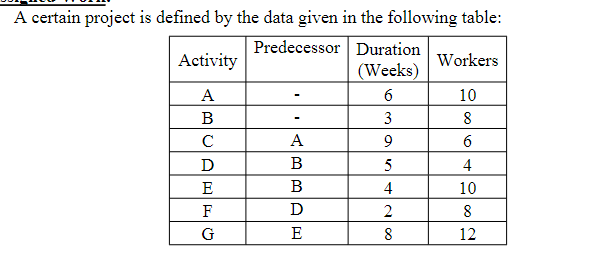
a) Create a plan for this project in MSP following our usual conventions and use MSPs Project Summary Task feature to compute the overall project duration. Inspect the resulting project network and make sure there are no dangling ends. Assign the required workers to each project activity, assuming that each activity starts as soon as possible. Make sure the view in MSP shows the resulting resource loading graph, then save your project plan under the file name HW8a. b) For the project plan you generated in part (a), rearrange the timing of select individual activities within MSP to reduce the overall fluctuation in resource demand. Assume that the project duration cannot be extended and remember that the precedence relationships must not be violated. Save your revised project plan under the file name HW8b. c) If there are only 20 workers available for this project, rearrange the timing of select individual activities within MSP to ensure that the project can be completed as quickly as possible but without violating the resource limit. In this case, the project duration may be extended if necessary (but again making sure to maintain all precedence relationships). Save your revised project plan under the file name HW8c.
A certain project is defined by the data given in the following table: Predecessor Duration Activity Workers (Weeks) A 6 10 B 3 8 A 9 6 D B 5 4 E B 4 10 F D 2 8 G E 8 12 AL Olco G A certain project is defined by the data given in the following table: Predecessor Duration Activity Workers (Weeks) A 6 10 B 3 8 A 9 6 D B 5 4 E B 4 10 F D 2 8 G E 8 12 AL Olco GStep by Step Solution
There are 3 Steps involved in it

Get step-by-step solutions from verified subject matter experts
 Study Help