







Question: A - I'm Sorry Dave. I Can't Do That HAL 9000 is a fictional character in Arthur C. Clarke's 2001: A Space Odyssey. HAL
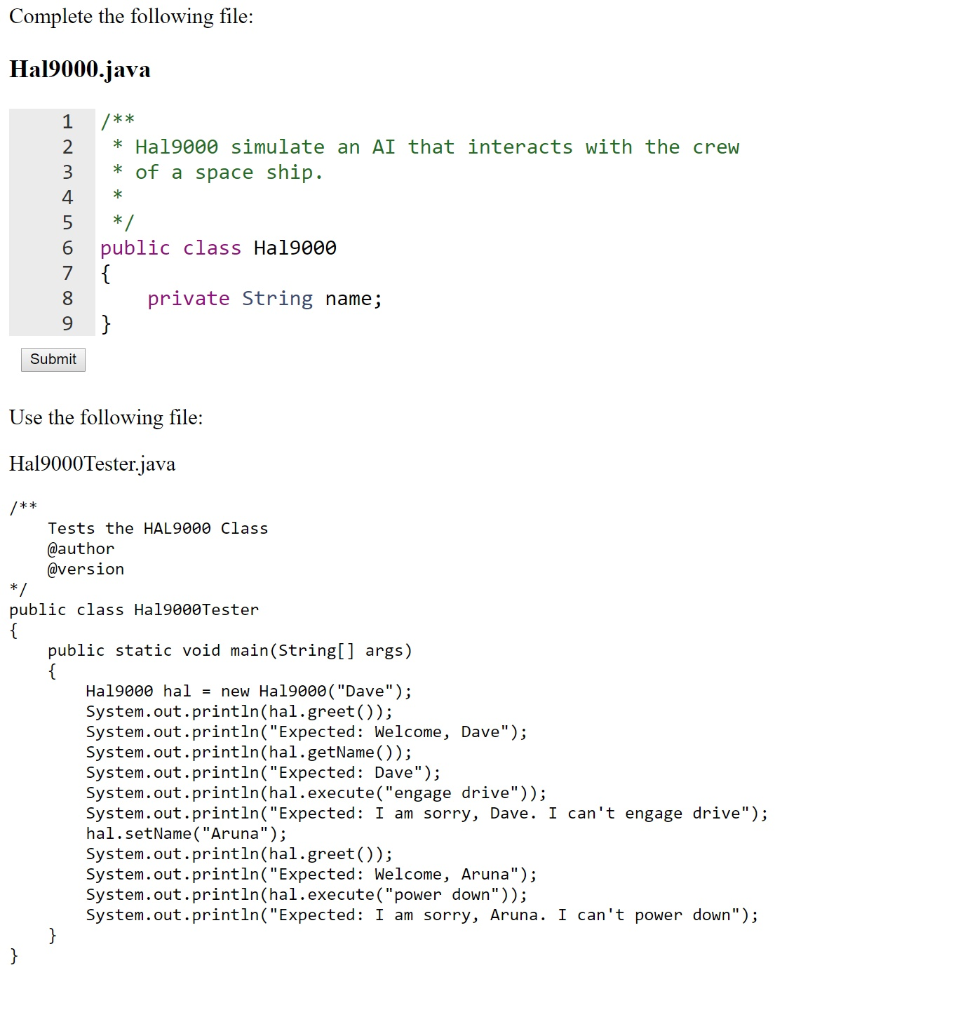
A - I'm Sorry Dave. I Can't Do That HAL 9000 is a fictional character in Arthur C. Clarke's 2001: A Space Odyssey. HAL (Heuristically programmed Algorithmic computer) is an AI (artificial intelligence) computer that controls the systems of the spacecraft and interacts with the crew. In this assignment you will finish the Ha19000 class. The Ha19000 has one constructor which takes a string parameter of a name of the crew member it is interacting with. It has methods: public String getName() which gets the name public void setName (String newName) which sets a new name public String greet () which returns a string consisting of "Greetings, name" where name is the name supplied in the constructor. public String reportStatus () which returns a string consisting of "All systems are operating normally, name" where name is the name supplied in the constructor. public String execute (String command) which returns a string consisting of "I am sorry, name. I can't " + command where name is the name supplied in the constructor and command is the parameter. Supply Javadoc for the constructor and all the methods Complete the following file: Hal9000.java * Hal9000 simulate an AI that interacts with the crew * of a space ship. 1 /** 2 3 4 * 5 */ 6 7 { 8 9 public class Ha19000 private String name; Submit Use the following file: Hal9000Tester.java /** */ Tests the HAL9000 Class @author @version public class Ha19000Tester { public static void main(String[] args) { Ha19000 hal = new Hal9000 ("Dave"); System.out.println(hal.greet()); System.out.println("Expected: Welcome, Dave"); System.out.println(hal.getName()); System.out.println("Expected: Dave"); System.out.println(hal.execute(" "engage drive")); System.out.println("Expected: I am sorry, Dave. I can't engage drive"); hal.setName("Aruna"); System.out.println(hal.greet()); System.out.println("Expected: Welcome, Aruna"); System.out.println(hal.execute("power down")); System.out.println("Expected: I am sorry, Aruna. I can't power down"); } }
Step by Step Solution
There are 3 Steps involved in it

Get step-by-step solutions from verified subject matter experts
 Study Help