







Question: A .ino file exists and is attached below. The code is designed to convert a decimal number to its binary counterpart, however, it contains errors.
A ".ino" file exists and is attached below. The code is designed to convert a decimal number to its binary counterpart, however, it contains errors. It is your responsibility to:
Read the code and fix any errors so that it can convert decimal to binary without adding extra lines of code.
Instead of only converting one number, change the code to count in binary (0-31).
Change the code such that 5 LEDs light up to indicate the binary number (LOW = 0; HIGH = 1).
*Please appropriately format and comment on the code
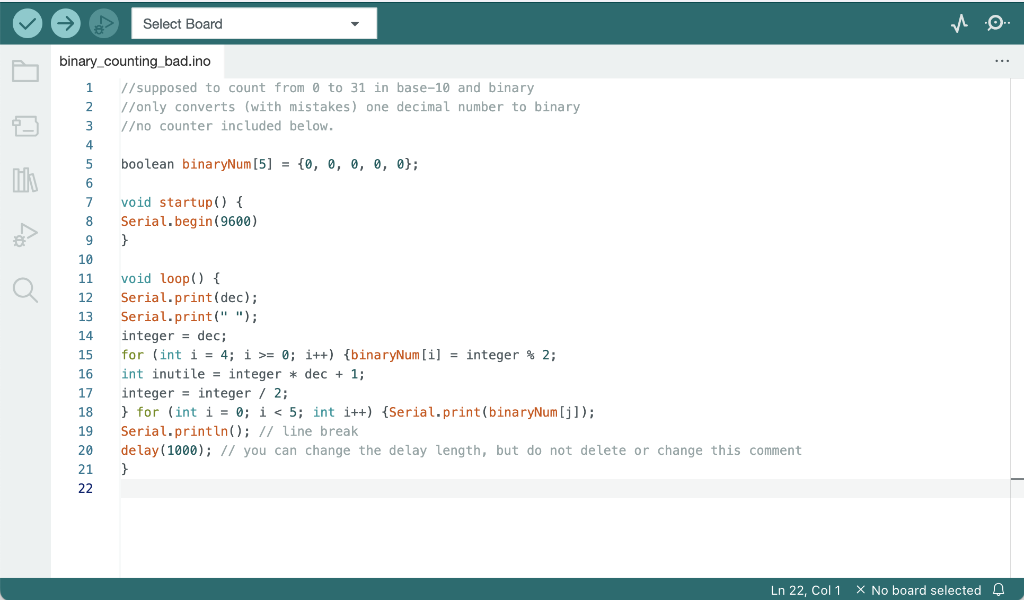
TEXT FILE:
//supposed to count from 0 to 31 in base-10 and binary
//only converts (with mistakes) one decimal number to binary
/o counter included below.
boolean binaryNum[5] = {0, 0, 0, 0, 0};
void startup() {
Serial.begin(9600)
}
void loop() {
Serial.print(dec);
Serial.print(" ");
integer = dec;
for (int i = 4; i >= 0; i++) {binaryNum[i] = integer % 2;
int inutile = integer * dec + 1;
integer = integer / 2;
} for (int i = 0; i
Serial.println(); // line break
delay(1000); // you can change the delay length, but do not delete or change this comment
}
12345678910111213141516171819202122//supposedtocountfrom0to31inbase-10andbinary//onlyconverts(withmistakes)onedecimalnumbertobinary/ocounterincludedbelow.booleanbinaryNum[5]={0,0,0,0,0};voidstartup(){Serial.begin(9600)}voidloop(){Serial.print(dec);Serial.print("");integer=dec;for(inti=4;i>=0;i++){binaryNum[i]=integer2;intinutile=integerdec+1;integer=integer/2;}for(inti=0;i
Step by Step Solution
There are 3 Steps involved in it

Get step-by-step solutions from verified subject matter experts
 Study Help