







Question: A MATLAB function M-file for Euler's method (as described in class and on pages 17-19 of the textbook) for solving the differential equation 0 dt
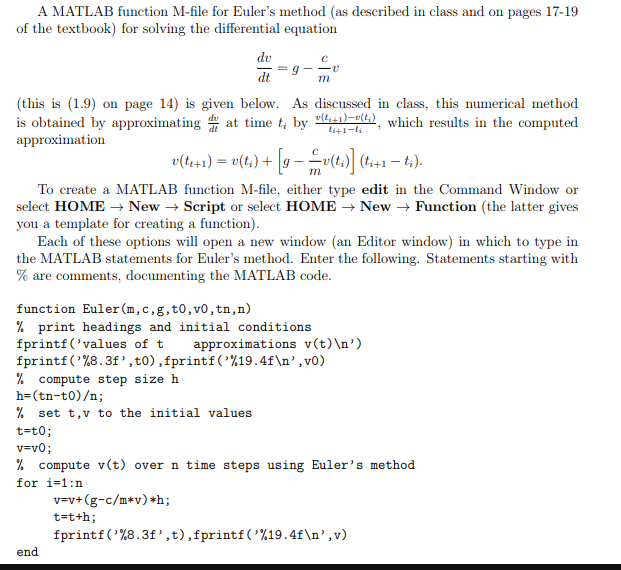
A MATLAB function M-file for Euler's method (as described in class and on pages 17-19 of the textbook) for solving the differential equation 0 dt (this is (1.9) on page 14) is given below. As discussed in class, this numerical method is obtained by approximating at time t, by approximation which results in the computed To create a MATLAB function M-file, either type edit in the Command Window or select HOMENew - Script or select HOMENew - Function (the latter gives you a template for creating a function) Each of these options will open a new window (an Editor window) in which to type in the MATLAB statements for Euler's method. Enter the following. Statements starting with % are comments. documenting the MATLAB code. function Euler(m,c, g,t0, v0, tn,n) % print headings and initial conditions fprintf ('values of approximations v(t) ') % compute step size h h-(tn-to); % set t,v to the initial values t-to % compute v(t) over n time steps using Euler's method for i-1:n t-tth; forintf("X8.3f, t) ,fprintf('%19.4f ' ,v) end A MATLAB function M-file for Euler's method (as described in class and on pages 17-19 of the textbook) for solving the differential equation 0 dt (this is (1.9) on page 14) is given below. As discussed in class, this numerical method is obtained by approximating at time t, by approximation which results in the computed To create a MATLAB function M-file, either type edit in the Command Window or select HOMENew - Script or select HOMENew - Function (the latter gives you a template for creating a function) Each of these options will open a new window (an Editor window) in which to type in the MATLAB statements for Euler's method. Enter the following. Statements starting with % are comments. documenting the MATLAB code. function Euler(m,c, g,t0, v0, tn,n) % print headings and initial conditions fprintf ('values of approximations v(t) ') % compute step size h h-(tn-to); % set t,v to the initial values t-to % compute v(t) over n time steps using Euler's method for i-1:n t-tth; forintf("X8.3f, t) ,fprintf('%19.4f ' ,v) end
Step by Step Solution
There are 3 Steps involved in it

Get step-by-step solutions from verified subject matter experts
 Study Help