







Question: A . Objective: You will design a simple Java application with Graphical User Interface ( GUI ) for a university system to enroll new students,
A Objective: You will design a simple Java application with Graphical User Interface GUI for a university system to enroll new students, search for a student, view & edit student information, display students in list form, save student information in a simple text file and retrieve the information from the text file as well.
B Goals: This workshop is designed to provide you hands on design and coding experience using Java. In this workshop you will use Classes & Object, loop, ifelse conditions, switch statements, String & ArrayList classes, Java Swing & AWT and File IO Both the lecture and lab section time slots will be used towards this. The codes must be demonstrated to the instructor and submitted in the lab section of the course as lab work.
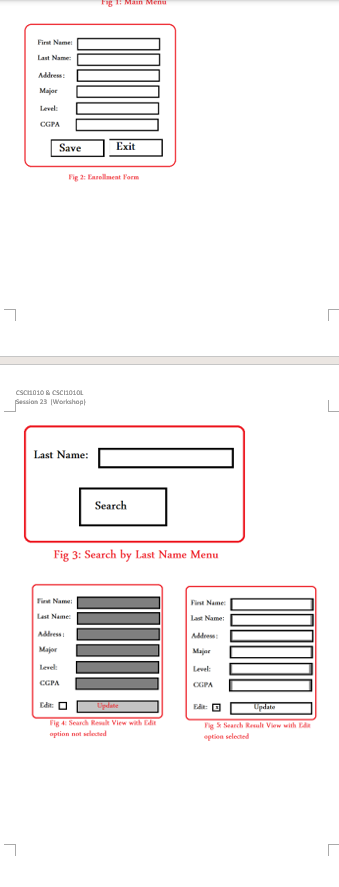
wireframe diagrams to design your user interface.
D Steps:
a For the GUI class MainMenu
i Create the class: extend JFrame and Implements ActionListener
ii Add the attributes for the buttons and the Jframe object
iii. Create the default constructor
iv Create a setup method make sure to call it from the constructor
Within the setup method instantiate the frame, the buttons, set the bounds, add action listeners, and add the buttons to the frame.
Set the size for the frame
Set layout to true
Set visible to true
v Add the actionPerformed method
b Follow the steps and add similar ones design other interfaces:
i Enrollment
ii Search
iii. ViewFig : Earollmeat Porm
CSchoio & Csciosol
fessias Workhop
Last Name:
Search
Fig : Search by Last Name Menu
aption not welocted
Fig St Seard Rewah View wilh Fin
eption selecaed
Step by Step Solution
There are 3 Steps involved in it
1 Expert Approved Answer
Step: 1 Unlock

Question Has Been Solved by an Expert!
Get step-by-step solutions from verified subject matter experts
Step: 2 Unlock
Step: 3 Unlock
 Study Help