







Question: A python question: For the following code: def _create(userParms): result = {'create': 'create stub'} return result Replace the default placeholder create with grid. so that
A python question:
For the following code:
def _create(userParms):
result = {'create': 'create stub'}
return result
Replace the default placeholder "create" with "grid". so that every time we call it, it randomly generates and returns something like:
{'grid': '0020000020000000'} or {'grid': '2200000000000000'} and so on.
the detail instruction on how to generate the number is as follow:

PS:
If you need more info, please email me at james.hdda at g mail dot com
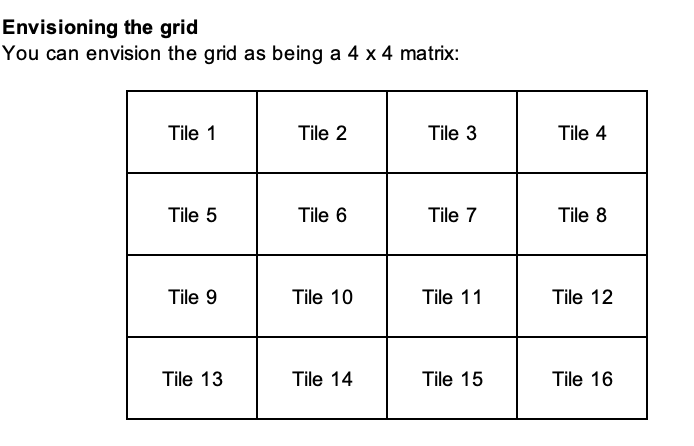
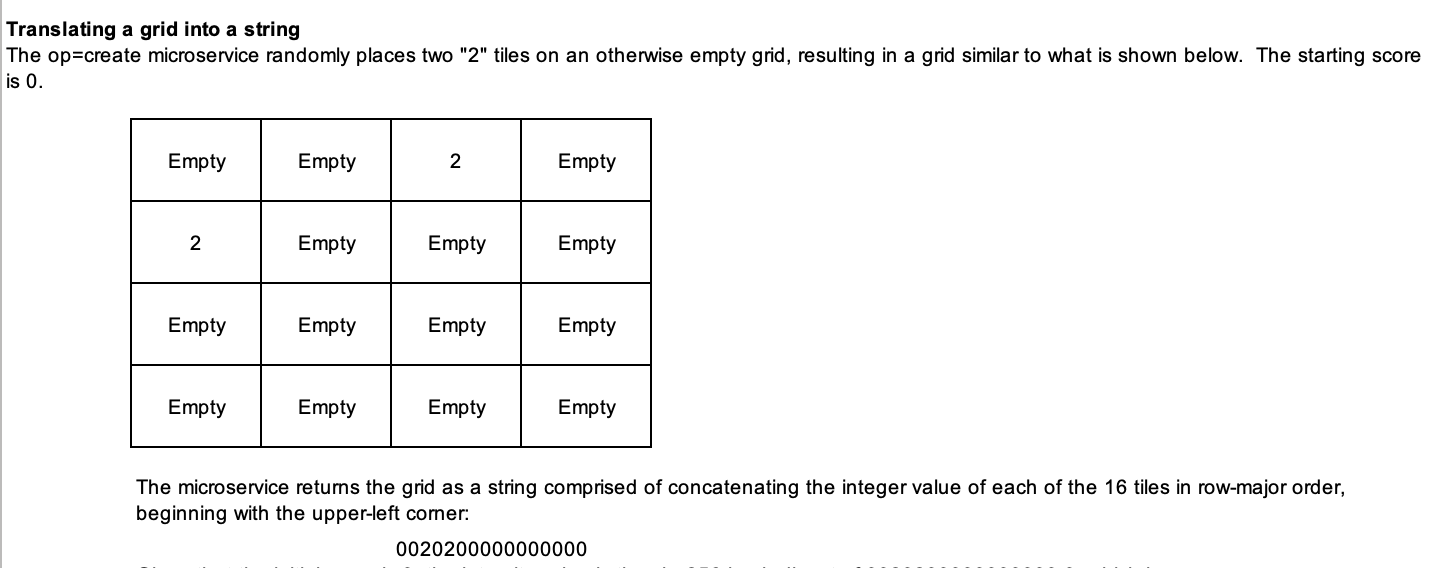
key grid content This key-value pair models the 2048 grid. Upon creation, two tiles, each having a value of 2, are randomly placed on a grid of otherwise empty tiles. The value associated with this key- value pair is a string comprised of concatenating the integer value of each of the 16 tiles in row- major order, beginning with the upper-left corner. Blank tiles are represented by "0"; non-blank tiles are represented without leading zeros. Envisioning the grid You can envision the grid as being a 4 x 4 matrix: Tile 1 Tile 2 Tile 3 Tile 4 Tile 5 Tile 6 Tile 7 Tile 8 Tile 9 Tile 10 Tile 11 Tile 12 Tile 13 Tile 14 Tile 15 Tile 16 Translating a grid into a string The op=create microservice randomly places two "2" tiles on an otherwise empty grid, resulting in a grid similar to what is shown below. The starting score is 0. Empty Empty 2 Empty 2 Empty Empty Empty Empty Empty Empty Empty Empty Empty Empty Empty The microservice returns the grid as a string comprised of concatenating the integer value of each of the 16 tiles in row- major order, beginning with the upper-left corner: 0020200000000000
Step by Step Solution
There are 3 Steps involved in it

Get step-by-step solutions from verified subject matter experts
 Study Help