



Question: A slight variation on generating the Sierpinski gasket with Problem Description: Refer to Exercise 2 . 1 . A slight variation on generating the Sierpinski
A slight variation on generating the Sierpinski gasket with Problem Description:
Refer to Exercise A slight variation on generating the Sierpinski gasket with
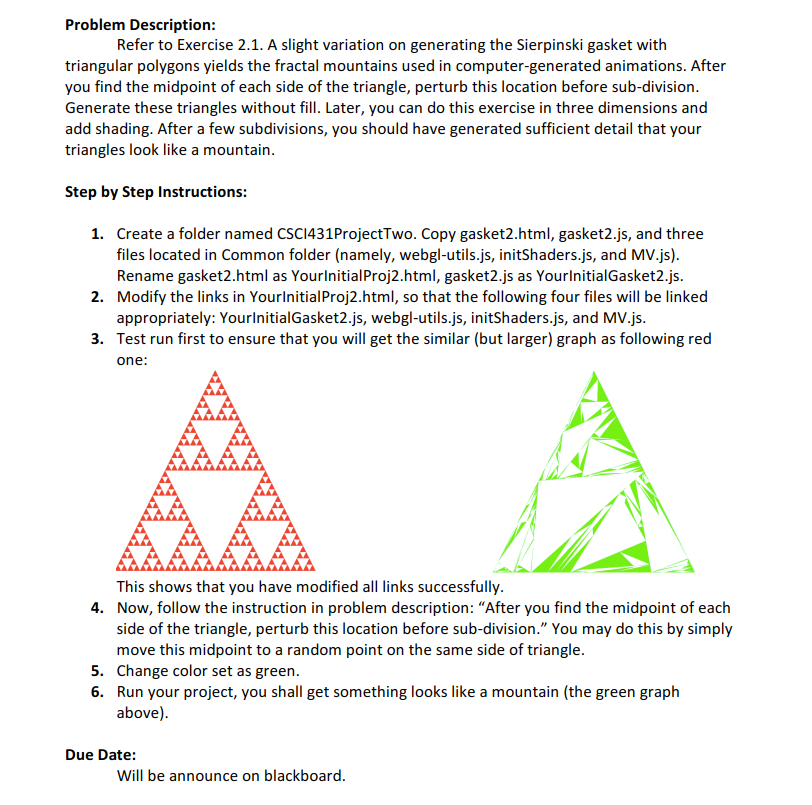
triangular polygons yields the fractal mountains used in computergenerated animations. After
you find the midpoint of each side of the triangle, perturb this location before subdivision.
Generate these triangles without fill. Later, you can do this exercise in three dimensions and
add shading. After a few subdivisions, you should have generated sufficient detail that your
triangles look like a mountain.
Step by Step Instructions:
Create a folder named CSClProjectTwo. Copy gaskethtml gasketjs a
triangular polygons yields the fractal mountains used in computergenerated animationsAfter
you find the midpoint of each side of the triangleperturb this location before subdivision
Generate these triangles without fillLateryou can do this exercise in three dimensions and
add shadingAfter a few subdivisionsyou should have generated sufficient detail that your
triangles look like a mountain
Step by Step Instructions:
Now, follow the instruction in problem description: After you find the midpoint of each
side of the triangleperturb this location before subdivisionYou may do this by simply
move this midpoint to a random point on the same side of triangle
Change color set as green.
Run your project, you shall get something looks like a mountain the green graph
above
Fix my code:
"use strict";
let canvas;
let gl;
let positions ;
let numTimesToSubdivide ;
window.onload function init
canvas document.getElementByIdglcanvas" ;
gl canvas.getContextwebgl;
if gl alert "WebGL isn't available" ;
Initialize our data for the Sierpinski Gasket
First, initialize the corners of our gasket with three positions.
let vertices
vec
vec
vec
;
divideTriangle vertices vertices vertices
numTimesToSubdivide;
Configure WebGL
glviewport canvas.width, canvas.height ;
glclearColor;
Load shaders and initialize attribute buffers
let program initShaders gl "vertexshader", "fragmentshader" ;
gluseProgramprogram;
Load the data into the GPU
let bufferId glcreateBuffer;
glbindBuffer glARRAYBUFFER, bufferId ;
glbufferData glARRAYBUFFER, flattenpositions glSTATICDRAW ;
Associate out shader variables with our data buffer
let positionLoc glgetAttribLocation program, "aPosition" ;
glvertexAttribPointer positionLoc, glFLOAT, false, ;
glenableVertexAttribArray positionLoc ;
render;
;
function trianglea b c
positions.pusha b c;
function divideTrianglea b c count
check for end of recursion
if count
trianglea b c;
else
bisect the sides
let ab mix a b;
let ac mix a c;
let bc mix b c;
count;
three new triangles
divideTriangle a ab ac count ;
divideTriangle c ac bc count ;
divideTriangle b bc ab count ;
function midpointDisplacementx x y y displacement, roughness
let mx xx;
let my yy;
let distance Math.sqrtxxyy;
ifdistance
return;
let randomDisplacementMathrandomdisplacement;
myrandomDisplacement;
let maxDisplacementdistanceroughness;
ifdisplacementmaxDisplacement
displacement maxDisplacement;
midpointDisplacementx y mx my displacement, roughness;
midpointDisplacementmx my x y displacement, roughness;
line.pushx y x y;
function render
glclear glCOLORBUFFERBIT ;
gldrawArrays glTRIANGLES, positions.length;
Step by Step Solution
There are 3 Steps involved in it
1 Expert Approved Answer
Step: 1 Unlock

Question Has Been Solved by an Expert!
Get step-by-step solutions from verified subject matter experts
Step: 2 Unlock
Step: 3 Unlock