







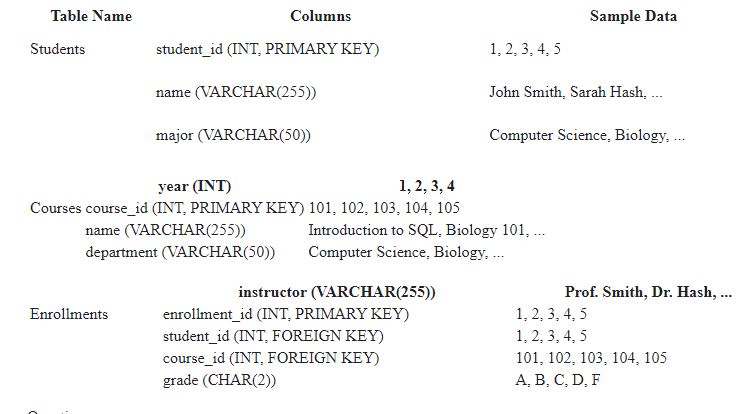
Question: * * A SQL TABLE IS PROVIDED. PLEASE ANSWER THE FOLLOWING QUESTIONS USING THE SQL TABLE. * * - List all students with a major
A SQL TABLE IS PROVIDED. PLEASE ANSWER THE FOLLOWING QUESTIONS USING THE SQL TABLE.
List all students with a major in "Computer Science".
Show the name and department of each course.
Display the name, major, and year of each student, ordered by year in descending order.
Select students who are enrolled in a specific course.
Insert:
Add a new student to the database with their name, major, and year.
Create a new course record with its name, department, and instructor.
Update:
Increase the grade of all students in a specific course by one letter grade.
Update the department of a course.
Delete:
Remove students who haven't enrolled in any courses.
Delete courses that no students are currently enrolled in
Distinct & Count:
Show the distinct list of departments offering courses.
Count the total number of students enrolled in each course.
Order By & Null Values:
Display courses alphabetically, ordered by name.
List students with missing grade information null values
Aliases & Concatenation:
Use an alias to rename the "grade" column to "lettergrade".
Create a new column named "fullname" by concatenating the "firstname" and "lastname" columns from the Students table assuming such columns exist
Literal Characters & Strings:
Find courses whose name starts with the letter M
Search for students whose name contains the word "Smith".
WHERE:
List students who are juniors year equal to
Show courses taught by a specific instructor.
Find students enrolled in both a specific course and another specific course.
Between & In:
Display courses offered by the "Math" department.
List students with a grade between B and A
Not In & Like:
Show courses that are not offered by the "English" department.
Find students whose name starts with "John" but doesn't have Jr in it
Wildcard Characters:
List courses whose name starts with "intro" and ends with "tion".
Find students whose name contains the letter a anywhere within it
Joins:
Combine student names with their enrolled course names using a join between Students and Enrollments tables.
Show the name, major, and grade of each student for a specific course using joins.
Group By & Having:
Calculate the average grade for each course using Group By and Avg.
Find courses where the average grade is above a specific threshold using Group By Having, and Avg.
Outer Joins:
List all students, even if they haven't enrolled in any courses, using a left join between Students and Enrollments tables.
Show all courses, along with the number of enrolled students even if there are none using a right join between Courses and Enrollments tables.
Advanced Joins:
Self Join:
Find students who are enrolled in the same course with a friend like being in the same courseuse a selfjoin on the Enrollments table with a condition on studentid
Identify courses that have prerequisites, using a selfjoin on the Courses table with a condition on a "prerequisitecourseid column if added
Full Outer Join:
List all students and their enrolled courses, even if a student hasn't enrolled in any or a course doesn't have any students enrolled use a full outer join
Show all courses with their instructors and enrolled students, even if a course has no instructor or students use a full outer join
Nested Joins:
Find students enrolled in a course taught by an instructor from a specific department use two joins: one between Courses and Instructors, and another between Enrollments and the joined table
List courses that share at least one student with another specific course use joins to combine Enrollments table with itself
Step by Step Solution
There are 3 Steps involved in it
1 Expert Approved Answer
Step: 1 Unlock

Question Has Been Solved by an Expert!
Get step-by-step solutions from verified subject matter experts
Step: 2 Unlock
Step: 3 Unlock
 Study Help