


Question: a. Start Excel, open EX 2-4.xIsx from the location where you store your Data Files, then save it as EX 2-Office Specialists Center Finances. The
a. Start Excel, open EX 2-4.xIsx from the
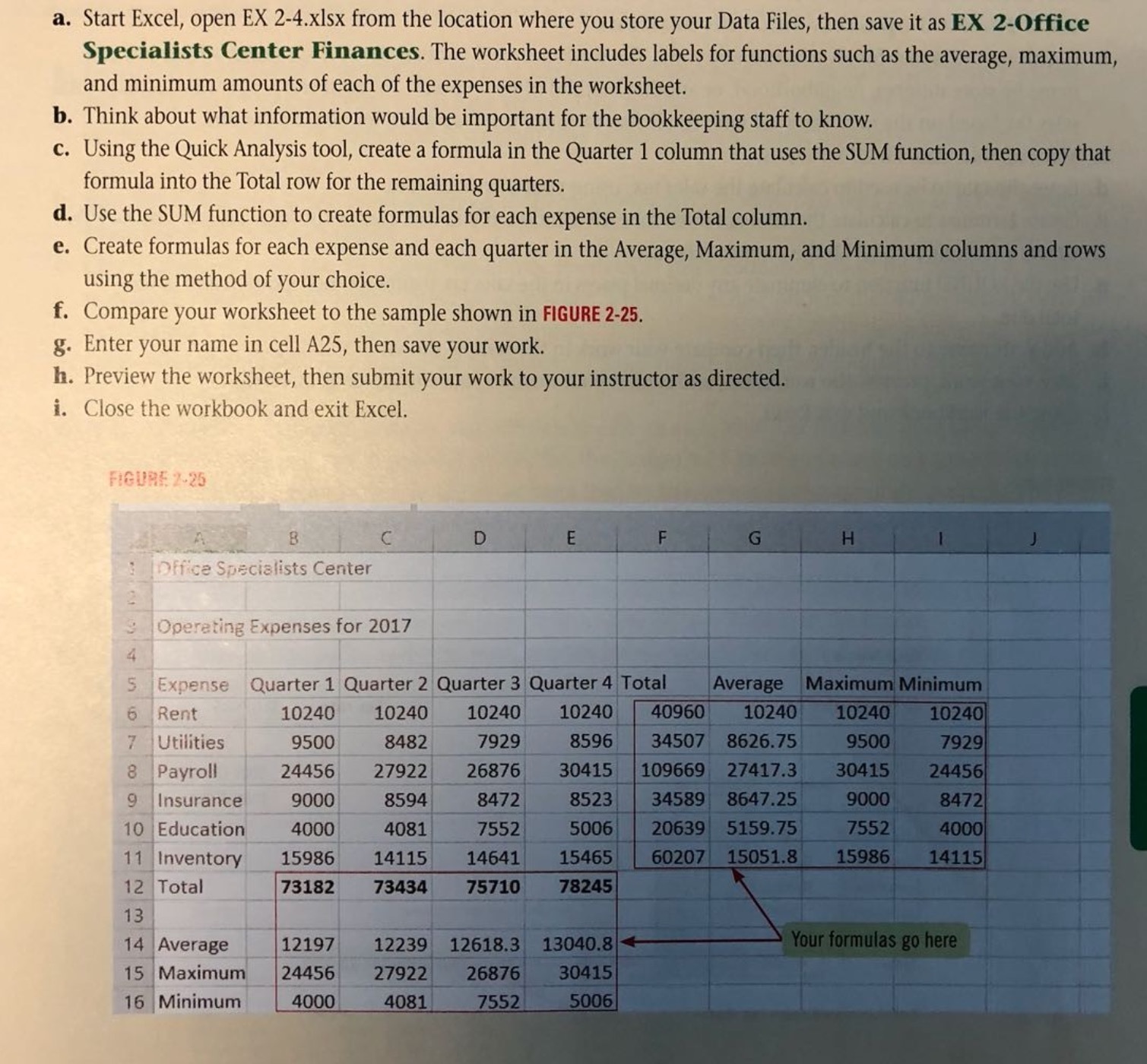
a. Start Excel, open EX 2-4.xIsx from the location where you store your Data Files, then save it as EX 2-Office Specialists Center Finances. The worksheet includes labels for functions such as the average, maximum, and minimum amounts of each of the expenses in the worksheet. b. Think about what information would be important for the bookkeeping staff to know. c. Using the Quick Analysis tool, create a formula in the Quarter 1 column that uses the SUM function, then copy that formula into the Total row for the remaining quarters. d. Use the SUM function to create formulas for each expense in the Total column. e. Create formulas for each expense and each quarter in the Average, Maximum, and Minimum columns and rows using the method of your choice. f. Compare your worksheet to the sample shown in FIGURE 2-25. g. Enter your name in cell A25, then save your work. h. Preview the worksheet, then submit your work to your instructor as directed. i. Close the workbook and exit Excel. FIGURE 2-25 A B C D E F G H Office Specialists Center Operating Expenses for 2017 5 Expense Quarter 1 Quarter 2 Quarter 3 Quarter 4 Total Average Maximum Minimum 6 Rent 10240 10240 10240 10240 40960 10240 10240 10240 7 Utilities 9500 8482 7929 8596 34507 8626.75 9500 7929 Payroll 24456 27922 26876 30415 109669 27417.3 30415 24456 9 Insurance 9000 8594 8472 8523 34589 8647.25 9000 8472 10 Education 4000 4081 7552 5006 20639 5159.75 7552 4000 11 Inventory 15986 14115 14641 15465 60207 15051.8 15986 14115 12 Total 73182 73434 75710 78245 13 14 Average 12197 12239 12618.3 13040.8 Your formulas go here 15 Maximum 24456 27922 26876 30415 16 Minimum 4000 4081 7552 5006

Step by Step Solution

There are 3 Steps involved in it

1 Expert Approved Answer
Step: 1 Unlock blur-text-image

Question Has Been Solved by an Expert!

Get step-by-step solutions from verified subject matter experts

Step: 2 Unlock
Step: 3 Unlock

Students Have Also Explored These Related Accounting Questions!