







Question: a) Using the Composite design pattern as your guide, write the remaining code that would be required to make this code run to produce the
a) Using the Composite design pattern as your guide, write the remaining code that would be required to make this code run to produce the output shown below.
b) Write the setColour method so that it outputs an error message if it receives a parameter value other than Green, White or Gold. The method should not be case-sensitive either, so green, white or gold should be acceptable.
c) revise the setColour method so that it throws an Exception rather than printing out an error message. Revise your first version of the setColour method so that it throws an Exception rather than printing out an error message.
d) Revise the code shown below to show how you would handle the exception thrown by the setColour method
How to approach this assignment
Approach this assignment using the incremental code and compile approach.
Create a test class in which the main method will run. You can create a method for the code below and call that method from main, or you can run the code from main
Add a line of code - write the classes/methods to get this line of code to compile. Continue doing this until you reach the final line of code below. Your code should compile. You now have the skeleton to your solution
Refactor the code to achieve the full functionality of the assignment. The assignment suggests using the composite design pattern. Does your code observe this pattern? If not, refactor it so that it does .
Does your code produce the output required? If not, use the debugger to step through the program execution to see why not. Diagnose the problem - and refactor your code so that the correct output is produced.
Finally, if another shape is added, to any of the Drawing objects, will the code still work. It should do, though the output will be different.
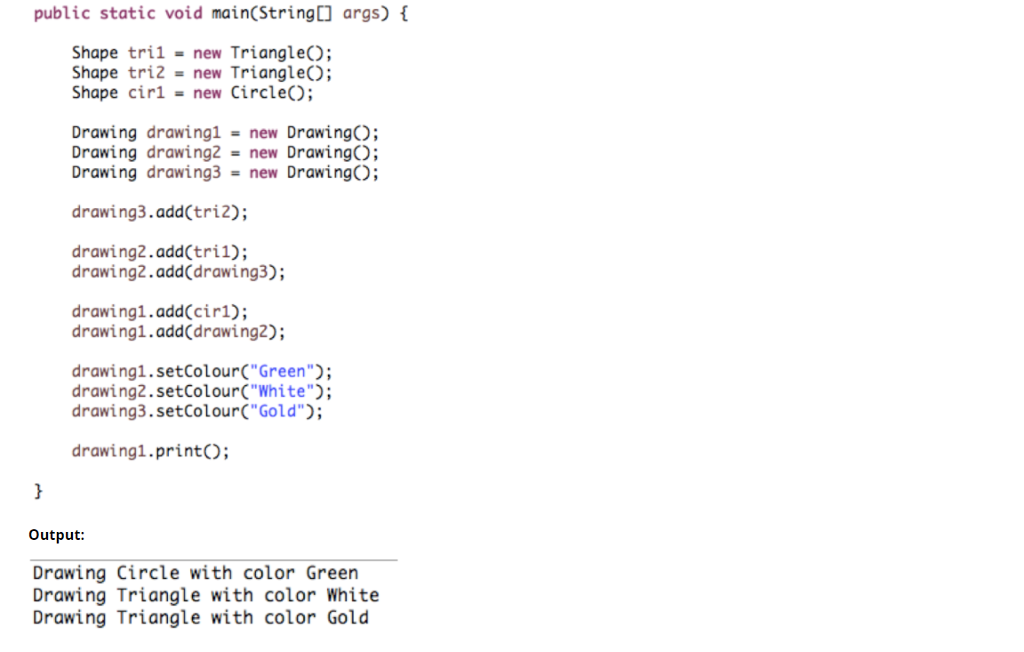
public static void main(String args) Shape tri1 new TriangleO; Shape tri2 = new Triangle(); Shape cir- new CircleO Drawing drawing1-new DrawingO; Drawing drawing2 = new Drawing(); Drawing drawing3 = new Drawing(); drawing3.add(tri2); drawing2.add(tril); drawing2.add(drawing3); drawing1.add(cir1) drawingi.add drawing2); drawing1.setColour(" Green drawing2.setColourC"White"; drawing3.setColour("Gold"; drawing1.printO; Output: Drawing Circle with color Green Drawing Triangle with color White Drawing Triangle with color Gold
Step by Step Solution
There are 3 Steps involved in it

Get step-by-step solutions from verified subject matter experts
 Study Help