







Question: a. Write a CTE query that returns the most recently created active promotion by service with these columns: The Service ID, promotion code, promotion description,
a. Write a CTE query that returns the most recently created active promotion by service with these columns:
The Service ID, promotion code, promotion description, and date record was created
b. Using the CTE, write a SELECT statement that returns one row per customer that shows the order details for service(s) with a promotion
Return the Last Name, First Name, service, quantity and order date for the customer
Also include in the result, the service ID, promotion description and promo created date from the CTE
For all queries, sort the result set
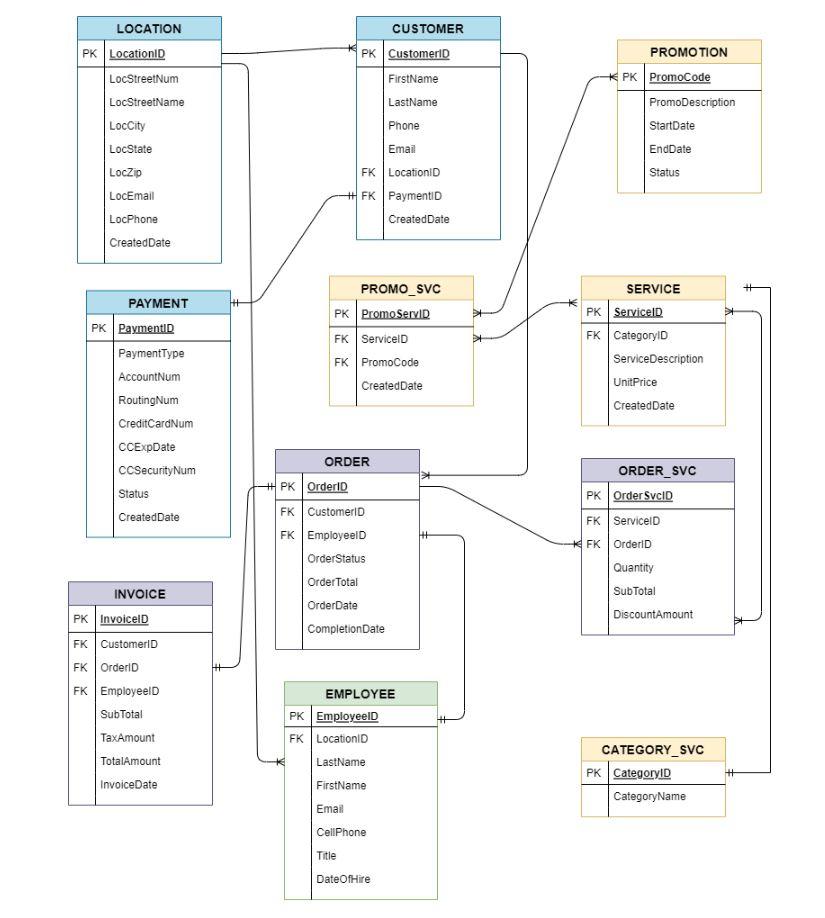
please use entity and attribute names provided as its what I named mine, again thank you so much!
\begin{tabular}{|l|l|} \hline \multicolumn{2}{|c|}{ LOCATION } \\ \hline PK & LocationID \\ \hline & LocStreetNum \\ LocStreetName \\ LocCity \\ LocState \\ LocZip \\ LocEmail \\ LocPhone \\ CreatedDate \\ \hline \end{tabular} \begin{tabular}{|l|l|} \hline \multicolumn{2}{|c|}{ PROMOTION } \\ \hline PK & PromoCode \\ \hline & PromoDescription \\ StartDate \\ EndDate \\ Status \\ \hline \end{tabular} \begin{tabular}{|l|l|} \hline \multicolumn{2}{|c|}{ PAYMENT } \\ \hline PK & PaymentID \\ \hline & PaymentType \\ AccountNum \\ RoutingNum \\ CreditCardNum \\ CCExpDate \\ CCSecurityNum \\ Status \\ CreatedDate \\ \hline \end{tabular} \begin{tabular}{|l|l|} \hline \multicolumn{2}{|c|}{ PROMO_SVC } \\ \hline PK & PromeservID \\ \hline FK & ServicelD \\ FK & PromoCode \\ & CreatedDate \\ \hline \end{tabular} \begin{tabular}{|l|l|} \hline \multicolumn{2}{|c|}{ INVOICE } \\ \hline PK & InvoicelD \\ \hline FK & CustomerID \\ FK & OrderiD \\ FK & EmployeelD \\ & SubTotal \\ TaxAmount \\ TotalAmount \\ InvoiceDate \\ \hline \end{tabular} \begin{tabular}{|l|l|} \hline \multicolumn{2}{|c|}{ CATEGORY_SVC } \\ \hline PK & CategoryID \\ \hline & CategoryName \\ \hline \end{tabular} CellPhone Title DateOfHire
Step by Step Solution
There are 3 Steps involved in it

Get step-by-step solutions from verified subject matter experts
 Study Help