







Question: SQL SERVER Queries I need help with, ANY HELP WOULD BE APPRECIATED. 1. Write a SELECT statement that returns the following the customer's name along
SQL SERVER Queries I need help with, ANY HELP WOULD BE APPRECIATED.
1. Write a SELECT statement that returns the following
the customer's name along with a count of the number of services each customer ordered
Return one row for each customer that ordered more than one service. Group and sort the result set by the last name and then by the first name.
2. Write a SELECT statement that returns the following
Last Name, First Name, and Service description columns of each customer that has a unique service.
In other words, do not include customers who have the same service as another customer. Sort the results by Last Name and then by First Name
3. a. Write a CTE query that returns the most recently created active promotion by service with these columns:
The Service ID, promotion code, promotion description, and date record was created
b. Using the CTE, write a SELECT statement that returns one row per customer that shows the order details for service(s) with a promotion
Return the Last Name, First Name, service, quantity and order date for the customer
Also include in the result, the service ID, promotion description and promo created date from the CTE
For all queries, sort the result set
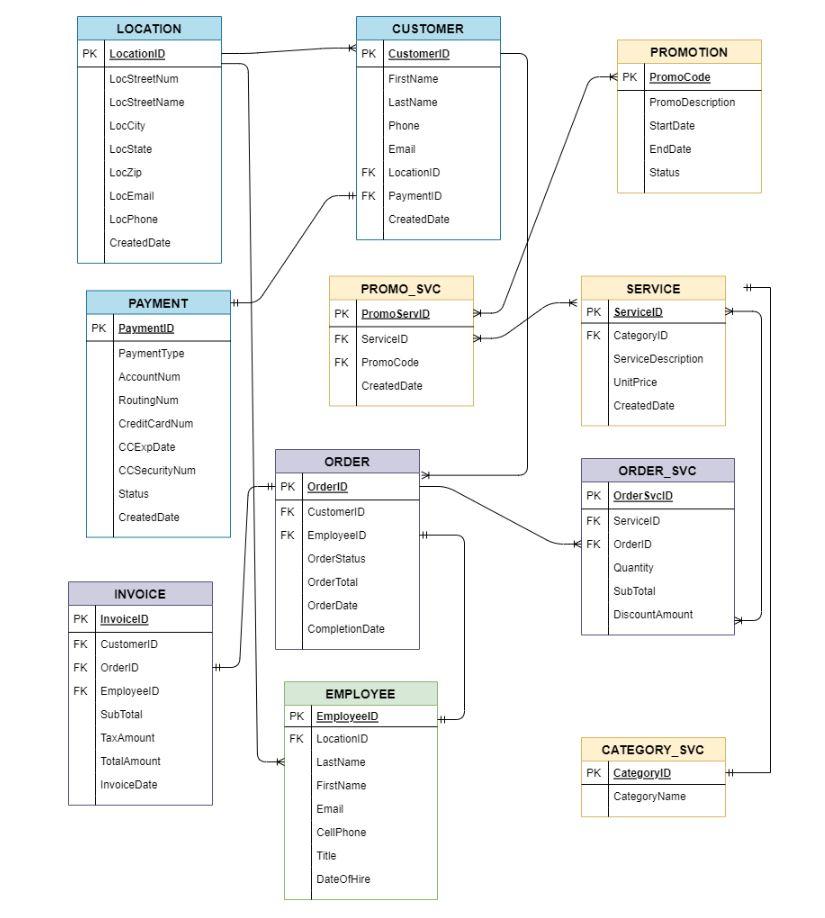
The last submission of these question were incorrect based on this db structure, please help
\begin{tabular}{|l|l|} \hline \multicolumn{2}{|c|}{ LOCATION } \\ \hline PK & LocationID \\ \hline & LocStreetNum \\ LocStreetName \\ LocCity \\ LocState \\ LocZip \\ LocEmail \\ LocPhone \\ CreatedDate \\ \hline \end{tabular} \begin{tabular}{|l|l|} \hline \multicolumn{2}{|c|}{ PROMOTION } \\ \hline PK & PromoCode \\ \hline & PromoDescription \\ StartDate \\ EndDate \\ Status \\ \hline \end{tabular} \begin{tabular}{|l|l|} \hline \multicolumn{2}{|c|}{ PAYMENT } \\ \hline PK & PaymentID \\ \hline & PaymentType \\ AccountNum \\ RoutingNum \\ CreditCardNum \\ CCExpDate \\ CCSecurityNum \\ Status \\ CreatedDate \\ \hline \end{tabular} \begin{tabular}{|l|l|} \hline \multicolumn{2}{|c|}{ PROMO_SVC } \\ \hline PK & PromeservID \\ \hline FK & ServicelD \\ FK & PromoCode \\ & CreatedDate \\ \hline \end{tabular} \begin{tabular}{|l|l|} \hline \multicolumn{2}{|c|}{ INVOICE } \\ \hline PK & InvoicelD \\ \hline FK & CustomerID \\ FK & OrderiD \\ FK & EmployeelD \\ & SubTotal \\ TaxAmount \\ TotalAmount \\ InvoiceDate \\ \hline \end{tabular} \begin{tabular}{|l|l|} \hline \multicolumn{2}{|c|}{ CATEGORY_SVC } \\ \hline PK & CategoryID \\ \hline & CategoryName \\ \hline \end{tabular} CellPhone Title DateOfHire
Step by Step Solution
There are 3 Steps involved in it

Get step-by-step solutions from verified subject matter experts
 Study Help