







Question: ACC Lab #7 Depreciation Methods 1 ACC 213 - Lab #7 for Chapter 8 - Depreciation Me Name 2 3 4 Lab #7 is divided
ACC Lab #7 Depreciation Methods 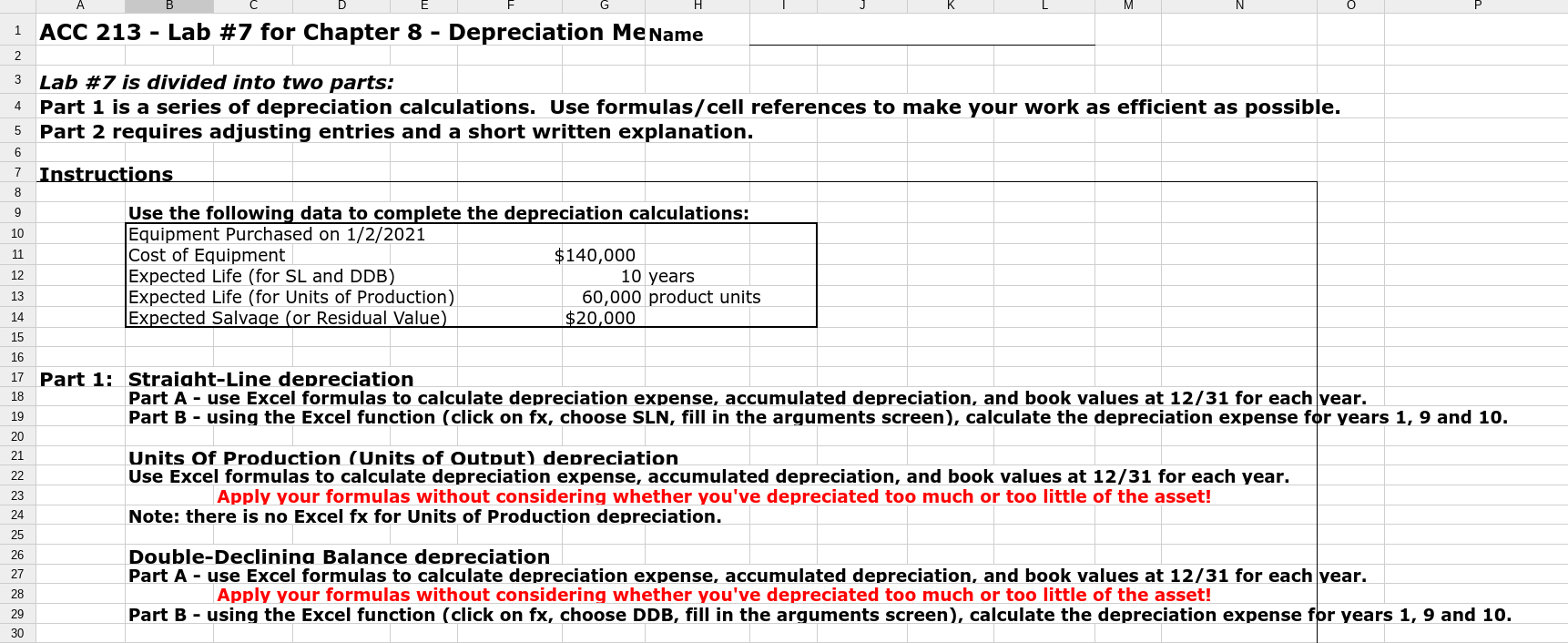
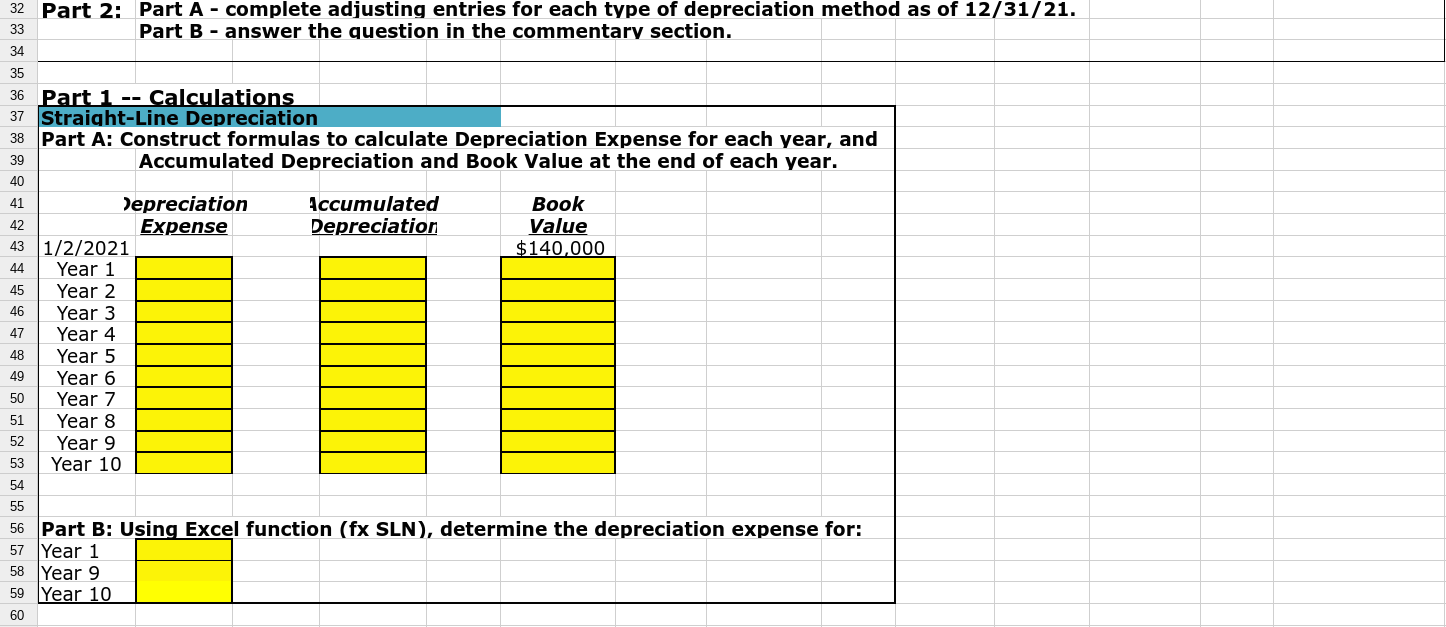
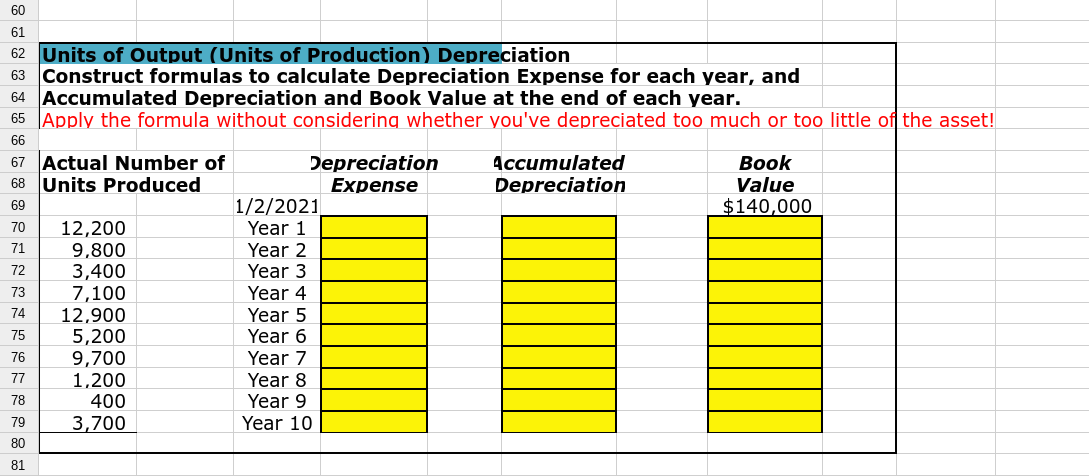
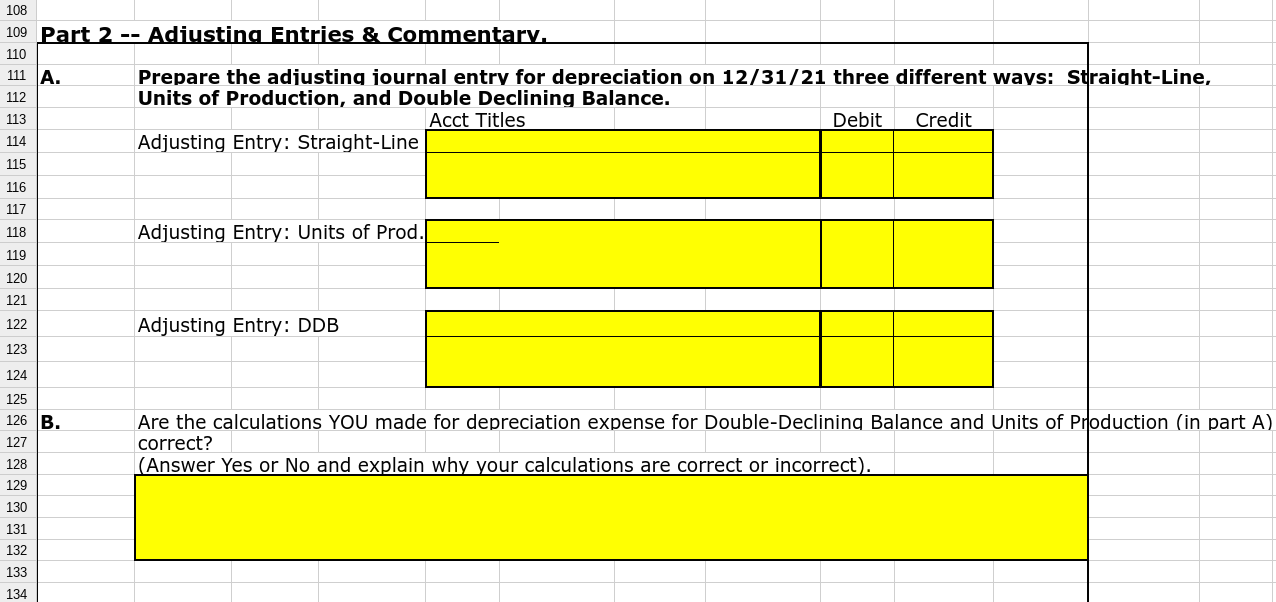
1 ACC 213 - Lab #7 for Chapter 8 - Depreciation Me Name 2 3 4 Lab #7 is divided into two parts: Part 1 is a series of depreciation calculations. Use formulas/cell references to make your work as efficient as possible. 5 Part 2 requires adjusting entries and a short written explanation. 6 7 Instructions 8 9 Use the following data to complete the depreciation calculations: 10 Equipment Purchased on 1/2/2021 Cost of Equipment $140,000 Expected Life (for SL and DDB) 10 years Expected Life (for Units of Production) 60,000 product units Expected Salvage (or Residual Value) $20,000 11 12 13 14 15 16 18 17 Part 1: Straiaht-Line depreciation Part A - use Excel formulas to calculate depreciation expense, accumulated depreciation, and book values at 12/31 for each year. Part B - using the Excel function (click on fx, choose SLN, fill in the arguments screen), calculate the depreciation expense for years 1, 9 and 10. 19 20 21 22 Units Of Production (Units of Output) depreciation Use Excel formulas to calculate depreciation expense, accumulated depreciation, and book values at 12/31 for each year. Apply your formulas without considering whether you've depreciated too much or too little of the asset! Note: there is no Excel fx for Units of Production depreciation. 23 24 25 26 27 Double-Declining Balance depreciation Part A - use Excel formulas to calculate depreciation expense, accumulated depreciation, and book values at 12/31 for each year. Apply your formulas without considering whether you've depreciated too much or too little of the asset! Part B - using the Excel function (click on fx, choose DDB, fill in the arguments screen), calculate the depreciation expense for years 1, 9 and 10. 28 29 30 33 32 Part 2: Part A - complete adjusting entries for each type of depreciation method as of 12/31/21. Part B - answer the question in the commentary section. 34 35 36 Part 1 -- Calculations 37 Straight-Line Depreciation 38 Part A: Construct formulas to calculate Depreciation Expense for each year, and 39 Accumulated Depreciation and Book Value at the end of each year. 40 41 Depreciation Accumulated Book 42 Expense Depreciation Value 43 1/2/2021 $140,000 44 Year 1 45 Year 2 46 Year 3 47 Year 4 48 Year 5 49 Year 6 50 Year 7 51 Year 8 52 Year 9 53 Year 10 54 55 56 Part B: Using Excel function (fx SLN), determine the depreciation expense for: 57 Year 1 58 Year 9 59 Year 10 60 60 61 62 Units of Output (Units of Production) Depreciation 63 Construct formulas to calculate Depreciation Expense for each year, and 64 Accumulated Depreciation and Book Value at the end of each year. 65 Apply the formula without considering whether you've depreciated too much or too little of the asset! 66 67 Actual Number of Depreciation Accumulated Book 68 Units Produced Expense Depreciation Value 69 1/2/2021 $140,000 70 12,200 Year 1 71 9,800 Year 2 72 3,400 Year 3 73 7,100 Year 4 74 12,900 Year 5 75 5,200 Year 6 76 9,700 Year 7 77 1,200 Year 8 78 Year 9 79 3,700 Year 10 80 81 400 113 108 109 Part 2 -- Adiusting Entries & Commentary. 110 111 A. Prepare the adjusting journal entry for depreciation on 12/31/21 three different ways: Straight-Line, 112 Units of Production, and Double Declining Balance. Acct Titles Debit Credit 114 Adjusting Entry: Straight-Line 115 116 117 118 Adjusting Entry: Units of Prod. 119 120 121 122 Adjusting Entry: DDB 123 124 125 126 B. 127 128 129 130 131 132 Are the calculations YOU made for depreciation expense for Double-Declining Balance and Units of Production (in part A) correct? (Answer Yes or No and explain why your calculations are correct or incorrect). 133 134
Step by Step Solution
There are 3 Steps involved in it

Get step-by-step solutions from verified subject matter experts
 Study Help