







Question: ACC220 Chapter 14 Problem A: Compute: NPV IRR Simple rate of Return Profitability Index Data Set Buy Machine Project life Residual of machine Working capital
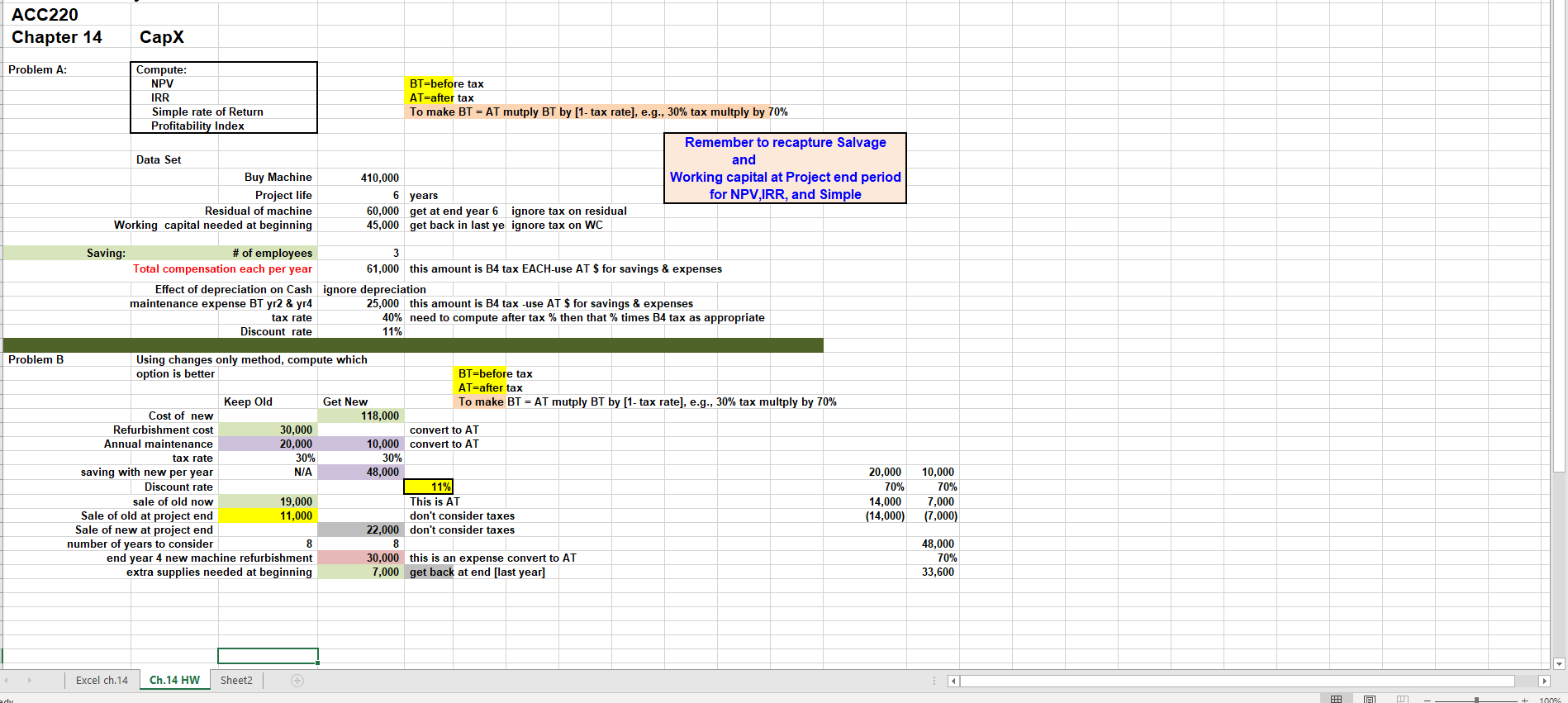
ACC220 Chapter 14 Problem A: Compute: NPV IRR Simple rate of Return Profitability Index Data Set Buy Machine Project life Residual of machine Working capital needed at beginning BT=before tax AT=after tax To make BT = AT mutply BT by [1- tax rate), e.g., 30% tax multply by 70% Remember to recapture Salvage and 410,000 Working capital at Project end period 6 years for NPV,IRR, and Simple 60,000 get at end year 6 ignore tax on residual 45,000 get back in last ye ignore tax on WC Saving: # of employees 3 Total compensation each per year 61,000 this amount is B4 tax EACH-use AT $ for savings & expenses Effect of depreciation on Cash ignore depreciation maintenance expense BT yr2 & yr4 25,000 this amount is B4 tax -use AT $ for savings & expenses tax rate 40% need to compute after tax % then that % times B4 tax as appropriate Discount rate 11% Problem B Using changes only method, compute which option is better BT=before tax AT=after tax Keep Old Get New To make BT = AT mutply BT by [1- tax rate), e.g., 30% tax multply by 70% Cost of new 118,000 Refurbishment cost 30,000 convert to AT Annual maintenance 20.000 10,000 convert to AT tax rate 30% 30% saving with new per year N/A 48.000 Discount rate 11% sale of old now 19,000 This is AT Sale of old at project end 11,000 don't consider taxes Sale of new at project end 22,000 don't consider taxes number of years to consider 8 8 end year 4 new machine refurbishment 30,000 this is an expense convert to AT extra supplies needed at beginning 7,000 get back at end [last year] 20,000 70% 14,000 (14,000) 10,000 70% 7,000 (7,000) 48,000 70% 33,600 Excel ch.14 Ch.14 HW Sheet2 ad A
Step by Step Solution
There are 3 Steps involved in it

Get step-by-step solutions from verified subject matter experts
 Study Help