







Question: Access Case #1 IS 2000 Databases are critical in business as they store a large amount of data for an organization, and various tools
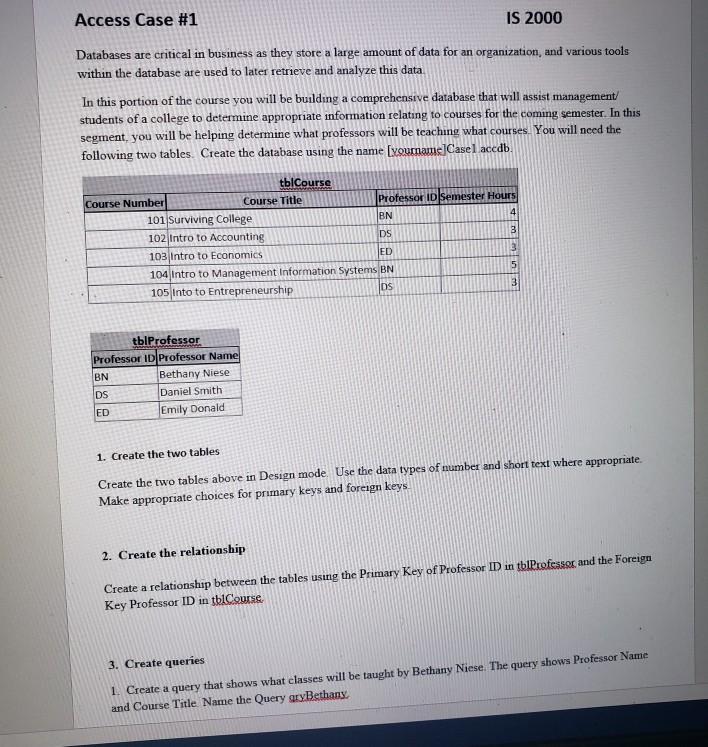
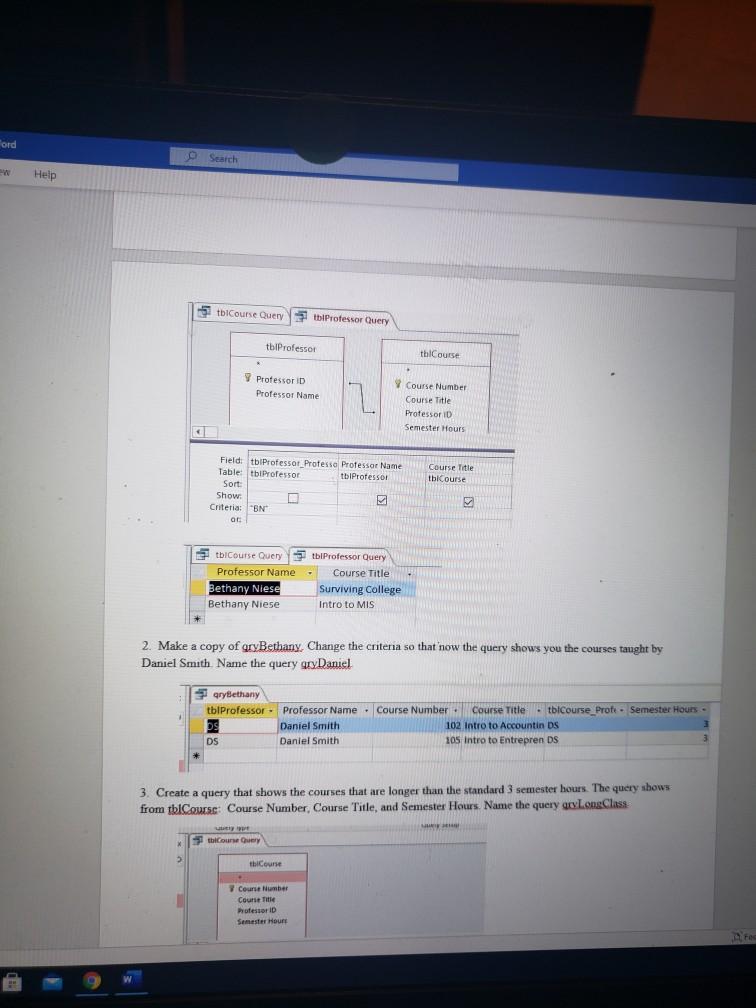
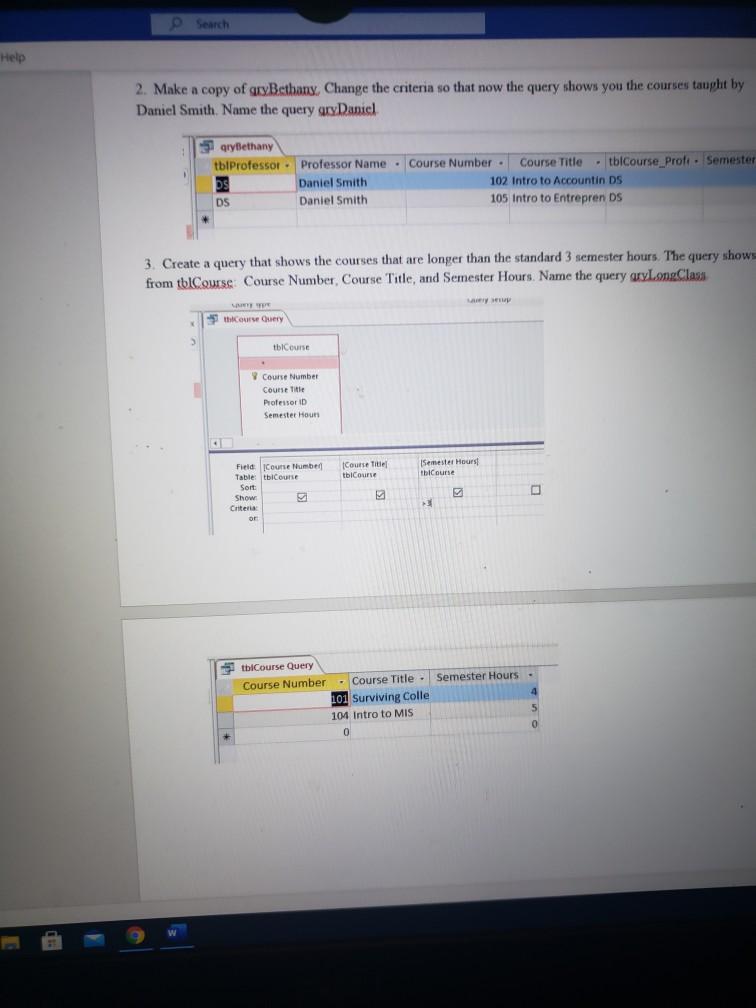
Access Case #1 IS 2000 Databases are critical in business as they store a large amount of data for an organization, and various tools within the database are used to later retrieve and analyze this data. In this portion of the course you will be building a comprehensive database that will assist management/ students of a college to determine appropriate information relating to courses for the coming semester. In this segment, you will be helping determine what professors will be teaching what courses. You will need the following two tables. Create the database using the name [yourname]Casel accdb. tblCourse Course Title Course Number Professor ID Semester Hours 101 Surviving College BN 4 102 Intro to Accounting DS 103 Intro to Economics ED 104 Intro to Management Information Systems BN 105 Into to Entrepreneurship DS 3 tblProfessor Professor ID Professor Name BN Bethany Niese DS Daniel Smith ED Emily Donald 1. Create the two tables. Create the two tables above in Design mode. Use the data types of number and short text where appropriate. Make appropriate choices for primary keys and foreign keys. 2. Create the relationship Create a relationship between the tables using the Primary Key of Professor ID in tblProfessor and the Foreign Key Professor ID in tblCourse. 3. Create queries 1. Create a query that shows what classes will be taught by Bethany Niese. The query shows Professor Name and Course Title Name the Query gryBethany. 3 5 Ford Help O O Search tblCourse Query tblProfessor Query tblProfessor Professor D Professor Name Field: tblProfessor Professo Professor Name Table: tblProfessor tblProfessor Course Title tblCourse Sort Show: Criteria: "BN M 5 or: tblProfessor Query tblCourse Query Professor Name. Bethany Niese Course Title Surviving College Intro to MIS Bethany Niese 2. Make a copy of gryBethany, Change the criteria so that now the query shows you the courses taught by Daniel Smith. Name the query gryDaniel gryBethany tblProfessor ps Professor Name Course Number Daniel Smith Course Title tblCourse_Profe- Semester Hours - 102 Intro to Accountin DS DS Daniel Smith 105 Intro to Entrepren DS 3. Create a query that shows the courses that are longer than the standard 3 semester hours. The query shows from tblCourse: Course Number, Course Title, and Semester Hours. Name the query gryLongClass sey uuely ope tblCourse Query thiCourse bol Course Number Course Title Professor ID tblCourse Course Number Course Title Professor D Semester Hours Semester Hours Fec Help CH Search 2. Make a copy of gryBethany, Change the criteria so that now the query shows you the courses taught by Daniel Smith. Name the query gryDaniel qryBethany . . . tblProfessor Professor Name Course Number Course Title tblCourse Prof Semester 102 Intro to Accountin DS DS Daniel Smith Daniel Smith DS 105 Intro to Entrepren DS 3. Create a query that shows the courses that are longer than the standard 3 semester hours. The query shows from tblCourse Course Number, Course Title, and Semester Hours. Name the query aryLongClass Lavery setup spany spe thCourse Query > tblCourse Course Number Course Title Professor ID Semester Hours Field Course Number Table: tblCourse Sort: Show g Criteria or tblCourse Query Course Number d (Course Title) tblCourse Semester Hours tblCourse E 7 O +3 Course Title Semester Hours - 5 - - 101 Surviving Colle 104 Intro to MIS 0 0
Step by Step Solution
3.52 Rating (152 Votes )
There are 3 Steps involved in it
Below is the solution Create a table tblProfessor and tblC... View full answer

Get step-by-step solutions from verified subject matter experts
 Study Help