Question: ACCT 361 Accounting Analytics Spring 2024 Assignment #2 Converting from the REA Model to the Logical Model Background You have been assigned to build an
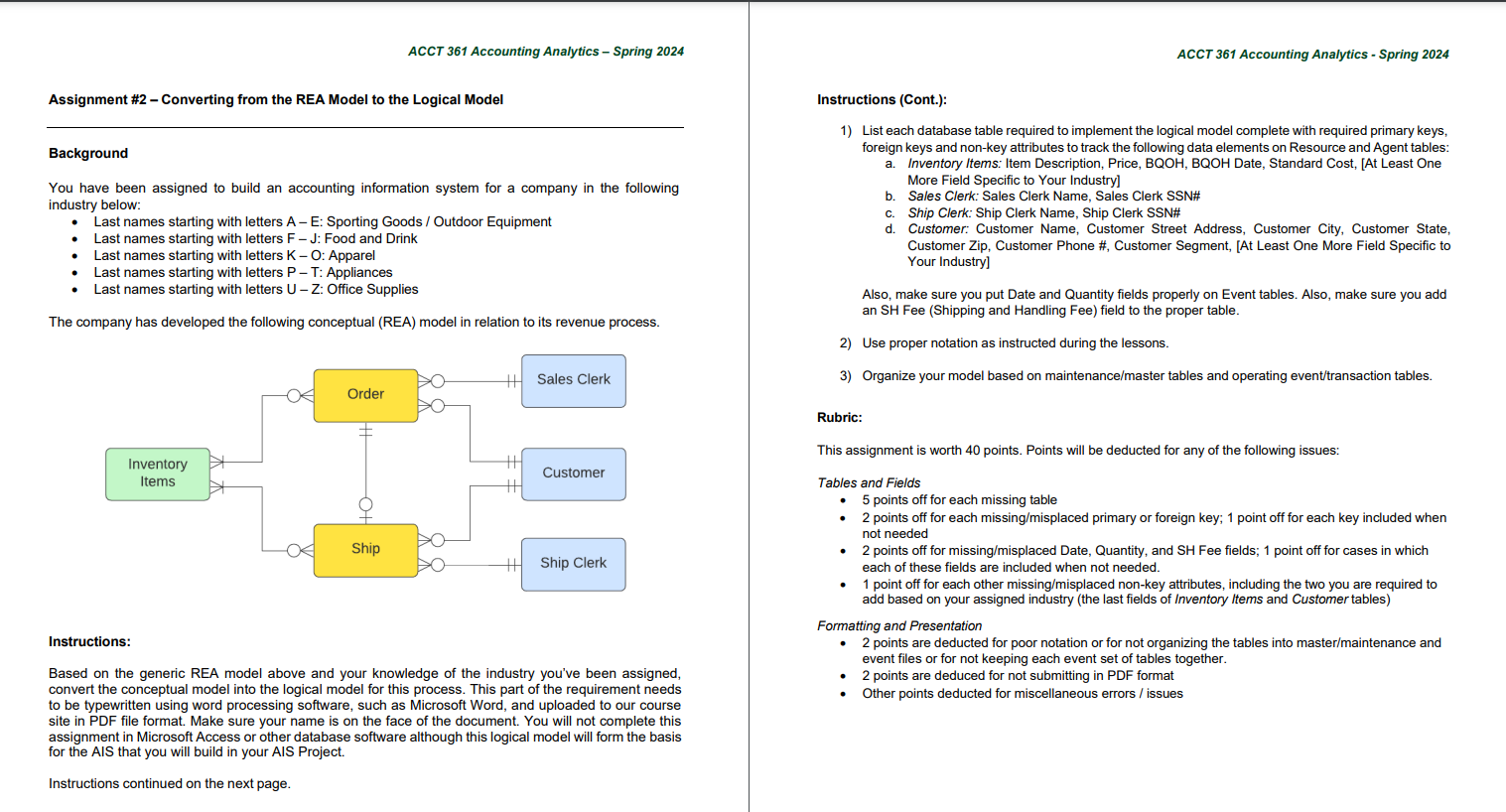
ACCT 361 Accounting Analytics Spring 2024 Assignment #2 Converting from the REA Model to the Logical Model Background You have been assigned to build an accounting information system for a company in the following industry below: Last names starting with letters A E: Sporting Goods / Outdoor Equipment Last names starting with letters F J: Food and Drink Last names starting with letters K O: Apparel Last names starting with letters P - T: Appliances Last names starting with letters U Z: Office Supplies The company has developed the following conceptual (REA) model in relation to its revenue process. Sales Clerk C Order In;i::gry 1 Customer - @@/ B & 4 Ship Clerk Instructions: Based on the generic REA model above and your knowledge of the industry you've been assigned, convert the conceptual model into the logical model for this process. This part of the requirement needs to be typewritten using word processing software, such as Microsoft Word, and uploaded to our course site in PDF file format. Make sure your name is on the face of the document. You will not complete this assignment in Microsoft Access or other database software although this logical model will form the basis for the AIS that you will build in your AIS Project. Instructions continued on the next page. ACCT 361 Accounting Analytics - Spring 2024 Instructions (Cont.): 1) List each database table required to implement the logical model complete with required primary keys, foreign keys and non-key attributes to track the following data elements on Resource and Agent tables: a. Inventory ltems: Item Description, Price, BQOH, BQOH Date, Standard Cost, [At Least One More Field Specific to Your Industry] b. Sales Clerk: Sales Clerk Name, Sales Clerk SSN# c. Ship Clerk: Ship Clerk Name, Ship Clerk SSN# d. Customer: Customer Name, Customer Street Address, Customer City, Customer State, Customer Zip, Customer Phone #, Customer Segment, [At Least One More Field Specific to Your Industry] Also, make sure you put Date and Quantity fields properly on Event tables. Also, make sure you add an SH Fee (Shipping and Handling Fee) field to the proper table. 2) Use proper notation as instructed during the lessons. 3) Organize your model based on maintenance/master tables and operating event/transaction tables. Rubric: This assignment is worth 40 points. Points will be deducted for any of the following issues: Tables and Fields 5 points off for each missing table + 2 points off for each missing/misplaced primary or foreign key; 1 point off for each key included when not needed + 2 points off for missing/misplaced Date, Quantity, and SH Fee fields; 1 point off for cases in which each of these fields are included when not needed. + 1 point off for each other missing/misplaced non-key attributes, including the two you are required to add based on your assigned industry (the last fields of Inventory items and Customer tables) Formatting and Presentation * 2 points are deducted for poor notation or for not organizing the tables into master/maintenance and event files or for not keeping each event set of tables together. * 2 points are deduced for not submitting in PDF format Other points deducted for miscellaneous errors / issues
Step by Step Solution
There are 3 Steps involved in it
1 Expert Approved Answer
Step: 1 Unlock
Question Has Been Solved by an Expert!
Get step-by-step solutions from verified subject matter experts
Step: 2 Unlock
Step: 3 Unlock
Students Have Also Explored These Related Accounting Questions!









 Study Help